

WordPress Video Security That Works

A glowing digital shield protecting a video player on a laptop screen, representing unbreakable video security.

You’ve built something valuable – online courses, training videos, or proprietary content that drives your business. Now you’re watching helpless as your work gets shared freely across social media, torrent sites, and competitor platforms. The revenue you depend on is walking out the door, one unauthorized download at a time.

If you’re reading this, you’ve likely discovered that your current WordPress setup isn’t actually protecting anything. You’re not alone, and more importantly, you’re not stuck with ineffective solutions.

What Video Piracy Actually Costs US Content Creators

Video piracy drains $2.8 billion annually from US online education creators alone. Individual course creators lose between $15,000 and $50,000 monthly to unauthorized sharing and credential theft. These aren’t abstract industry statistics – they represent real businesses failing because their protection strategies consisted of hoping people would “do the right thing.”

Infographic detailing $2.8B in annual revenue losses, categorized by sector and average monthly losses per business size.
An annual breakdown of $2.8 billion in revenue losses across different sectors and business sizes.

Healthcare training faces the steepest consequences. Medical facilities creating proprietary training videos must comply with HIPAA regulations. When their content gets distributed without authorization, they face both revenue loss and potential regulatory fines reaching $1.5 million per incident. Corporate training theft exposes trade secrets and competitive intelligence, often causing damage that far exceeds the original video’s production cost.

Consider a Texas-based corporate safety training company that lost $180,000 in annual revenue when their certification videos appeared on torrent sites. Their WordPress membership plugin protected the login page perfectly. The problem? Anyone could access the actual video files by typing the direct URL into their browser. The company spent an additional $25,000 in legal fees pursuing takedown notices, ultimately recovering less than 10% of their losses.

The Legal Reality

US copyright law provides some recourse through DMCA takedown notices, but this approach is purely reactive. Section 1201 of the Digital Millennium Copyright Act does protect against circumventing technical protection measures – but only when those measures actually exist and function effectively. Most WordPress site owners discover their basic plugin protection offers no legal standing when pursuing copyright infringement cases.

State business entity protections vary significantly. LLCs in Delaware, Nevada, and Wyoming offer stronger intellectual property asset protection compared to sole proprietorships in other states. However, these protections only apply when content creators demonstrate they implemented reasonable security measures.

Industry data shows 73% of premium course creators experience content theft within their first year. The average detection time spans 4-6 months, meaning substantial damage occurs before creators realize their content is being distributed without authorization. During this period, unauthorized access typically reduces legitimate sales by 25-40%.

Why Your WordPress Protection Isn’t Working

WordPress video protection plugins operate within your web browser, which fundamentally limits their ability to prevent determined content theft. Browser-based protection cannot control system-level functions like screen recording software, mobile device capture features, or network traffic analysis tools.

The Technical Reality

Most WordPress protection relies on JavaScript to hide download buttons or obfuscate video URLs. Any user can disable JavaScript, open browser developer tools with F12, or monitor network traffic to locate direct video file links. These methods require no specialized technical knowledge – just basic computer literacy.

5-Minute Security Test: Right now, go to one of your “protected” videos. Press F12, click the Network tab, and reload the page. Can you see the direct video URL? If yes, your protection isn’t working.

Popular plugins like Protected Video explicitly acknowledge their limitations in their own documentation: “Technical users may still be able to access the underlying video.” This describes anyone comfortable using standard browser features that come pre-installed on every computer.

The Screen Recording Problem

Screen recording represents the most significant challenge for browser-based protection. Every major operating system includes built-in recording tools:

  • Windows 10/11: Game Bar (Windows key + G)
  • macOS: QuickTime Player and Screenshot Toolbar
  • iOS: Control Center screen recording
  • Android: Quick Settings screen recorder

Third-party applications like OBS Studio, Bandicam, and Camtasia offer even more sophisticated capture capabilities. WordPress protection plugins have zero ability to detect or prevent these tools because they operate at the operating system level, completely outside browser control.

Mobile devices present particular challenges. Smartphone screen recording has become as common as taking photos. Apple’s iOS and Google’s Android provide one-tap recording activation. Your WordPress protection plugin has no awareness that recording is happening, much less any ability to stop it.

Testing reveals most WordPress video protection can be bypassed in under five minutes using standard browser features. The F12 developer console reveals network requests, the Elements tab shows obfuscated URLs, and the Console tab can execute JavaScript to access hidden elements.

WordPress Video Protection Plugins: What Actually Works

Understanding which plugins provide genuine protection versus security theater helps you make informed decisions based on your actual business needs and threat model.

PluginProtection LevelCostBest For
VdoCipherHollywood-grade DRM$99+/month$10k+ monthly revenue
CopySafe VideoSystem-level protection$150-$395 + annual feesSensitive corporate content
PDA GoldFile-level protection$147/yearLMS integration
Protected VideoBasic embed protectionFreeLight protection needs

VdoCipher: Enterprise-Grade DRM Protection

VdoCipher leads the WordPress plugin market with Hollywood-level DRM encryption and AWS hosting infrastructure. The plugin integrates Google Widevine and Apple FairPlay DRM systems, providing protection that approaches broadcast television standards.

Compliance Features: HIPAA-ready hosting meets healthcare industry requirements, while SOC 2 Type II certification satisfies financial services compliance needs. The plugin includes forensic watermarking that embeds viewer information directly into video streams, enabling copyright enforcement and legal action against unauthorized distribution.

Reality Check: Starting at $99 monthly for 500GB bandwidth, VdoCipher suits businesses generating $10,000+ monthly revenue from video content. Implementation requires API key configuration and video upload to VdoCipher’s servers rather than your WordPress media library.

CopySafe Video: System-Level Protection with Trade-offs

CopySafe Video Protection targets high-security applications through system-level copy protection and domain locking capabilities. The plugin prevents screen capture, print screen functions, and developer tool access via integration with proprietary ArtisBrowser.

User Experience Impact: ArtisBrowser requirement creates significant challenges. Corporate environments often restrict browser installations, blocking access to protected content. Consumer users show high abandonment rates (40-60%) when confronted with browser download requirements.

Cost Structure: One-time license model ($150-$395 depending on features) plus domain licensing fees ($50-$150 per domain annually) that many users overlook during evaluation.

Professional Security Configuration: A Systematic Approach

Effective video protection requires systematic implementation rather than hoping a single plugin solves everything. This approach helps you build layered security appropriate for your content value and business requirements.

Content Classification Framework

High-Value Content: Proprietary training materials generating significant revenue, confidential business processes, and premium course content with substantial production investment.

Medium-Value Content: Standard educational materials with moderate competitive advantage, general training videos with some proprietary elements.

Low-Value Content: Promotional materials, supplementary content, materials where sharing might benefit marketing goals.

Implementation Phases

Phase 1: Foundation Security

  • Configure HTTPS encryption across your entire WordPress site
  • Implement two-factor authentication with plugins like Wordfence or Duo Security
  • Set up proper file permissions and .htaccess rules to prevent direct URL access

Phase 2: Plugin Configuration

  • Choose your primary protection plugin based on threat model and budget analysis
  • Configure settings systematically, starting with basic protection levels
  • Test functionality after each configuration change

Phase 3: Advanced Protection

  • Implement dynamic watermarking using personalized information like user IDs
  • Configure geographic restrictions for specific regions
  • Set up monitoring systems to detect unauthorized access attempts

When WordPress Plugins Aren’t Enough

Revenue Threshold: Businesses generating over $25,000 monthly from video content typically require enterprise-grade protection. At this scale, professional solution costs become justified by potential theft losses.

User Volume Pressures: Sites serving over 1,000 concurrent video viewers often experience performance issues with plugin-based solutions relying on WordPress infrastructure.

Compliance Escalation: Healthcare organizations requiring HIPAA compliance, educational institutions needing FERPA adherence, and corporations managing sensitive training materials often find WordPress plugins insufficient for regulatory requirements.

Handling Security Breaches: Your Response Plan

Content theft will eventually happen despite your best protection efforts. Having a systematic response plan minimizes damage and increases your chances of recovering losses.

Detection and Documentation

Set up automated monitoring across social media platforms, torrent sites, and educational forums. Configure Google Alerts using unique phrases from your video content for ongoing surveillance. Document everything immediately upon discovering theft – screenshot infringing content, record its location, and preserve metadata.

Legal Response Procedures

File DMCA takedown notices promptly with hosting platforms and search engines. Most major platforms process legitimate DMCA requests within 24-48 hours. Consider cease and desist letters for direct competitors or individuals profiting from your content. Consult intellectual property attorneys for cases involving substantial losses or repeat offenders.

Damage Control

Quantify financial losses by analyzing traffic patterns, sales data, and user behavior changes following theft incidents. Implement emergency restrictions for compromised content while investigating breach sources. Communicate transparently with legitimate users about security improvements.

Local Resources & Citations

U.S. Copyright Office (.gov): Official source for copyright registration procedures, DMCA processes, and intellectual property protection guidelines that content creators need for legal enforcement actions.

Small Business Administration – Cybersecurity Resources (.gov): Official guidance on cybersecurity best practices for small businesses, including risk assessment frameworks and incident response planning specifically tailored for US entrepreneurs.

NIST Cybersecurity Framework (.gov): Authoritative cybersecurity standards and guidelines that professional video protection platforms use for compliance certification and security measure validation.

Beyond WordPress: Professional Video Security Platforms

WordPress plugin limitations become apparent when businesses require protection that actually prevents content theft rather than simply deterring casual sharing. Professional video security platforms provide military-grade protection specifically designed for high-value digital content.
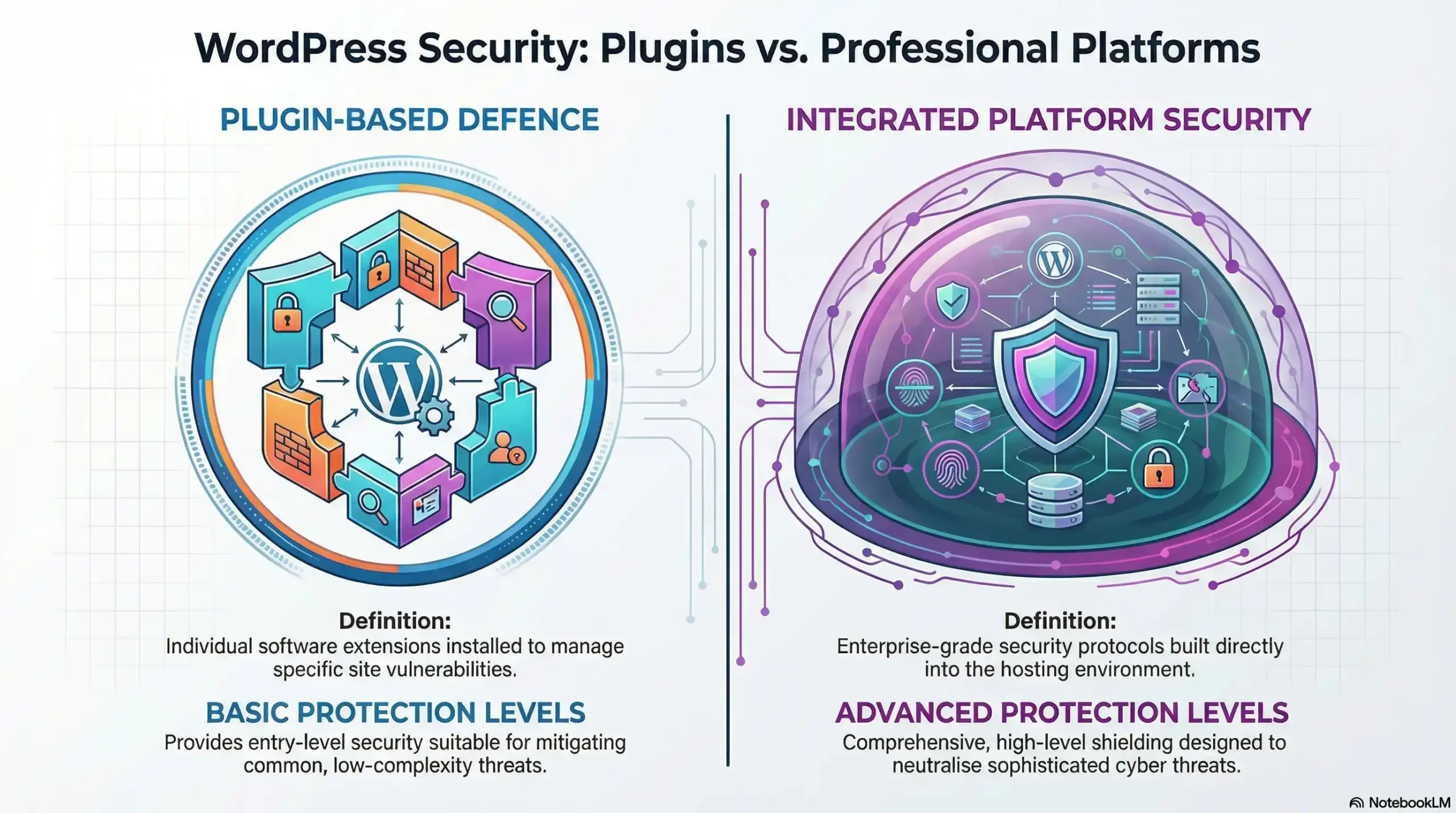
Infographic comparing WordPress plugin and professional platform security levels against common threats.
Side-by-side threat protection comparison.

Architectural Advantages

Traditional WordPress hosting exposes video files through predictable URL structures and standard web delivery protocols. Professional platforms encrypt content at the file level with military-grade AES-256 encryption, deliver through proprietary networks, and implement forensic tracking that makes unauthorized distribution both detectable and legally actionable.

Real Protection Capabilities

Screen Recording Countermeasures: Detection capabilities identify unauthorized capture attempts and respond with session termination, account flagging, or legal notice generation. While WordPress plugins acknowledge their inability to prevent screen recording, professional platforms implement multiple countermeasures.

Forensic Tracking: Complete visibility into content access patterns, user behavior, and potential security threats. Detailed analytics identify sharing patterns, unusual access locations, and suspicious account activity.

Device Management: Fingerprinting and session management prevent credential sharing by limiting simultaneous access and detecting unusual login patterns.

Business Integration

Compliance Automation: Regulatory requirements like HIPAA, FERPA, and industry-specific standards get handled automatically without requiring business owners to understand complex compliance frameworks.

Performance Guarantees: Service level agreements provide compensation for service disruptions, ensuring business continuity that WordPress hosting cannot match.

The choice between WordPress plugins and professional platforms ultimately depends on content value and business goals. WordPress plugins serve as stepping stones for developing businesses, but cannot provide comprehensive security that serious content creators require for protecting substantial revenue streams.

Frequently Asked Questions

Basic browser plugins fail because they:

  • Hide URLs using simple JavaScript.

  • Get bypassed easily by standard developer tools. True security requires military-grade DRM encryption at the file level

Browser plugins cannot block system-level recording tools. To stop them, you must use:

  • L1 DRM for native browsers.

  • Dynamic forensic watermarking.

  • Device fingerprinting

You can secure your site in under 30 minutes by:

  1. Installing an enterprise-grade API plugin.

  2. Enabling DRM encryption.

  3. Activating global CDN delivery for zero buffering

Stop credential sharing by implementing these security measures:

  • Device fingerprinting.

  • Concurrent session limits.

  • Forensic tracking to identify unusual login patterns and protect your course revenue

No. When properly configured with an integrated Amazon CDN, your secure videos will maintain global performance and deliver zero buffering, regardless of the user’s location or device

Dynamic watermarks deter piracy by:

  • Embedding the viewer’s email directly onscreen.

  • Identifying the source of content leaks.

  • Providing forensic-grade tracking for legal action

Piracy drains billions annually. Individual course creators routinely lose between $15,000 and $50,000 monthly when relying solely on ineffective, standard WordPress protection plugins

Yes, tools like Video DownloadHelper easily capture standard embedded videos. Preventing this requires unbreakable DRM encryption that explicitly blocks unauthorized download requests

When using military-grade platforms, forensic tracking instantly identifies the breach source. This allows you to terminate the session immediately and provides the exact data needed for legal recourse

Yes. Universal compatibility ensures that premium security protocols function perfectly across all platforms, including older smartphones and tablets often ignored by standard browser-based solutions

Comments are closed.