Key Takeaways: Securing Your Video Content in 2026
Encrypt Everything: Use AES-level encryption and HTTPS to ensure intercepted videos are worthless to hackers.
Double Down on Access Control: Enforce MFA, especially for admins, and integrate with your identity systems for precise permission management.
Choose Security-First Infrastructure: Pick CDNs and video players that prioritize DDoS protection, encrypted playback, and token-based authentication.
Protect Premium Content with DRM & Watermarking: Combine digital rights management with both visible and invisible watermarks to prevent leaks and trace unauthorized sharing.
Make MFA a Default, Not an Option: Go beyond passwords with app-based, biometric, or hardware token verification—tailored to user roles.
Train Your Team & Users: Invest in quick training materials to boost the adoption of secure practices without frustrating end users.
Audit & Update Regularly: Conduct quarterly compliance checks and automate software patching and vulnerability scans.
Learn from Real-World Breaches: Study past incidents to avoid common pitfalls—like weak passwords, lack of SSL, or insider threats.
Balance Security with UX: Implement adaptive MFA, remember trusted devices, and offer smart fallback options to keep security tight and user experience smooth.
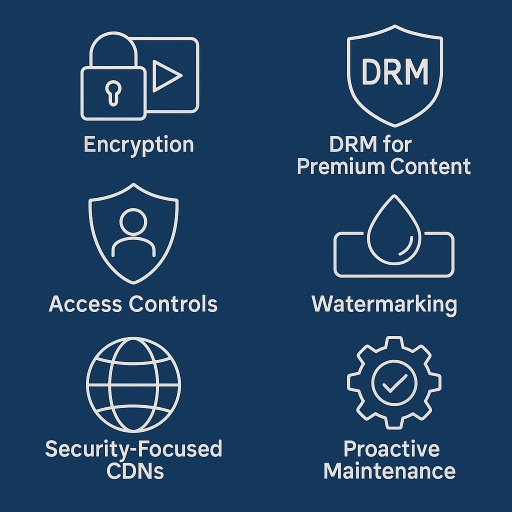
7 Proven Tactics to Lock Down Video Hosts
Video platforms are prime cyberattack targets due to their valuable content and user data. Protect yours with these critical measures:
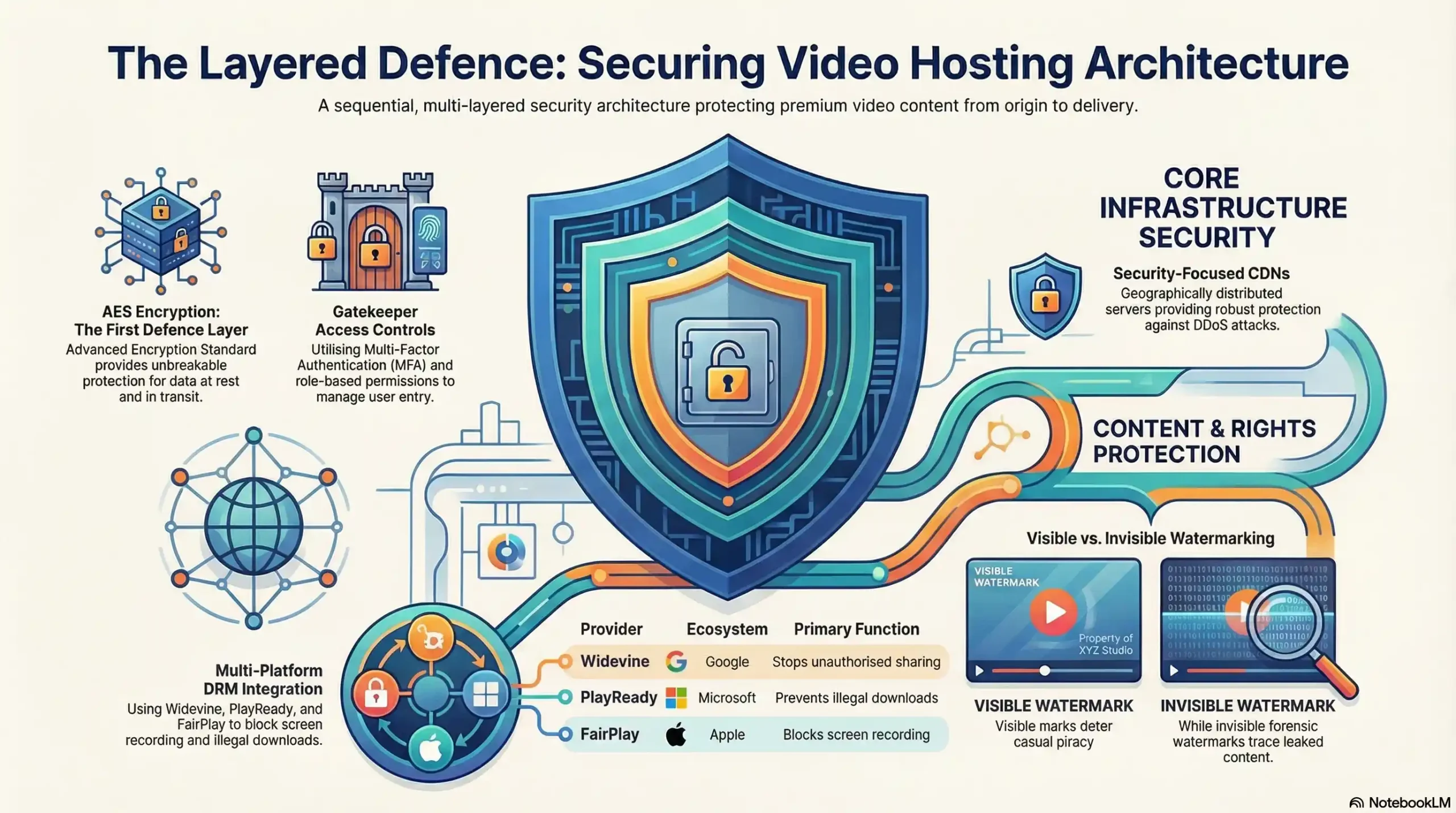
1. Encryption: Your First Defense Layer
Why it matters: Encodes videos so only authorized users with decryption keys can access them
Top solution: Advanced Encryption Standard (AES) for unbreakable protection
Key benefit: Renders content useless even if hackers intercept files
2. Access Controls: Gatekeeper Security
Essential tools: Multi-factor authentication (MFA) + role-based permissions
Critical action: Integrate with existing identity systems (e.g., Active Directory)
Result: Precision control over who views or edits content
3. Security-Focused CDNs
Must-have features: DDoS protection + geographically distributed servers
Top providers: Cloudflare, Akamai, or Amazon CloudFront
Bonus: Accelerates global playback while blocking attacks
4. DRM for Premium Content
Use when: Hosting copyrighted/paid videos
Industry standards: Widevine (Google), PlayReady (Microsoft), FairPlay (Apple)
Stops: Illegal downloads, screen recording, unauthorized sharing
Ready to lock down your premium content?
Protect your revenue with our unbreakable DRM video platform.
5. Watermarking: The Invisible Tracker
Visible watermarks: Deter casual piracy (e.g., logo overlays)
Invisible watermarks: Forensic tracing for leaked content
Pro tip: Combine both for legal evidence
6. Secure Video Players
Non-negotiables: Token-based authentication + encrypted playback
Trusted options: JW Player, Bitmovin, or Kaltura
Avoid: Players lacking HTTPS support
7. Proactive Maintenance
Critical routine: Weekly security patches for all hosting software
Overlooked risk: Outdated video players/CDN configurations
Expert move: Automate vulnerability scans
MFA for Video Security: Why Extra Layers Beat Passwords Alone
Why MFA Is Non-Negotiable for Video Protection
MFA blocks 99.9% of account hacks (Microsoft) by requiring two or more verification factors:
Knowledge: Password/PIN
Possession: Mobile device or security key
Biometrics: Fingerprint/facial recognition
Unlike passwords alone, MFA stops attackers even if credentials are leaked – critical for protecting premium content and user data.
Implementing MFA: Best Practices for Video Platforms
Choose Your MFA Arsenal:
Security vs. Convenience: Prioritize these authentication methods from strongest to most vulnerable:
Authenticator apps (Google/Microsoft Authenticator): Best balance of security and usability
Biometric verification: Ideal for mobile/trusted devices (fingerprint/facial recognition)
Hardware security keys (Yubikey): Maximum protection for admin accounts
SMS/Email codes: Use only as a fallback (vulnerable to phishing)
4-Step Implementation Roadmap
Activate in platform settings
Enable in security dashboards (e.g., Kaltura, Panopto, Vimeo Enterprise)
Enforce for all privileged accounts immediately
Match methods to user needs
Creators/Admins: Require app-based or biometric verification
Viewers: Allow simpler options with risk-based triggers
Train users effectively
Create 60-second setup videos
Provide printable QR code guides
Explain why MFA protects its content
Monitor and escalate
Flag repeated failed attempts
Require re-authentication for:
Sensitive video libraries
Download requests
Unusual locations/devices
Balancing Security vs. Accessibility: Pro Tips
Prevent user frustration without compromising safety:
Adaptive MFA: Trigger extra checks only for:
New devices/locations
High-value video access
Suspicious login patterns
Trusted Devices: Remember approvals for 30-90 days
Fallback Options: Offer backup codes for app users
User Training: Explain why MFA protects their content
Result: Enterprise-grade security with consumer-friendly access.
Proactive Compliance Action Plan
Quarterly Audits
Checklist: Consent logs, encryption validations, deletion trails
Third-party certs: ISO 27001, SOC 2 Type II
Choose Compliance-Ready Platforms
Must-have features:
Regional data residency options
Automated consent management
HIPAA/GDPR compliance dashboards (e.g., Panopto, Kaltura)
Team Training Essentials
Quarterly workshops covering:
Breach reporting timelines (72 hrs under GDPR)
Handling right-to-be-forgotten requests
Recognizing PHI (Protected Health Information)
When Security Failed: 3 Devastating Video Breaches & How to Prevent Them
Why Breach Autopsies Are Essential Studying real incidents transforms abstract risks into concrete action plans. These cases reveal:
How attackers exploit overlooked weaknesses
The catastrophic business impact of failures
Exact prevention measures you can implement today
1. The Vimeo Third-Party Breach (2026)
- What happened: Attackers compromised Vimeo’s integration with a third-party analytics vendor, Anodot, and used stolen authentication tokens to access customer data stored in Vimeo’s cloud environment.
- Damage: Roughly 119,000 user email addresses and account metadata exposed. The extortion group ShinyHunters published 106GB of stolen data after Vimeo declined to pay a ransom.
- Root cause: A compromised third-party integration, not a direct breach of Vimeo’s own systems — a reminder that your security is only as strong as every vendor you connect to.
- Your prevention:
- Audit every third-party integration’s access scope — don’t grant broader permissions than the integration actually needs
- Rotate and monitor API tokens for third-party services regularly
- Have an incident response plan that explicitly covers vendor breaches, not just direct attacks
(Sources: BleepingComputer, CPO Magazine, TechRadar — April/May 2026)
2. The Twitch Source Code Leak (2021)
- What happened: A misconfigured server exposed Twitch’s entire internal environment — including source code, internal security tools, and confidential streamer payout data — which was leaked publicly.
- Damage: 125GB of proprietary data leaked, including years of source code history and financial data on the platform’s top creators.
- Root cause: A server configuration error, not a sophisticated attack. Login credentials and payment data weren’t exposed, but the reputational and competitive damage was still severe.
- Your prevention:
- Regularly audit server and cloud storage configurations for public accessibility
- Apply least-privilege access even to internal infrastructure
- Treat configuration errors as seriously as external attacks in your security audits
(Widely reported; one detailed writeup via Huntress)
3. The Unsecured Streaming Analytics Database (2025)
- What happened: Security researchers discovered an unprotected database — an Elasticsearch instance with no password required — holding over 324 million log entries from a streaming ad-insertion platform, exposing user IPs, session IDs, and account identifiers.
- Damage: Continuously growing exposure; the database was receiving millions of new log entries daily before it was secured, creating an ongoing session-hijacking risk.
- Root cause: A production database left publicly accessible with no authentication.
- Your prevention:
- Never leave production databases without authentication, even “temporarily”
- Run regular external scans for exposed infrastructure — don’t assume misconfigurations will be caught internally
- Treat session IDs and account identifiers as sensitive data requiring the same protection as passwords
(Source: TechRadar, citing Cybernews research — reported August 2025)
In today’s hyper-connected world, video content is more than just media—it’s a valuable asset that demands airtight protection. As cyber threats evolve, relying on outdated security measures leaves your brand, your users, and your intellectual property at risk. By implementing layered defenses—like encryption, DRM, MFA, and regular audits—you not only secure your content but also build lasting trust with your audience. Proactive protection isn’t just smart—it’s essential.