
What is CDN Security Configuration? CDN security configuration is the process of applying protective layers — including token authentication, geo-restrictions, origin shielding, and encryption — to a Content Delivery Network to prevent unauthorized access, hotlinking, and content leaks. For video platforms and online course creators, a properly configured CDN is the difference between a secure, revenue-generating content library and one that is actively being stolen. Inkrypt Videos delivers enterprise-grade CDN security with a 30-minute setup, combining Amazon CDN performance with military-grade content protection.
You built something valuable. Hundreds of hours of premium video content — courses, masterclasses, training modules, or exclusive media — hosted on a platform you trust. But if your CDN security configuration is weak, incomplete, or simply default, that content is not protected. It is exposed.
Every day, misconfigured CDNs silently bleed revenue for content creators and enterprises worldwide. Hotlinked videos. Bypassed tokens. Geo-spoofed streams. Direct origin access. The attack vectors are real, they are active, and most platforms have no idea they are being exploited until the damage is already done.
This guide gives you the exact framework to configure CDN security correctly — so your content reaches every legitimate viewer worldwide, and nobody else.
Why CDN Security Is the #1 Threat to Your Video Revenue
Most content creators focus their security efforts on passwords and login pages. That is the wrong battlefield. The real vulnerability sits deeper — inside the delivery infrastructure itself. Your CDN is the highway your video content travels on. If that highway has no checkpoints, anyone can get on.
A single misconfigured CDN setting can expose your entire video library to unauthorized access, regardless of how strong your platform login is. Attackers do not need your password. They need your URL.
The Real Cost of a Content Leak
The numbers are not abstract. The global video piracy market costs the industry an estimated $71 billion annually, with online course piracy and unauthorized streaming accounting for a rapidly growing share. For individual creators, a single leaked course can represent thousands of dollars in lost enrollments within days of publication.
Beyond direct revenue loss, content leaks destroy competitive advantage. Your proprietary methodology, your teaching style, your premium media — once leaked, it becomes free content on piracy forums, Telegram channels, and torrent sites. Credential sharing compounds the problem further, with studies showing that up to 73% of streaming subscribers have shared login access with someone outside their household.
The entry point for most of these breaches is not a sophisticated cyberattack. It is a CDN that was never properly configured in the first place.
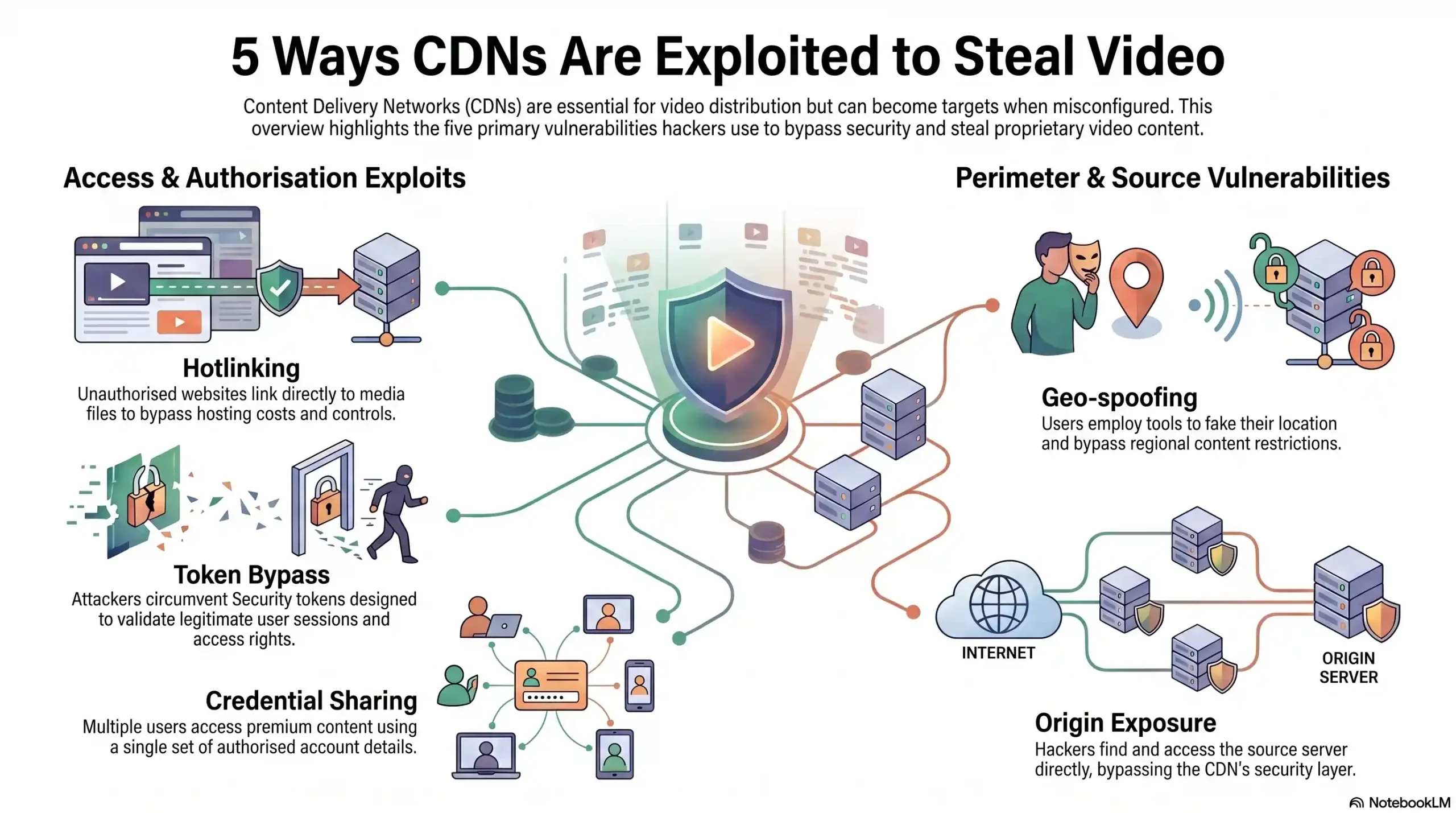
Hotlinking 🔴 Critical
- Method: Direct URL embedding on external sites
Token Bypass 🔴 Critical
- Method: Exploiting unsigned or expired tokens
Geo-Spoofing 🟠 High
- Method: VPN masking to bypass geo-restrictions
Origin Exposure 🔴 Critical
- Method: Direct origin server access bypassing CDN
Credential Sharing 🟠 High
- Method: Multi-user login on single account
The 6 Pillars of a Bulletproof CDN Security Configuration
Securing your CDN is not a single switch you flip. It is a layered architecture — six interlocking pillars that, when configured correctly, create an environment where content leaks become structurally impossible rather than just unlikely.
Pillar 1 — Signed URLs & Token Authentication
Signed URLs are the foundation of CDN access control. Instead of generating a static, permanent link to your video content — which can be copied, shared, and accessed indefinitely — token authentication generates a unique, time-limited URL for each authorized viewing session.
When a verified user requests your video, the system generates a cryptographically signed URL that expires after a defined window, typically between 30 seconds and a few hours depending on your configuration. If that URL is copied and shared, it is already dead. No valid token, no access.
Inkrypt Videos implements dynamic token authentication at the CDN layer, meaning every video request is individually validated before a single frame is delivered. This eliminates hotlinking and unauthorized URL sharing at the infrastructure level.
Pillar 2 — Hotlink Protection & Referrer Validation
Hotlinking occurs when an external website or application embeds your video URL directly, consuming your CDN bandwidth and serving your content to their audience without authorization. Without referrer validation, your content can be broadcast from any domain on the internet.
Referrer-based hotlink protection restricts video playback exclusively to your whitelisted domains. A video hosted on your platform will only play when the request originates from your approved domain list. Any attempt to embed or access the content from an unauthorized domain returns an immediate block.
This is particularly critical for online course creators whose content is frequently targeted for embedding on piracy aggregator sites.
Pillar 3 — Geo-Restriction & IP Whitelisting
Geo-restriction allows you to define exactly which countries or regions are authorized to access your content. For enterprises managing licensing agreements, regional compliance requirements, or market-specific content strategies, geo-restriction is not optional — it is a legal necessity.
From a piracy prevention perspective, geo-restrictions combined with IP whitelisting create a geographic perimeter around your content. When integrated with VPN detection capabilities, this pillar also addresses the growing challenge of geo-spoofing, where users mask their true location to bypass regional access controls.
Inkrypt Videos supports granular geo-restriction configuration, allowing creators to whitelist specific countries, blacklist high-risk regions, and apply different access rules to different content libraries simultaneously.
Pillar 4 — Origin Shield & Direct Access Blocking
Your CDN edge network is your content’s public-facing delivery layer. Your origin server — where the master video files actually live — should never be publicly accessible. Origin exposure is one of the most dangerous and most commonly overlooked CDN security vulnerabilities.
An origin shield acts as an additional caching and protection layer between the CDN edge and your origin server, masking the origin’s true IP address and ensuring all traffic is routed exclusively through the CDN. Direct access blocking then enforces that the origin server will only respond to requests from authorized CDN nodes, rejecting all other traffic entirely.
Without this configuration, a technically motivated attacker can bypass your entire CDN security stack by accessing your origin server directly, rendering every other security measure irrelevant.
Pillar 5 — End-to-End Encryption & HTTPS Enforcement
Transmitting video content over unencrypted HTTP connections is a critical security failure. Every video stream must be delivered over HTTPS with enforced TLS encryption, ensuring that content cannot be intercepted, inspected, or captured in transit.
End-to-end encryption means the content is protected from the moment it leaves your origin server to the moment it renders in your viewer’s browser or app. This is especially important for enterprise clients operating in regulated industries — healthcare training content, financial services onboarding, and government agency materials all carry compliance requirements that mandate encrypted content delivery.
Inkrypt Videos enforces HTTPS across all delivery endpoints by default, with no configuration required from the user — it is the baseline, not an add-on.
Pillar 6 — Dynamic Watermarking as a Security Layer
Traditional watermarks are static — a logo burned into the corner of the video that determined pirates simply crop out. Dynamic watermarking is fundamentally different, and it is one of Inkrypt Videos’ most powerful proprietary security tools.
Dynamic watermarks embed invisible, session-specific identifiers directly into the video stream for each individual viewing session. If a user records their screen and distributes that recording, the watermark travels with it — carrying the exact user ID, timestamp, IP address, and session data of the person who leaked it. This transforms your content security from reactive to forensic.
For enterprise clients and premium content publishers, dynamic watermarking is not just a deterrent. It is an evidence-gathering system that makes every content leak fully traceable back to its source.
🎯 Ready to See All 6 Security Pillars in Action?
Discover how Inkrypt Videos configures every layer automatically — so your content is protected before your first video goes live.
CDN Security Configuration Checklist for Content Creators & Enterprises
Before launching any video content publicly, run through this pre-launch security checklist to confirm every critical CDN security layer is active and correctly configured.
Pre-Launch CDN Security Checklist
Token Authentication ✅
- Configuration item: Signed URLs enabled with defined expiry windows
Hotlink Protection ✅
- Configuration item: Domain whitelist configured, referrer validation active
Geo-Restriction ✅
- Configuration item: Authorized regions defined, blocked regions enforced
Origin Shield ✅
- Configuration item: Origin IP masked, CDN-only access enforced
HTTPS Enforcement ✅
- Configuration item: All delivery endpoints on TLS encryption
Dynamic Watermarking ✅
- Configuration item: Session-specific watermarks active on all streams
Analytics Monitoring ✅
- Configuration item: Real-time access tracking and anomaly alerts enabled
Credential Protection ✅
- Configuration item: Single-session or device-limit rules configured
If any item in this checklist is unconfigured, your content has an exploitable vulnerability. Every row matters.
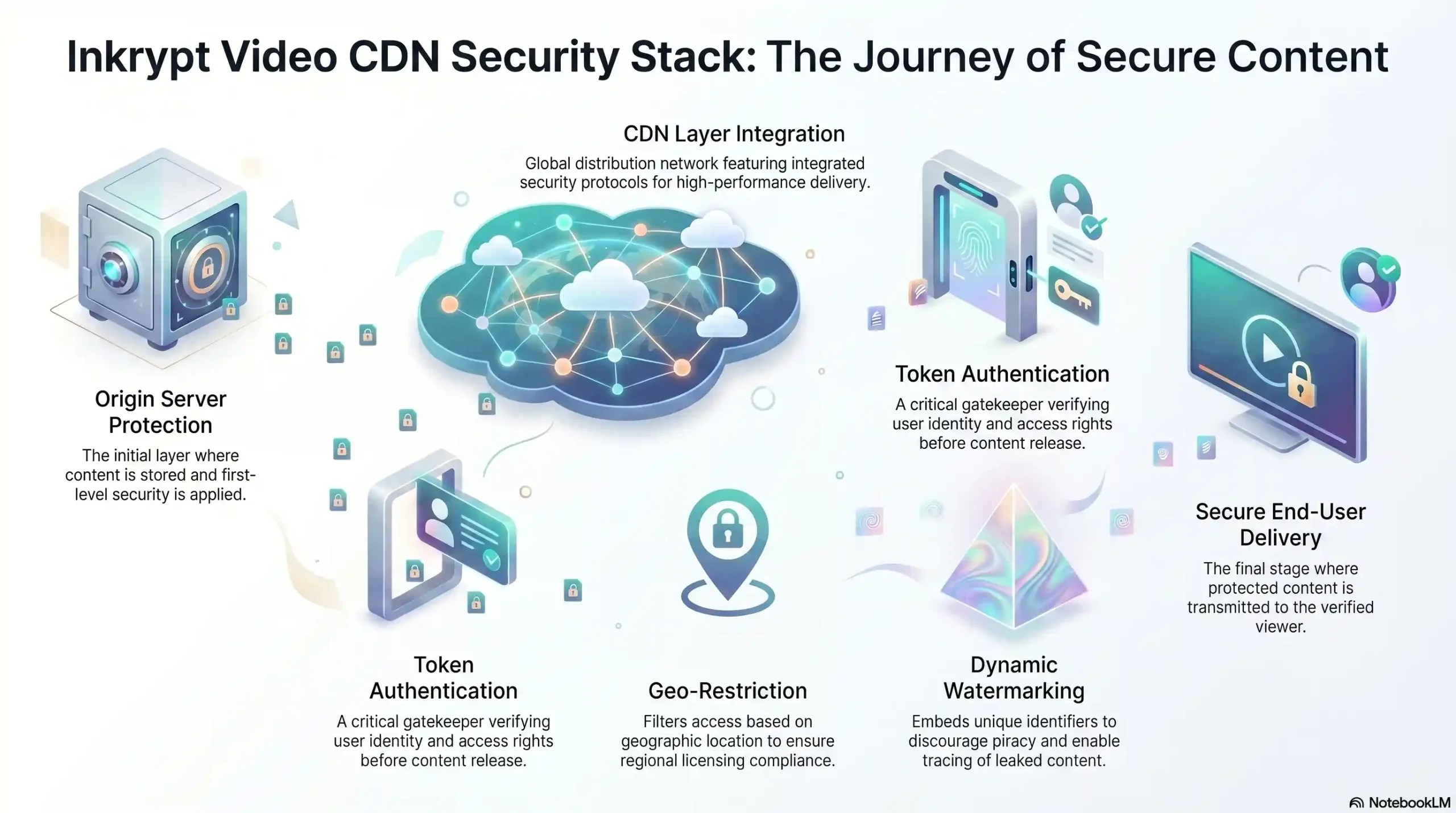
Origin Protection
- Technology: Origin Shield
- Inkrypt feature: ✅ Built-in
Access Control
- Technology: Signed URLs / Token Auth
- Inkrypt feature: ✅ Built-in
Regional Control
- Technology: Geo-Restriction
- Inkrypt feature: ✅ Built-in
Identity Tracking
- Technology: Dynamic Watermarking
- Inkrypt feature: ✅ Proprietary
Delivery Encryption
- Technology: HTTPS / TLS
- Inkrypt feature: ✅ Built-in
Threat Intelligence
- Technology: Real-Time Analytics
- Inkrypt feature: ✅ Built-in
Why Global Delivery Doesn’t Have to Mean Global Risk
There is a persistent myth in the content security space that performance and security exist in tension — that locking down your content means slowing it down. This tradeoff is outdated, and it has never been true for platforms built correctly from the ground up.
How Inkrypt Videos Combines Amazon CDN Speed With Fortress-Level Security
Inkrypt Videos is built on Amazon CDN’s global edge infrastructure, distributing content across a worldwide network of delivery nodes that serve video from the location physically closest to each viewer. The result is sub-second load times and zero-buffering playback regardless of whether your audience is in New York, Nairobi, or New Delhi.
Critically, every security layer — token authentication, geo-restriction, origin shielding, dynamic watermarking, and HTTPS enforcement — operates at the CDN edge level. Security processing does not add latency to the viewer experience because it happens at the infrastructure layer, not the application layer. Your viewers get a seamless, professional streaming experience. Unauthorized users get nothing.
This is the architecture that enterprise OTT platforms and global media companies pay hundreds of thousands of dollars to build independently. Inkrypt Videos delivers the identical security and performance stack to individual course creators and growing media businesses — configured in 30 minutes, not 30 weeks.
🔗 Local Resources & Authoritative Citations
1. NIST Computer Security Resource Center — CDN & Encryption Guidelines (U.S. Government — .gov) The U.S. National Institute of Standards and Technology publishes the definitive federal frameworks for CDN security, TLS encryption standards, and access control — reference this resource to verify that your video security configuration aligns with globally recognized government-grade cybersecurity benchmarks.
2. NIST Cybersecurity Framework (CSF 2.0) (U.S. Government — .gov) NIST develops cybersecurity standards, guidelines, best practices, and resources to meet the needs of U.S. industry, federal agencies, and the broader public — use this framework to evaluate whether your content delivery infrastructure covers all five core security functions: Identify, Protect, Detect, Respond, and Recover.
3. IETF RFC 8446 — TLS 1.3 Official Encryption Standard (Internet Engineering Task Force) The Internet Engineering Task Force’s TLS 1.3 protocol allows client/server applications to communicate over the internet in a way designed to prevent eavesdropping, tampering, and message forgery — this is the official technical specification behind the HTTPS encryption that every secure CDN video stream must implement.
4. WIPO Internet Treaties — Digital Content Protection (United Nations Agency) WIPO administers the WIPO Copyright Treaty and the WIPO Performances and Phonogram Treaty, which set down international norms aimed at preventing unauthorized access to and use of creative works on the Internet or other digital networks — reference this resource to understand the international legal framework that makes DRM enforcement and anti-piracy measures legally binding across 115+ countries worldwide.
🎯 Your Content Built Your Business. Don’t Let a Misconfigured CDN Tear It Down.
Join thousands of creators and enterprises who trust Inkrypt Videos to protect and deliver their premium content worldwide — with zero compromise on speed or security.