
Digital Rights Management (DRM) is a technology framework that protects video and other digital content from unauthorized copying, downloading, and redistribution. It works by encrypting content and locking it behind a license server that only releases the decryption key to authenticated, authorized viewers. For anyone selling access to video, DRM is the difference between hoping no one steals your content and making sure they can’t.
This guide covers how DRM actually works, the three systems that power nearly every protected stream, how it differs from plain encryption or password protection, and what it takes to add it to your own videos.
How Does DRM Work?
DRM works by encrypting each video with a unique content key, then requiring a license server to verify the viewer before that key is ever released. The video stays encrypted end-to-end — it’s only decrypted, frame by frame, inside an approved player on an authorized device.
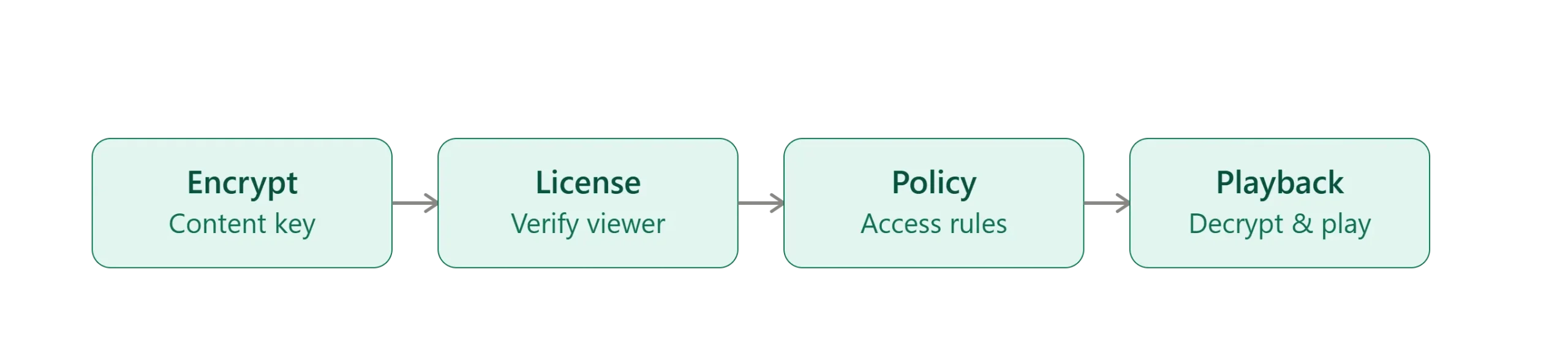
The process runs in three stages:
- Encryption — During packaging, your video is encrypted (typically using the CENC/AES-128 standard) with a unique content key. Without that key, the file is unusable.
- Licensing — When someone hits play, a license server checks who they are and what they’re entitled to before releasing the decryption key. No valid entitlement, no key, no playback.
- Policy enforcement — The license carries the rules: how long access lasts, how many devices can play it, what resolution is allowed, and whether screen recording or output to an unapproved display is blocked.
This is what separates DRM from ordinary encryption — it’s not just scrambling a file, it’s controlling what happens to it after someone has “access.”
The Three DRM Systems Behind Almost Every Protected Stream
Real-world DRM isn’t one piece of technology — it’s three separate systems, each controlled by a different platform owner, working together as “multi-DRM.” No single one covers every device, so protecting a video for all your viewers means supporting all three:
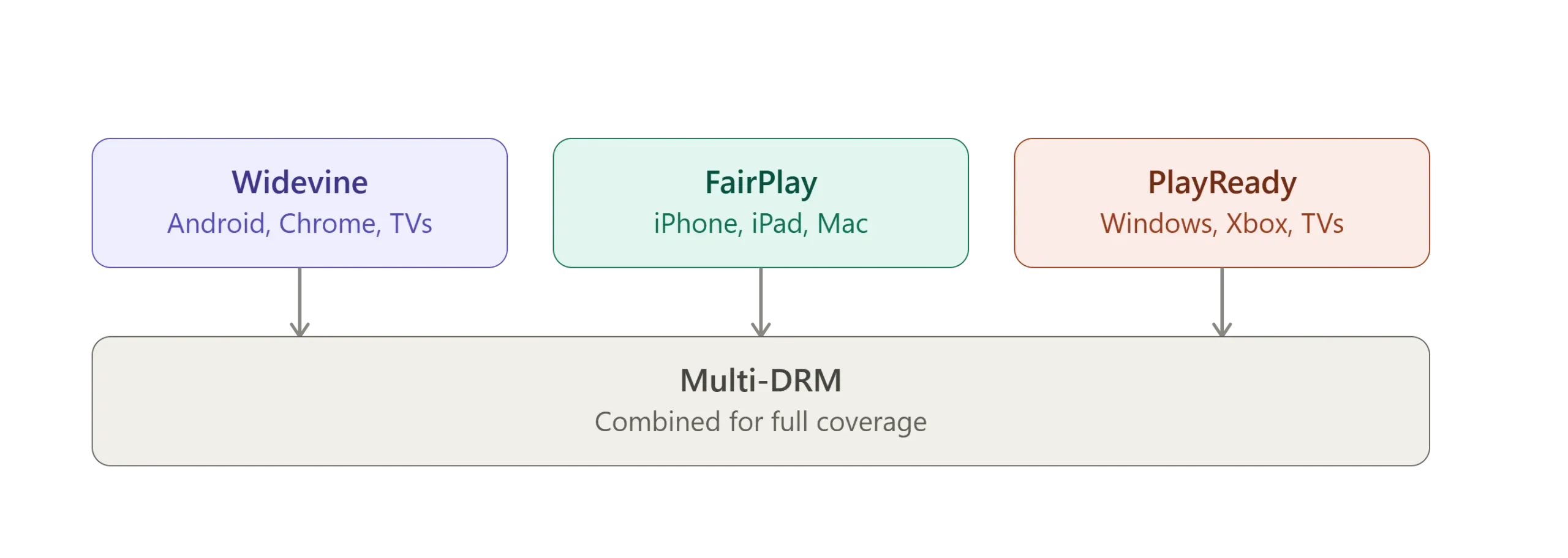
- Google Widevine — Covers Android devices, Chrome and Chromium-based browsers, Android TV, and Chromecast. It has the broadest device footprint of the three.
- Apple FairPlay — Required for iPhone, iPad, Mac (Safari), and Apple TV. Nothing else works on Apple hardware.
- Microsoft PlayReady — Covers Windows, Xbox, Edge, and many smart TV platforms.
For a deeper look at how each works, see our guides to browser DRM, Apple FairPlay, and Microsoft PlayReady.
Because each system speaks its own language, a properly protected video is packaged once and served with the right license per device automatically. This is also why DRM systems support different security levels — some enforced in hardware, some in software — which is why premium content like HD and 4K streams typically requires the stronger, hardware-backed tier.
Why Do Video Businesses Need DRM?
DRM matters because access control alone doesn’t stop content from being copied once someone has it — only DRM controls what happens after playback starts. That gap is exactly where most content leaks originate.
It shows up differently depending on who’s protecting the content:
- Online course creators and coaches — Students share login credentials, or download lessons and redistribute them outside the platform, undercutting the business the course was built on.
- Enterprises and media companies — Internal training or licensed content leaks outward, creating both a revenue problem and a compliance one.
- Premium publishers and subscription platforms — Shared subscriber credentials let far more people access content than actually pay for it.
If you want a closer look at how this plays out in practice, we’ve broken down real-world anti-piracy strategies and looked at how Netflix uses DRM to protect its own catalog at scale.
DRM vs. Other Content Protection Methods
DRM is the only method that keeps working after a viewer already has access — most other protections stop at the front door. Here’s how it compares to the tools it’s often confused with:
- Plain encryption — Protects a file in transit, but once it’s decrypted client-side, nothing stops someone from saving the raw video.
- Password or login protection — Controls who reaches the page. It does nothing to stop that person from downloading or sharing the video once they’re in.
- Watermarking — Doesn’t block piracy directly, but embeds a traceable identifier that helps you find the source of a leak. It’s a complement to DRM, not a substitute — this is a big part of what Inkrypt’s video protection features are built around.
- Domain or token restrictions — Stop your video from being embedded or hotlinked elsewhere, but don’t stop someone from downloading it directly.
Most serious video protection strategies layer several of these together, with DRM as the core that controls playback itself.
Is DRM Legal?
Yes. In the U.S., the DMCA’s anti-circumvention provisions (Section 1201) make it illegal to bypass DRM protections — separate from and in addition to any copyright infringement that follows. The EU Copyright Directive includes similar anti-circumvention protections. That means bypassing DRM carries legal exposure on its own, even before anyone redistributes the content.
Common Use Cases for DRM
- Online courses and coaching programs protecting paid curriculum from being downloaded and resold.
- Enterprise training and internal video, especially where content includes proprietary processes or compliance material.
- Premium publishers and subscription platforms protecting exclusive content that drives their revenue model.
- Live and on-demand event streaming, where a leaked stream during the event window is the most damaging kind of piracy.
How to Add DRM to Your Video Content
Adding DRM comes down to picking a platform that handles multi-DRM packaging for you, then setting the access rules that match your business. Building Widevine, FairPlay, and PlayReady support in-house is a real engineering project — most businesses don’t need to take that on themselves.
- Choose a DRM-enabled hosting platform rather than building multi-DRM support from scratch.
- Upload your content — the platform packages it for Widevine, FairPlay, and PlayReady automatically.
- Set your access policies — expiration windows, device limits, download blocking, geo-restrictions.
- Embed the secure player on your site, app, or course platform.
- Monitor usage and watermarking data to catch unusual access patterns early.
If you’re weighing platforms, our breakdown of what to look for in DRM software covers the questions worth asking before you commit. And if you want to see how this looks in practice, Inkrypt’s plans include multi-DRM protection out of the box, with setup typically measured in minutes, not weeks.
Ready to add multi-DRM protection to your video library? Start a free 30-day trial and see it running on your own content.