

What is PlayReady DRM? PlayReady DRM is Microsoft’s enterprise-grade digital rights management framework designed to protect video content from unauthorized access, copying, and piracy. It uses AES-128 encryption combined with a real-time license server to control how, when, and where content can be played. Trusted by Hollywood studios, global streaming platforms, and enterprise organizations, PlayReady is one of the three pillars of modern multi-DRM content protection — alongside Google’s Widevine and Apple’s FairPlay.
What Is PlayReady DRM?
Every year, the global video streaming industry loses billions of dollars to digital piracy. Illegal downloads, unauthorized screen captures, and credential sharing are not abstract threats — they are daily realities for course creators, media companies, and premium content publishers worldwide. At the center of the industry’s defense against this crisis sits PlayReady DRM: Microsoft’s battle-tested content protection framework.
PlayReady is a Digital Rights Management (DRM) system developed by Microsoft and first introduced in 2007. Its core function is deceptively simple: ensure that only authorized users, on authorized devices, under authorized conditions, can access protected video content. In practice, it achieves this through a sophisticated combination of encryption, real-time license delivery, and hardware-level security enforcement.
What separates PlayReady from basic password protection or simple encryption tools is its policy enforcement capability. PlayReady does not just lock content — it defines the rules under which that content can be unlocked. Can it be downloaded? For how long? On how many devices? Can it be played offline? All of these conditions are embedded within the license, and PlayReady enforces them at the hardware and software level.
Trusted by Netflix, Disney+, and major Hollywood studios, PlayReady has become the global standard for Windows-ecosystem content protection — and a critical component of any serious multi-DRM strategy. For the broader picture across all three systems, see our guide to browser DRM, Widevine, and PlayReady.
Developer
- Microsoft Corporation
First Released
- 2007
Encryption Standard
- AES-128 / Common Encryption (CENC)
License Model
- Real-time server-based license acquisition
Primary Platforms
- Windows, Xbox, Smart TVs, Android
Industry Adoption
- Netflix, Disney+, HBO Max, BBC iPlayer
Complementary DRMs
- Widevine (Google), FairPlay (Apple)
Key Use Cases
- Streaming, VOD, corporate training, online courses
How Does PlayReady DRM Actually Work?
Understanding PlayReady at a technical level is essential for any content owner making decisions about their protection stack. The system operates across three interconnected layers.
The Encryption Layer (AES-128 & CENC)
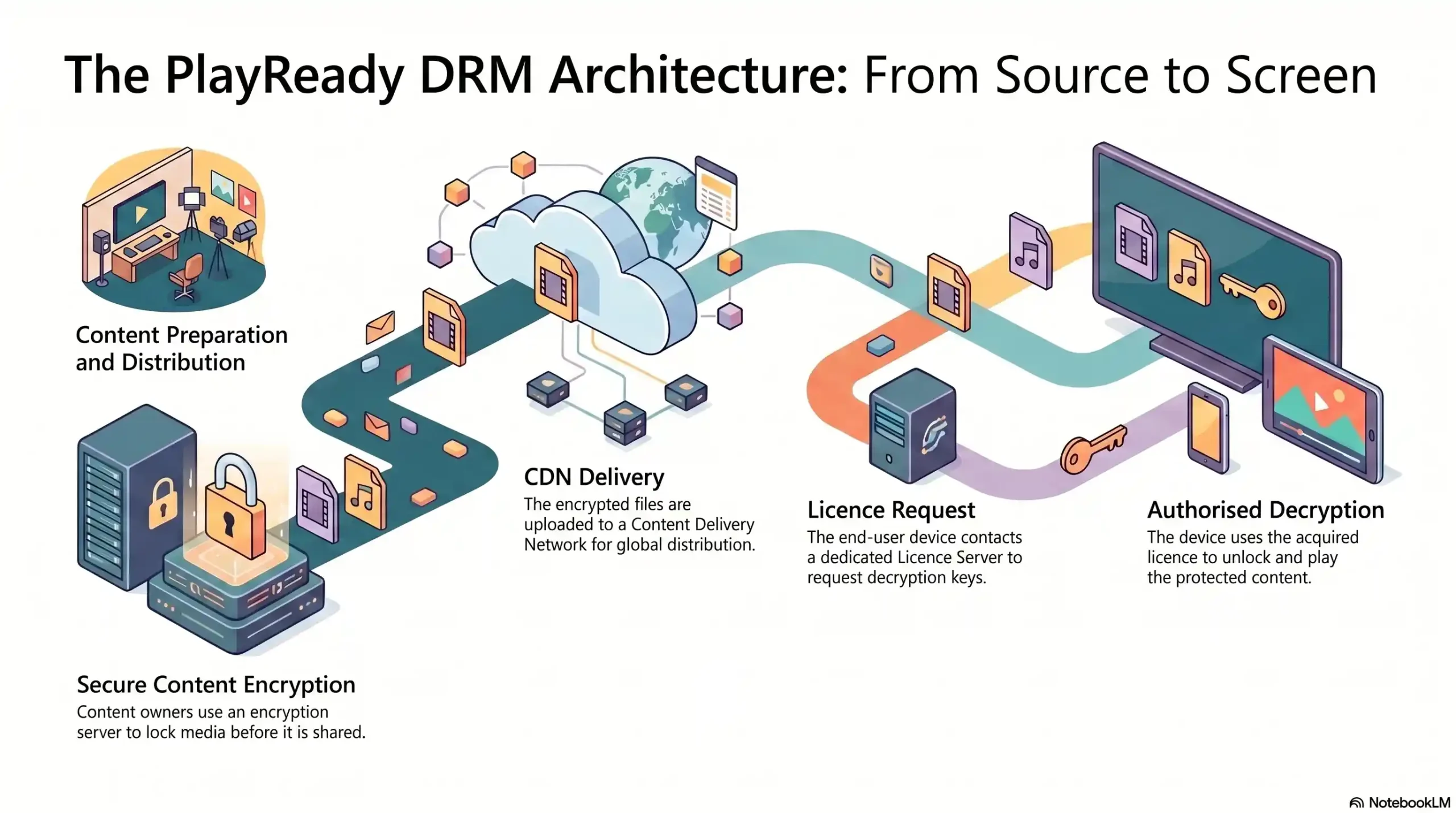
Before a single frame of your video reaches a content delivery network, PlayReady encrypts it using AES-128 encryption — the same standard used by financial institutions and government agencies to protect classified data. Each piece of content is encrypted with a unique Content Key, making it mathematically unreadable to anyone who does not possess the corresponding decryption license.
PlayReady operates within the Common Encryption (CENC) standard, meaning the same encrypted file can be decrypted by multiple DRM systems — including Widevine and FairPlay — without re-encoding. This is a critical efficiency advantage for any platform distributing content globally across mixed device ecosystems.
The License Server Mechanism
When an authorized user presses “Play,” a silent but critical process begins in milliseconds. The user’s device sends a license request to PlayReady’s license server. The server validates the user’s credentials, checks the defined policy rules, and — if everything is authorized — issues an encrypted license containing the Content Key.
This license is temporary, device-bound, and policy-controlled. It cannot be transferred to another device or used beyond its defined parameters. The entire transaction happens in the background, invisibly, before playback begins. This is what makes PlayReady fundamentally different from static encryption: the protection is dynamic and conditional, not a one-time lock.
Encrypted Media Extensions (EME) & Browser Integration
Modern browsers do not natively “speak” DRM — they communicate with DRM systems through a W3C standard called Encrypted Media Extensions (EME). EME acts as the bridge between the browser and the Content Decryption Module (CDM) — the hardware or software component that actually performs decryption on the user’s device.
On Windows devices, Microsoft’s PlayReady CDM is deeply integrated at the operating system level, enabling hardware-enforced security — the highest level of DRM protection available. This hardware security level is what qualifies PlayReady-protected platforms for 4K Ultra HD content delivery from major Hollywood studios, a threshold that software-only DRM cannot meet.
What Devices & Platforms Support PlayReady?
PlayReady’s native home is the Windows ecosystem, where it enjoys the deepest integration and highest security levels. Windows 10 and 11, Microsoft Edge, Internet Explorer, Xbox consoles, and Windows-based Smart TVs all support PlayReady natively at the hardware security level.
Beyond Windows, PlayReady has achieved broad adoption across:
- Smart TVs — Samsung, LG, and Panasonic devices with Microsoft licensing
- Android devices — Through software-level CDM integration
- Roku & streaming sticks — Many devices carry PlayReady licenses
- Older devices — PlayReady’s longevity since 2007 means broad legacy compatibility, an advantage competitors often overlook
However, one critical gap exists: Apple’s ecosystem. iOS, iPadOS, macOS, and Safari do not support PlayReady. Apple exclusively uses its own FairPlay DRM system — see our FairPlay DRM deep-dive for the Apple-specific picture. This means any content owner relying solely on PlayReady is leaving a substantial portion of their global audience either unprotected or locked out entirely — a problem that only a multi-DRM strategy can solve.
PlayReady vs. Widevine vs. FairPlay — Which DRM Do You Actually Need?
The modern streaming landscape is not a single-DRM world. It is a three-DRM world, and understanding how each system maps to your audience is essential before investing in any protection infrastructure.
Developer
- PlayReady: Microsoft
- Widevine: Google
- FairPlay: Apple
Primary Platform
- PlayReady: Windows / Xbox
- Widevine: Android / Chrome
- FairPlay: iOS / macOS / Safari
Encryption
- PlayReady: AES-128 / CENC
- Widevine: AES-128 / CENC
- FairPlay: AES-128 / HLS
License Model
- PlayReady: Server-based
- Widevine: Server-based
- FairPlay: Server-based
Hardware Security
- PlayReady: Yes (Windows)
- Widevine: Yes (Android)
- FairPlay: Yes (Apple)
4K HDR Support
- PlayReady: Yes
- Widevine: Yes
- FairPlay: Yes
Device Coverage
- PlayReady: Wide (non-Apple)
- Widevine: Very Wide
- FairPlay: Apple-only
Implementation Complexity
- PlayReady: High
- Widevine: Medium-High
- FairPlay: Medium
Legacy Device Support
- PlayReady: Strong
- Widevine: Moderate
- FairPlay: Limited
The honest answer to “which DRM do you need?” is: all three. A course creator with students on Windows laptops, Android phones, and iPhones cannot adequately protect their content with a single DRM system. An enterprise media company distributing globally needs every ecosystem covered without exception.
📌 Protecting content across all devices means you need all three DRM systems working in unison. Inkrypt Videos delivers PlayReady, Widevine, and FairPlay protection from a single unified platform — so your content is secured regardless of what device your audience uses.
The Real Limitations of PlayReady DRM (What Microsoft Won’t Tell You)
PlayReady is powerful. It is also incomplete as a standalone solution — and understanding its limitations is the mark of a content security professional.
Screen Recording & Capture Vulnerabilities
PlayReady effectively prevents direct digital copying — ripping files, downloading streams, or intercepting encrypted transmissions. What it cannot fully prevent is the analog hole: the fundamental vulnerability where a camera or screen recorder captures content as it plays on a display.
While PlayReady’s hardware security level can block software-based screen capture tools on supported devices, a determined bad actor with a physical camera can always record a screen. This is not a PlayReady failure specifically — it is an industry-wide limitation of all DRM systems. The solution lies in the forensic layer: dynamic watermarking that embeds invisible, traceable identifiers into every stream, making leaked content traceable back to its source.
Implementation Complexity for Non-Developers
Deploying PlayReady independently is not a weekend project. A complete implementation requires:
- A licensed PlayReady license server (Microsoft charges licensing fees)
- CDN infrastructure capable of delivering encrypted CENC content
- Backend development to integrate license acquisition with your user authentication system
- CDM compatibility testing across every target device and browser
- Ongoing maintenance as devices, browsers, and OS versions update
For development teams at major studios, this is manageable. For an online course creator or independent publisher, it represents weeks of development time and significant ongoing cost — barriers that effectively put enterprise-grade DRM out of reach without the right platform partner.
Why PlayReady Alone Is Not Enough
Even a perfectly deployed PlayReady implementation has structural gaps:
- No Apple coverage without adding FairPlay
- No forensic identification of leak sources without watermarking
- No protection for non-DRM-capable devices without fallback strategies
- No behavioral analytics to identify suspicious access patterns
The content protection stack that serious creators and enterprises actually need combines multi-DRM encryption + dynamic forensic watermarking + global CDN delivery + real-time analytics. PlayReady is one critical pillar of that stack — not the entire building.
PlayReady in the Real World — Who Uses It & Why
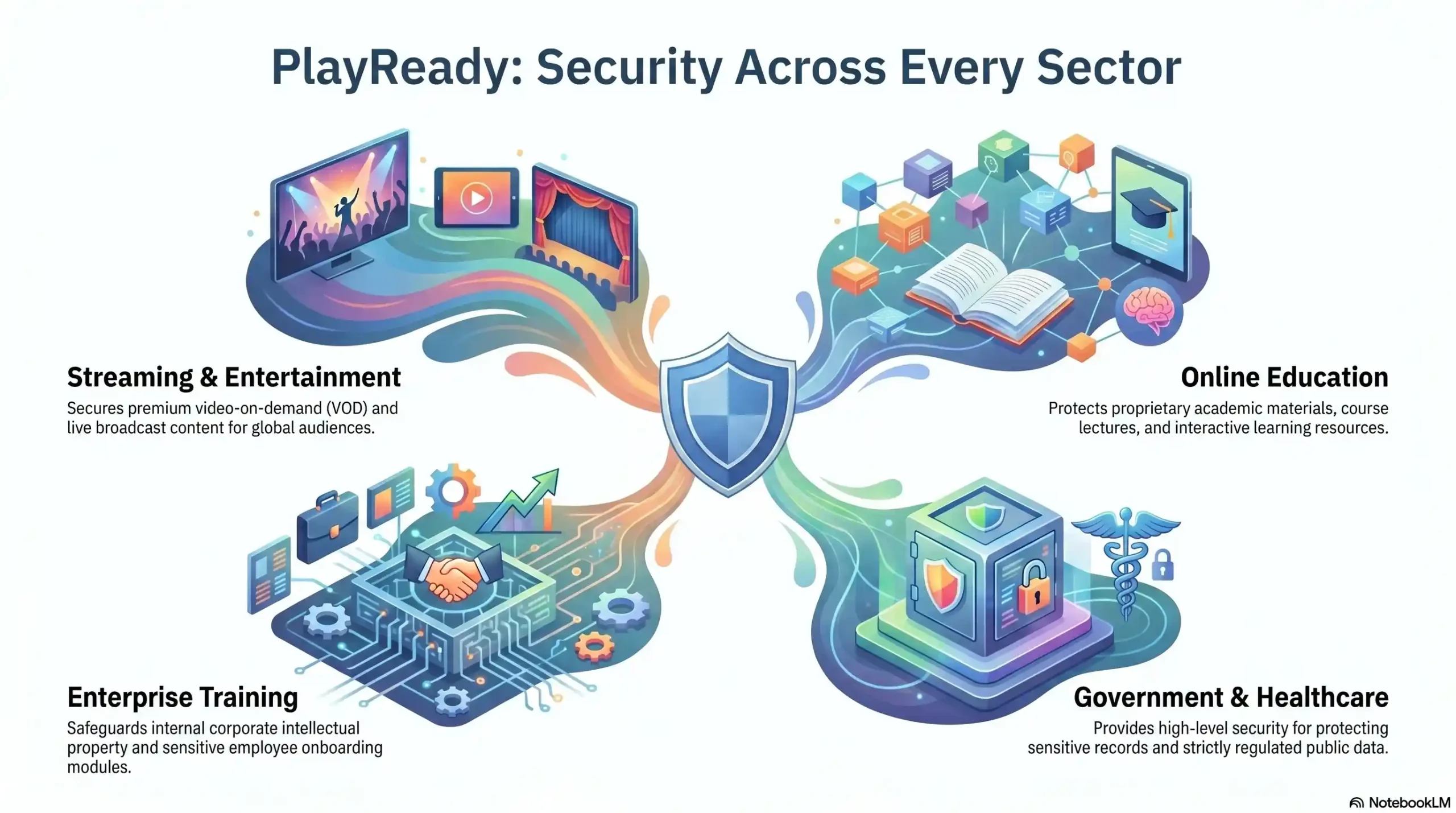
Streaming & Entertainment
- PlayReady use case: 4K VOD, live sports, premium film
- Key security requirement: Hardware-level DRM for studio compliance
Online Course Creators
- PlayReady use case: Premium video courses, coaching programs
- Key security requirement: Prevent sharing, credential protection
Enterprise Corporate Training
- PlayReady use case: Proprietary training libraries, onboarding
- Key security requirement: Access control, compliance, audit trails
Government & Healthcare
- PlayReady use case: Sensitive training materials, compliance content
- Key security requirement: Forensic tracking, strict access policy
Premium Publishers
- PlayReady use case: Subscription video content, exclusive media
- Key security requirement: Piracy prevention, subscriber value protection
The common thread across every industry is not the content type — it is the value of the content. When video represents revenue, intellectual property, or regulatory compliance, PlayReady’s policy-based protection becomes not a luxury but a fundamental operational requirement.
How to Implement PlayReady DRM Without the Technical Headache
The Traditional Route (Developer-Heavy)
The conventional path to PlayReady deployment runs through Microsoft’s official licensing program and requires building or purchasing a complete infrastructure stack. Organizations following this route typically face:
- Timeline: 4–12 weeks minimum for a production-ready deployment
- Cost: Licensing fees, infrastructure costs, and significant developer hours
- Expertise required: Backend developers, DevOps engineers, and DRM specialists
- Ongoing burden: Continuous maintenance as platforms and devices evolve
For organizations with dedicated technical teams and enterprise budgets, this route delivers maximum control. For the vast majority of content owners, it is an unnecessary obstacle between their content and the protection it needs.
The Smart Route — Multi-DRM Platforms
A purpose-built multi-DRM platform abstracts the entire complexity of PlayReady (and Widevine and FairPlay) into a streamlined integration layer. Rather than building and maintaining a license server, configuring CDN encryption, and testing CDM compatibility across hundreds of device combinations, content owners connect their video library to a platform that handles all of it.
The practical difference is dramatic:
- Timeline: 30 minutes to full deployment
- Technical requirement: WordPress plugin or simple API integration
- Coverage: PlayReady + Widevine + FairPlay simultaneously
- Maintenance: Handled by the platform, not your team
📌 Inkrypt Videos delivers enterprise-grade PlayReady, Widevine, and FairPlay protection powered by Amazon CDN — fully configured in under 30 minutes. No licensing server to build. No CDM compatibility testing. No ongoing infrastructure management. Start protecting your content today with Inkrypt Videos.