Table of Contents
ToggleWhat is Browser DRM? Browser DRM (Digital Rights Management) is a content protection system built into modern web browsers that prevents unauthorized copying, downloading, and redistribution of premium video content. It works through three core components: AES-128 encryption, a license server that authenticates viewer access, and a Content Decryption Module (CDM) that decrypts video only inside a secure, protected environment. The three dominant browser DRM systems are Google Widevine, Microsoft PlayReady, and Apple FairPlay.
1. The Hidden Crisis Every Content Creator Faces
You spent months creating your online course. You recorded, edited, structured, and launched it. Within weeks, your video content appears on a piracy forum — free for anyone to watch.
This is not a rare edge case. It is the default outcome for premium video content that is not protected by real Digital Rights Management.
In 2026, global online piracy costs the content industry an estimated $71 billion annually. For individual course creators and media publishers, the damage is deeply personal: lost revenue, devalued expertise, and the erosion of the competitive advantage they worked to build.
The most dangerous misconception in the industry is that basic security measures are enough. Unlisted YouTube links, password-protected pages, and simple login walls are not content protection. They are inconveniences. A determined viewer — or a single disgruntled student — can bypass every one of these measures in minutes. Research shows just how many people use easy video download and piracy tools — the numbers are staggering.
Real protection operates at the browser level, embedded into the decryption pipeline itself. That protection has a name: Browser DRM.
2. What Is Browser DRM? (The Clear Definition)
Browser DRM is a content protection framework that operates natively inside modern web browsers to control how digital video is accessed, decrypted, and played back.
Unlike surface-level restrictions, browser DRM does not simply hide your content behind a wall. It encrypts the content at the source, issues decryption keys only to verified, authorized viewers, and ensures that the decrypted video never enters a state where it can be copied, downloaded, or screen-recorded — at least on hardware-secured devices.
The system rests on three foundational pillars:
- Encryption: Video content is encrypted using AES-128 before delivery. Without the correct decryption key, the content is unreadable data.
- Licensing: A dedicated license server issues decryption keys only after verifying the viewer’s identity and access rights. Licenses can carry rules — expiry windows, device limits, resolution caps.
- Secure Playback: Decryption happens inside a protected module, not in open browser memory where capture tools can intercept it.
How the Browser DRM Ecosystem Works
Three components work in sequence every time a viewer presses play on DRM-protected content.
Encrypted Media Extensions (EME) is the W3C-standardized API that allows a web page to communicate with the browser’s DRM system. EME does not perform decryption itself — it is the secure communication bridge between your video player and the decryption engine.
The Content Decryption Module (CDM) is the decryption engine. It is proprietary software — in some cases hardware-backed — built into the browser or operating system. The CDM receives the encrypted video stream and the license key, performs decryption inside a sandboxed environment, and outputs video directly to the display. On devices with a Trusted Execution Environment (TEE), this decryption happens inside protected hardware memory that is completely inaccessible to the rest of the system.
The License Server is the gatekeeper. When a viewer attempts to play protected content, the CDM sends an encrypted license request to the license server. The server authenticates the user, validates their access rights, and — if approved — returns an encrypted decryption key. This entire handshake happens in milliseconds, invisibly, before playback begins.
To understand how this compares to how major platforms implement it, see our deep dive on Netflix DRM — the how and why of encrypted video security.
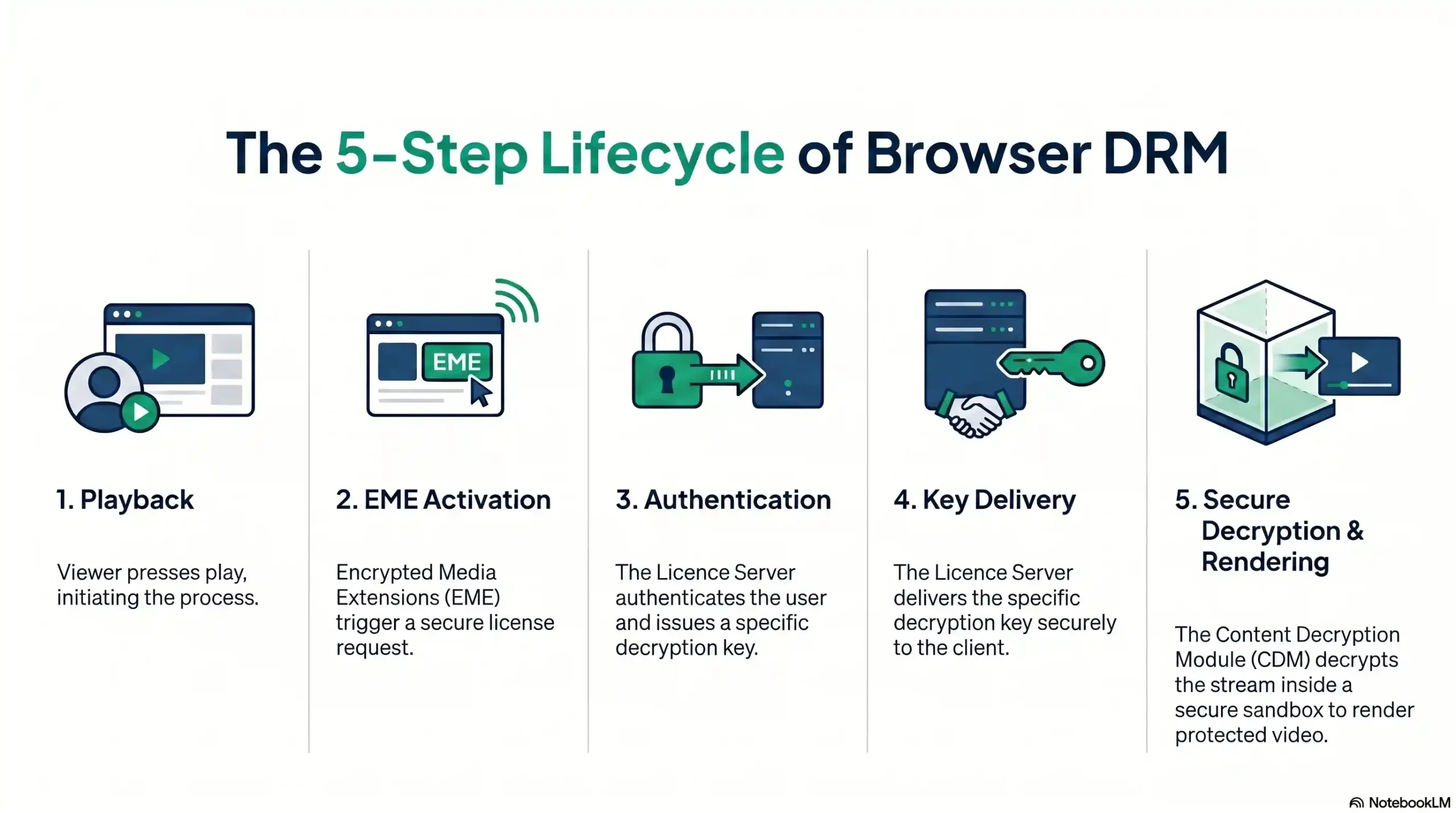
| DRM Playback Step | Component Involved | Function |
|---|---|---|
| 1. Play Initiated | Video Player + EME | Detects encrypted content, triggers license request |
| 2. License Request | CDM → License Server | Sends encrypted device authentication request |
| 3. Authentication | License Server | Verifies user identity and access rights |
| 4. Key Delivery | License Server → CDM | Returns encrypted decryption key |
| 5. Secure Playback | CDM + TEE | Decrypts and renders video in protected memory |
3. The Big Three: Widevine, PlayReady & FairPlay
No single DRM system covers every device, browser, and operating system. The digital ecosystem is fragmented across three major technology empires — Google, Microsoft, and Apple — each with its own DRM standard, its own CDM, and its own device territory.
Understanding each system is not optional knowledge for serious content publishers. It is the foundation of a complete protection strategy. If you are evaluating your options, our guide on 7 things to consider when selecting the right DRM software is essential reading before you decide.
Google Widevine — The Android & Chrome Standard
Widevine is the most widely deployed DRM system in the world. Developed originally by Widevine Technologies and acquired by Google in 2010, it is now the native DRM for Chrome, Firefox, Android devices, Chromecast, and the majority of smart TVs and OTT devices.
Widevine operates across three security levels that determine how strongly content is protected on a given device:
- L1 (Highest): Decryption and video processing occur entirely within a hardware Trusted Execution Environment. Required for HD and UHD content on premium platforms. Screen recording is blocked at the hardware level.
- L2: Decryption occurs in TEE, but video processing does not. Rare in modern deployments.
- L3 (Software-only): Decryption occurs in software. The most common level on older or budget devices. Typically restricted to SD resolution by content providers due to higher capture risk.
For any content creator or publisher targeting Android users, Chrome users, or the broader streaming ecosystem, Widevine is non-negotiable. Understanding the difference between SD vs HD matters here — Widevine’s security level directly determines the maximum resolution your content can be delivered at on any given device.
Microsoft PlayReady — The Windows & Xbox Guardian
PlayReady is Microsoft’s enterprise-grade DRM system, announced in 2007 and deeply integrated into the Windows ecosystem. It is the native DRM for Microsoft Edge, Windows native applications, Xbox consoles, and a range of set-top boxes and smart TV platforms.
PlayReady’s security levels mirror Widevine’s tiered approach:
- SL150: Software-based protection. Basic security for non-premium content.
- SL2000: Software with additional output controls. Suitable for most commercial content.
- SL3000: Hardware-backed protection equivalent to Widevine L1. Required for premium UHD content on Windows.
While Chrome’s dominance has reduced PlayReady’s browser footprint, it remains the critical DRM layer for Windows desktop applications, Xbox gaming platforms, and enterprise environments where Microsoft infrastructure is standard. Skipping PlayReady means leaving Windows power users — often the highest-paying subscribers — without full content protection.
Apple FairPlay — The iOS & Safari Gatekeeper
FairPlay is Apple’s proprietary DRM, and it operates exclusively within the Apple ecosystem: Safari on macOS and iOS, iPhone, iPad, and Apple TV. There is no FairPlay outside Apple’s walls — and critically, there is no Widevine inside them on Safari.
What makes FairPlay strategically important is not just its ecosystem exclusivity — it is its hardware architecture. FairPlay integrates directly with Apple’s AVFoundation framework and leverages hardware-level security on every modern Apple device. Decryption occurs within the Secure Enclave on supported hardware, making FairPlay-protected content exceptionally resistant to screen recording and stream capture.
Apple devices represent between 25% and 30% of the global consumer device market. A content protection strategy that excludes FairPlay leaves one in four viewers — disproportionately high-income, high-engagement users — completely unprotected.
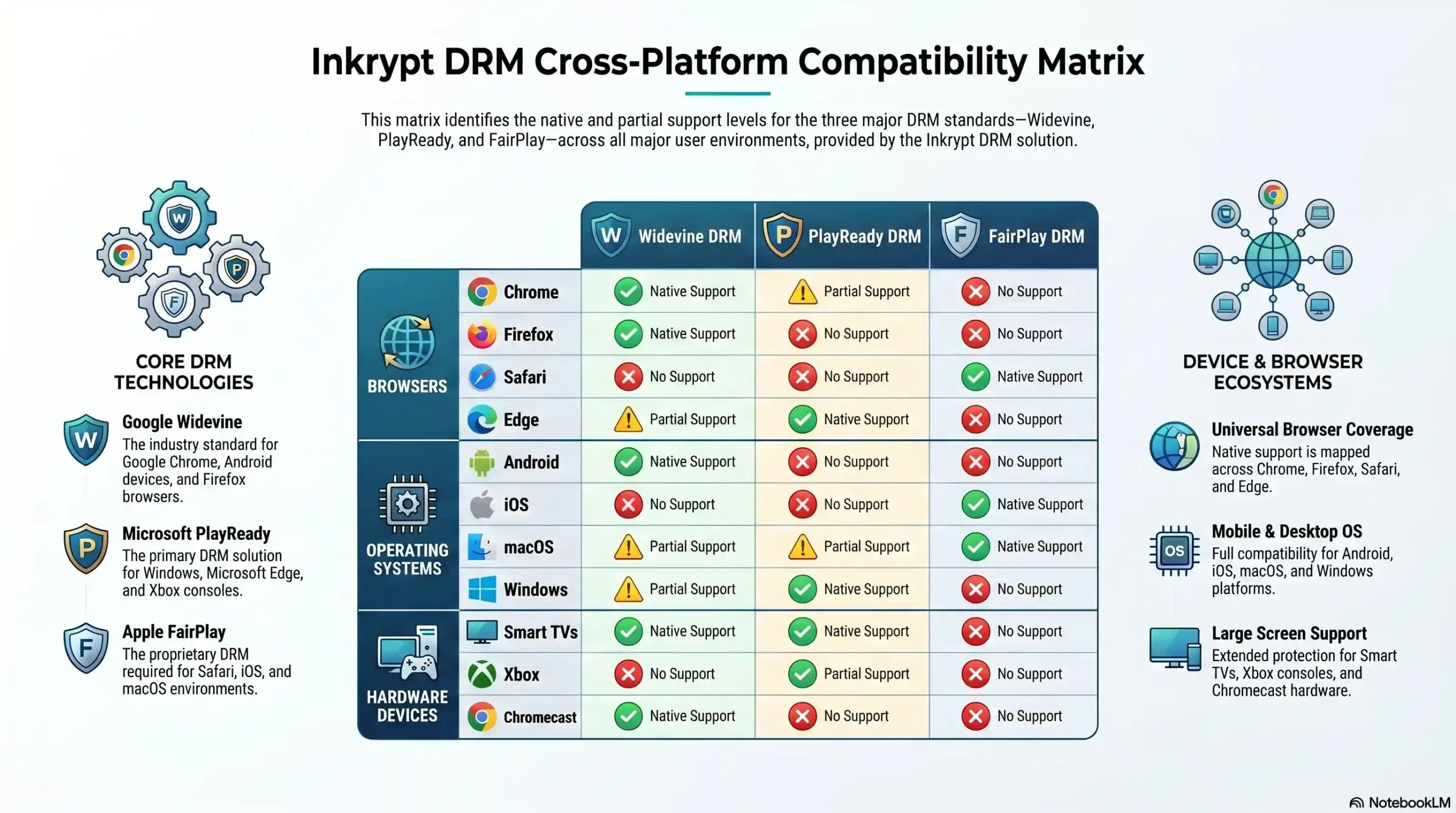
| Platform / Device | Widevine | PlayReady | FairPlay |
|---|---|---|---|
| Google Chrome | ✅ Native | ❌ | ❌ |
| Mozilla Firefox | ✅ Native | ❌ | ❌ |
| Apple Safari | ❌ | ❌ | ✅ Native |
| Microsoft Edge | ✅ | ✅ Native | ❌ |
| Android Devices | ✅ Native | ❌ | ❌ |
| iOS / iPhone / iPad | ❌ | ❌ | ✅ Native |
| macOS | ✅ (Chrome) | ❌ | ✅ (Safari) |
| Windows Desktop | ✅ (Chrome) | ✅ Native | ❌ |
| Smart TVs / OTT | ✅ Most | ✅ Some | ✅ Apple TV |
| Xbox | ❌ | ✅ Native | ❌ |
| Chromecast | ✅ Native | ❌ | ❌ |
4. Widevine vs PlayReady vs FairPlay: Side-by-Side Comparison
A question every content publisher eventually asks is: “Which DRM should I use?”
The correct answer is: all three — and here is why.
Each system is platform-sovereign. Widevine does not operate in Safari. FairPlay does not operate in Chrome. PlayReady is the only native option for Xbox. These are not competing products where you choose the best one. They are complementary shields, each covering the territory the others cannot reach.
| Attribute | Widevine | PlayReady | FairPlay |
|---|---|---|---|
| Owner | Microsoft | Apple | |
| Primary Browsers | Chrome, Firefox | Edge | Safari |
| Primary OS | Android, ChromeOS | Windows | iOS, macOS |
| Encryption Standard | AES-128 / CENC | AES-128 / CBCS | AES-128 / SAMPLE-AES |
| Security Levels | L1, L2, L3 | SL150, SL2000, SL3000 | Hardware-integrated |
| Hardware TEE Support | ✅ L1 | ✅ SL3000 | ✅ Always (modern Apple) |
| Licensing Model | Free (Google approval) | Paid license required | Apple Developer required |
| Best For | Android/Chrome ecosystem | Windows/Enterprise | Apple ecosystem |
| Screen Recording Block | ✅ at L1 | ✅ at SL3000 | ✅ Hardware-level |
5. Why Multi-DRM Is the Only Complete Solution
Using a single DRM system is not a security strategy. It is a security gap with branding.
Consider a course creator who implements Widevine-only protection. Their content is secured for Chrome and Android users. But every Safari user on iPhone, iPad, or Mac — representing up to 30% of their audience — has zero DRM protection. Their videos can be downloaded, screen-recorded, and redistributed freely by anyone on an Apple device.
Multi-DRM is the architecture of deploying Widevine, PlayReady, and FairPlay simultaneously through a single platform, with the system automatically detecting the viewer’s browser and device and serving the appropriate DRM license in real time. The viewer experiences nothing different. The content creator gains complete cross-platform coverage.
For enterprise publishers, the stakes are even higher. A single unprotected device tier is a liability — both commercially and legally, particularly in regulated industries with compliance requirements around content access and distribution. Explore the full Inkrypt Videos feature set to understand how multi-DRM is deployed as a unified, managed system.
🔒 Stop leaving 30% of your audience unprotected.
Inkrypt Videos delivers Widevine, PlayReady & FairPlay in one unified platform — with a 30-minute setup and a global Amazon CDN built in.
6. How Browser DRM Stops Real Piracy Threats
Understanding DRM architecture is valuable. Understanding what it actually stops is what makes the investment decision clear.
Threat #1: Unauthorized Downloading Without DRM, any video delivered over the web can be captured using browser developer tools, download extensions, or stream-ripping software. DRM encryption means the downloaded file is unreadable without the license key — which is issued only to authenticated, authorized devices. For a full breakdown of the techniques used against unprotected content, read our guide on ways to protect online video content from downloading.
Threat #2: Screen Recording This is the threat most creators underestimate. On devices with hardware-backed DRM (Widevine L1, FairPlay hardware, PlayReady SL3000), the decrypted video frames exist only inside a Trusted Execution Environment. They never pass through system memory in a readable state. Modern screen recording software — including OBS, built-in OS recorders, and third-party tools — captures a black screen or receives an access denial. On software-only DRM implementations (Widevine L3), screen recording may still be possible, which is why restricting L3 playback to SD resolution is standard practice among major streaming platforms.
Threat #3: Credential Sharing & Stream Ripping DRM licenses are issued to specific authenticated devices. Even if a student shares their login credentials, the license server can enforce device limits — restricting simultaneous playback across multiple devices, or binding licenses to registered devices only. Stream ripping tools that intercept network traffic receive only encrypted data; without the license, the stream is useless. Our analysis of anti-video piracy strategies covers how DRM fits into a broader, layered defence strategy.
7. DRM in Practice: What It Means for Course Creators & Publishers
The technical architecture of DRM becomes meaningful when mapped to real business scenarios.
Scenario: The Online Course Creator A business coach sells a $997 premium course covering proprietary frameworks they have developed over a decade. Without DRM, a single student purchase can result in the entire course being shared in a private Telegram group — reaching hundreds of non-paying viewers. With Inkrypt Videos’ multi-DRM protection, each video stream is encrypted, each license is device-specific, and download attempts return nothing but encrypted, unplayable data. The coach’s intellectual property remains their competitive advantage.
Scenario: The Enterprise Media Publisher A corporate training platform distributes compliance and certification content to enterprise clients. The content has contractual exclusivity obligations. DRM enforcement, combined with Inkrypt Videos’ dynamic watermarking, means that every playback session is traceable. If content leaks, forensic watermark analysis identifies the specific account and session responsible — providing both deterrence and evidentiary support for legal action.
The barrier that once made DRM feel out of reach for individual creators was complexity. Enterprise DRM implementations historically required weeks of developer work, dedicated infrastructure, and significant licensing budgets. Inkrypt Videos was built specifically to remove that barrier — reducing a full multi-DRM integration to a 30-minute setup with WordPress plugin support and a straightforward API. See how Inkrypt’s security beats the competition in video encryption for a direct technical comparison.
🎓 Your course content deserves real protection — not the illusion of it.
Inkrypt Videos is the multi-DRM platform built for creators and publishers who understand the real cost of piracy.
8. How to Choose the Right DRM Platform for Your Content
Not all DRM platforms are equal. When evaluating a solution, ask these five questions:
1. Does it support all three DRM systems? Any platform that offers only Widevine — or any single DRM — is not a complete solution. Your platform must deliver Widevine, PlayReady, and FairPlay simultaneously. Anything less leaves a measurable percentage of your audience unprotected.
2. Is the CDN performance global? DRM encryption adds processing overhead. A DRM platform without an enterprise-grade CDN will introduce buffering and latency — directly damaging the viewer experience. Look for Amazon CloudFront or equivalent CDN integration with global points of presence. Review how to select the best video delivery platforms with CDN and encryption support before committing to any provider.
3. How complex is the integration? Enterprise DRM solutions built for broadcast infrastructure are not designed for individual creators or mid-market publishers. Evaluate the realistic time-to-integration: is it 30 minutes with a plugin, or 3 months with a dedicated engineering team? If you are considering building your own infrastructure, explore what it takes to create a video hosting platform like YouTube to understand the scale of that commitment.
4. Does it include analytics and forensic tracking? DRM protects content in transit. Analytics and dynamic watermarking protect content after it has been accessed. Choose a platform that combines both — so you can detect threats, not just prevent them. Learn more about what makes a great cloud video hosting platform to understand what a complete solution looks like.
5. Is it compatible with older devices? A surprisingly common failure point. Many DRM platforms optimize for flagship devices and leave older hardware unsupported — creating gaps in your protection and your audience reach simultaneously.
Review Inkrypt Videos pricing to find the right plan for your content volume and security requirements.
📚 Resources & Citations
1. W3C — Encrypted Media Extensions (EME) Specification The World Wide Web Consortium’s official EME specification — the foundational web standard that governs how all browsers communicate with DRM systems — check here to understand the technical baseline every browser-based DRM implementation must comply with.
2. U.S. Copyright Office — The Digital Millennium Copyright Act (DMCA) The official U.S. government resource on the DMCA, which establishes the legal framework that makes circumventing DRM technological protection measures a federal offense — reference this to understand the legal force that backs your content protection.
3. Google Developers — Widevine DRM The official Google developer portal for Widevine DRM, covering device integration, security levels, and licensing partnership requirements — consult this for authoritative technical specifications on the world’s most widely deployed DRM system.
4. Apple Developer — FairPlay Streaming Overview Apple’s official FairPlay Streaming technical specification, detailing how AES-128 key delivery, device authentication, and HLS-based encrypted playback work across all Apple devices — the primary reference for any publisher targeting iPhone, iPad, Safari, or Apple TV audiences.
9. Frequently Asked Questions
Browser DRM (Digital Rights Management) is a content protection system built into modern web browsers that prevents unauthorized copying, downloading, and redistribution of premium video. It works through three components: AES-128 encryption to secure the content, a license server that authenticates viewer access, and a Content Decryption Module (CDM) that decrypts video only inside a protected, sandboxed environment — invisible to the viewer, impenetrable to pirates.
Widevine (Google), PlayReady (Microsoft), and FairPlay (Apple) are the three dominant browser DRM systems, each governing a different device ecosystem. Widevine protects Chrome and Android. PlayReady secures Windows and Xbox. FairPlay guards Safari, iPhone, and iPad. No single system covers all platforms — which is why a complete content protection strategy requires all three deployed simultaneously as Multi-DRM.
Yes — if your course content has real commercial value, DRM is the only technical barrier that prevents unauthorized downloading, screen recording, and redistribution. Password protection and unlisted links are not DRM. Without browser-level encryption and license enforcement, a single student purchase can result in your entire course being freely shared across piracy forums and private groups.
A Content Decryption Module (CDM) is proprietary software — sometimes hardware-backed — built into a browser or operating system that handles the decryption of DRM-protected video. The CDM receives the encrypted stream and a license key from the license server, decrypts the content inside a secure sandbox, and renders it directly to the display — preventing any other application from accessing the decrypted frames.
On devices with hardware-backed DRM — such as Widevine L1, FairPlay on modern Apple devices, or PlayReady SL3000 — yes. Decryption occurs inside a Trusted Execution Environment (TEE), meaning decrypted video frames never enter accessible system memory. Screen recording tools capture a black screen or receive an access denial. On software-only DRM implementations (Widevine L3), screen recording may still be possible, which is why major platforms restrict L3 to SD resolution.
Multi-DRM is the simultaneous deployment of Widevine, PlayReady, and FairPlay through a single platform, with automatic DRM selection based on the viewer’s device and browser. It is essential because no single DRM system covers every platform. Widevine alone leaves all Apple users unprotected. FairPlay alone leaves Android and Windows users exposed. Multi-DRM closes every gap — ensuring complete content protection across 100% of your audience’s devices.
With a purpose-built platform like Inkrypt Videos, full multi-DRM implementation — covering Widevine, PlayReady, and FairPlay — takes approximately 30 minutes using a WordPress plugin or straightforward API integration. Enterprise DRM solutions built for broadcast infrastructure can take weeks or months. The right platform eliminates that complexity without compromising on security standards or global content delivery performance.
In Chrome or Chromium‑based browsers, go to chrome://components, update the Widevine Content Decryption Module, restart the browser, and relaunch the streaming site.
Each browser must bundle the correct DRM module (Widevine, PlayReady, or FairPlay). If a browser doesn’t ship with that module or blocks it, DRM content won’t play.
Some privacy‑focused browsers strip Widevine by default, but doing so will break most streaming sites that require it; you trade privacy for access to DRM‑protected content.
Circumventing DRM is generally illegal under copyright laws in many countries, even if you own the video, so you should avoid tools that crack or strip DRM.
Developers match DRM to platforms: Widevine for Chrome/Android, PlayReady for Windows/Edge, and FairPlay for Apple devices. Many services bundle all three for full device coverage.
10. Conclusion: Real Security for Real Creators
Browser DRM is not a feature reserved for Netflix and Disney. It is the baseline standard of content protection for any creator, publisher, or enterprise whose business depends on the value of their video content.
Widevine, PlayReady, and FairPlay are not competing options. They are the three shields that, deployed together, close every platform gap in the modern device landscape. Understanding how they work — EME, CDM, license servers, TEE hardware security — transforms DRM from an abstract acronym into a concrete business defense.
The question for every content creator reading this is no longer “do I need DRM?” The question is: “how much revenue am I willing to lose before I implement it?”
Inkrypt Videos was built to answer that question with action — real multi-DRM protection, real global performance, and an integration timeline measured in minutes, not months. Start your free 30-day trial and experience the difference real security makes.
🛡️ Ready to protect your content with enterprise-grade DRM?
Inkrypt Videos delivers military-grade multi-DRM security with a 30-minute setup, Amazon CDN performance, and complete cross-platform coverage — from iPhone to Android to Windows.
Disclaimer:
The information provided in this guide is for educational purposes regarding digital content protection. While Browser DRM significantly mitigates unauthorized downloading and piracy, no security system is completely foolproof. Widevine, PlayReady, and FairPlay are registered trademarks of Google, Microsoft, and Apple, respectively. This article is brought to you by Inkrypt Videos, a comprehensive multi-DRM hosting platform.