
What is FairPlay DRM? FairPlay DRM is Apple’s proprietary Digital Rights Management system designed to encrypt and protect video content delivered via HTTP Live Streaming (HLS). Built into all Apple devices and Safari browsers, FairPlay prevents unauthorized copying, downloading, and redistribution of premium video content by issuing encrypted decryption keys only to authenticated, verified devices through a secure license server architecture.
Every year, content piracy costs the global media industry an estimated $71 billion in lost revenue. For online course creators, independent publishers, and enterprise media companies, a single leaked video can mean thousands — sometimes tens of thousands — of dollars in stolen value. Apple’s FairPlay DRM exists precisely to close that gap for anyone delivering video to Apple devices.
But here’s the problem: most explanations of FairPlay DRM are written either for Apple engineers or for enterprise architects with six-figure implementation budgets. If you’re a course creator, a media publisher, or a business evaluating video security platforms, you’ve probably encountered walls of technical documentation that answer none of your actual questions.
This guide changes that. By the end, you’ll understand exactly how FairPlay DRM works, where it succeeds, where it falls short, and how to implement it without needing a dedicated engineering team. For the broader picture across all three DRM systems, see our guide to browser DRM, Widevine, and PlayReady.
What Is FairPlay DRM? (The Plain-Language Breakdown)
Digital Rights Management — DRM — is the technology layer that controls how, when, where, and by whom digital content can be accessed. Think of it as a sophisticated lock system built directly into your video files. FairPlay is Apple’s version of that lock.
The Core Job of FairPlay DRM
FairPlay DRM does three things simultaneously:
- Encrypts your video content so it cannot be played without an authorized decryption key
- Controls who receives that key based on verified device and user authentication
- Enforces your licensing rules — limiting playback to approved devices, time windows, or subscription tiers
Without FairPlay DRM, any video delivered to an Apple device via HLS can potentially be intercepted, downloaded, and redistributed. With it, the content remains an encrypted, unusable file to anyone without proper authorization.
A Brief History — When & Why Apple Built FairPlay
Apple introduced FairPlay in 2003 alongside the original iTunes Music Store — one of the first mainstream attempts to sell digital media legally at scale. The core challenge Apple faced was identical to what content creators face today: how do you let paying customers access content freely while preventing everyone else from stealing it?
FairPlay evolved significantly from its music-protection roots. By the time Apple launched iTunes video content and, later, the Apple TV ecosystem, FairPlay had matured into a full video DRM standard capable of protecting high-definition and 4K content streams at enterprise scale.
How FairPlay Fits Into Apple’s Ecosystem
FairPlay is deeply integrated across the entire Apple hardware and software stack — iPhone, iPad, Mac, Apple TV, and Safari browser. This tight integration is simultaneously FairPlay’s greatest strength and its most significant limitation, which we’ll address in detail later in this guide.
How Does FairPlay DRM Actually Work? (The Technical Architecture, Simplified)
Understanding FairPlay’s architecture doesn’t require an engineering degree. It requires understanding three sequential steps: encryption, key management, and authenticated playback.
Step 1 — HLS Packaging & AES-128 Encryption
Every FairPlay-protected video begins as a standard video file that gets packaged into Apple’s HTTP Live Streaming (HLS) format. During this packaging process, the video is encrypted using AES-128 — the same encryption standard used by governments and financial institutions to protect classified data.
The result is a video stream that looks like noise to anyone without the correct decryption key. The encrypted content can travel freely across CDN networks, sit in cloud storage, and be delivered globally — because without the key, it is completely inaccessible.
Step 2 — The License Server & Key Security Module (KSM)
When an authenticated user hits play on their Apple device, the device doesn’t just start playing. It sends a license request to a license server — a secure backend system that manages decryption key delivery.
The license server communicates with a Key Security Module (KSM), which is the cryptographic core of the FairPlay system. The KSM validates the requesting device’s Apple certificate, confirms the user’s authorization status, and only then releases the decryption key — wrapped in an additional layer of encryption specific to that device.
This means the key delivered to your iPhone cannot be used on any other device. It is device-bound, session-specific, and expires according to the rules you configure.
Step 3 — Authentication & Secure Playback on Apple Devices
Once the decryption key reaches the Apple device, playback occurs inside Apple’s secure enclave — a hardware-level protected environment that prevents the decrypted video from being intercepted by other applications or processes running on the same device.
The user sees smooth, uninterrupted video. What they cannot do is extract, copy, or redirect that decrypted stream to another device or application.
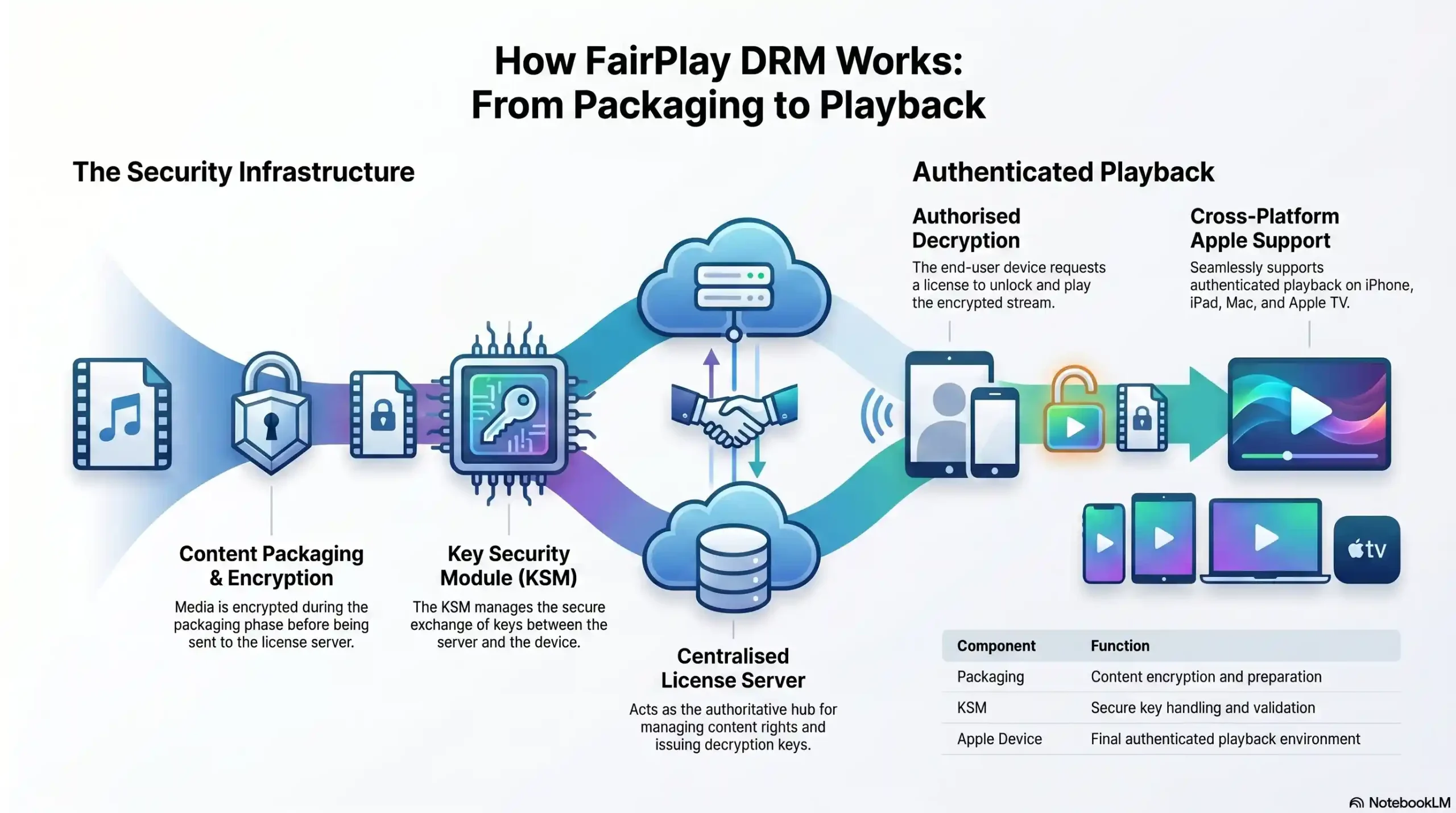
1. HLS Packager
- Function: Encrypts video stream using AES-128
2. License Server
- Function: Issues decryption keys to verified devices
3. Key Security Module (KSM)
- Function: Validates device certificate & manages keys
4. Apple Device Player
- Function: Decrypts & plays content in secure enclave
5. Token Authentication
- Function: Verifies user identity before key delivery
FairPlay DRM vs. Widevine vs. PlayReady — Which One Do You Actually Need?
FairPlay is Apple’s DRM. Widevine is Google’s. PlayReady is Microsoft’s. Each controls content playback within its own ecosystem. The uncomfortable truth that most DRM vendors won’t tell you upfront is this: no single DRM protects all your viewers.
The Multi-DRM Reality: Why One Standard Is Never Enough
Your audience doesn’t use only Apple devices. The moment a student opens your course on a Chrome browser, an Android phone, or a Windows laptop, FairPlay becomes irrelevant. That viewer falls outside FairPlay’s jurisdiction entirely.
This is why multi-DRM — the simultaneous deployment of FairPlay, Widevine, and PlayReady — is the only complete content protection strategy for any creator or publisher with a real-world, mixed-device audience.
Side-by-Side Comparison
Developer
- FairPlay: Apple
- Widevine: Google
- PlayReady: Microsoft
Primary Ecosystem
- FairPlay: iOS, macOS, Safari, Apple TV
- Widevine: Android, Chrome, ChromeOS
- PlayReady: Windows, Xbox, Edge
Encryption Standard
- FairPlay: AES-128 (HLS)
- Widevine: AES-128 / CENC
- PlayReady: AES-128 / CENC
4K / HDR Support
- FairPlay: ✅ Yes
- Widevine: ✅ Yes (L1 only)
- PlayReady: ✅ Yes
Browser Support
- FairPlay: Safari only
- Widevine: Chrome, Firefox, Edge
- PlayReady: Edge, IE
Mobile Support
- FairPlay: iOS only
- Widevine: Android only
- PlayReady: Windows Mobile
License Complexity
- FairPlay: High (Apple Dev account required)
- Widevine: Medium
- PlayReady: Medium
Best For
- FairPlay: Apple-first audiences
- Widevine: Android & web audiences
- PlayReady: Windows & enterprise
What This Means for Course Creators & Publishers
If your audience is primarily iPhone and iPad users — as is common in premium eLearning markets — FairPlay is non-negotiable. But if you’re not simultaneously deploying Widevine for Android and Chrome users, you’re leaving a significant portion of your audience either unprotected or unable to access your content at all.
The practical solution is a managed video platform that handles multi-DRM delivery automatically, without requiring you to maintain separate licensing agreements and infrastructure for each standard.
Protecting content across Apple, Android, and web? Inkrypt Videos delivers multi-DRM in one platform — no enterprise complexity required.
What Devices & Platforms Support FairPlay DRM?
Apple Device Compatibility
FairPlay DRM is natively supported across the full Apple device range:
- iPhone & iPad — All models running iOS 7 and above
- Mac — All models via Safari browser and native HLS playback
- Apple TV — All generations via tvOS
- Safari on macOS — The only desktop browser with native FairPlay support
Browser Support — Safari Only: What That Means for Your Audience
This is one of FairPlay’s most consequential limitations. FairPlay DRM only functions in Safari. A Mac user opening your content in Chrome, Firefox, or Brave cannot access FairPlay-protected content — regardless of whether they have a valid subscription.
This reality makes multi-DRM deployment not just recommended, but operationally essential for any platform with meaningful web traffic.
FairPlay on Third-Party Platforms & Video Hosts
Not all video hosting platforms support FairPlay. Implementing FairPlay requires a formal agreement with Apple, access to their KSM infrastructure, and a compliant license server — technical and legal prerequisites that many platforms simply haven’t completed. When evaluating a video host, FairPlay support should be an explicit, verified checkbox — not an assumed feature.
The Real Limitations of FairPlay DRM (What Nobody Tells You)
Intellectual honesty about DRM limitations is a hallmark of genuine security expertise. FairPlay is powerful — but it is not invincible, and pretending otherwise leaves content owners dangerously overconfident.
The Safari-Only Browser Restriction
As established above, FairPlay is exclusively a Safari technology on desktop. Any content protection strategy built around FairPlay alone will leave Chrome, Firefox, and Edge users either unprotected or locked out — neither outcome is acceptable for a serious content business.
Screen Recording: The Persistent Threat
FairPlay prevents downloading and stream interception effectively. What it cannot fully prevent is screen recording. On macOS in particular, screen recording software can capture FairPlay-protected playback — a vulnerability that no DRM system has yet fully closed at the software level.
The professional mitigation for this is dynamic watermarking — embedding invisible, user-specific identifiers into every stream. If pirated content surfaces, the watermark forensically identifies exactly which account it originated from, enabling legal action and account termination.
Implementation Complexity Without the Right Platform
Building a compliant FairPlay implementation from scratch requires an Apple Developer account, KSM integration, a license server infrastructure, and ongoing certificate management. For enterprise engineering teams, this is manageable. For independent creators and mid-size publishers, it represents a prohibitive technical and financial barrier.
Why FairPlay Alone Is Not a Complete Security Strategy
A complete video security posture combines FairPlay with Widevine and PlayReady for full device coverage, dynamic watermarking for forensic accountability, token authentication for session-level access control, and real-time analytics to detect anomalous viewing patterns that may indicate credential sharing or piracy attempts.
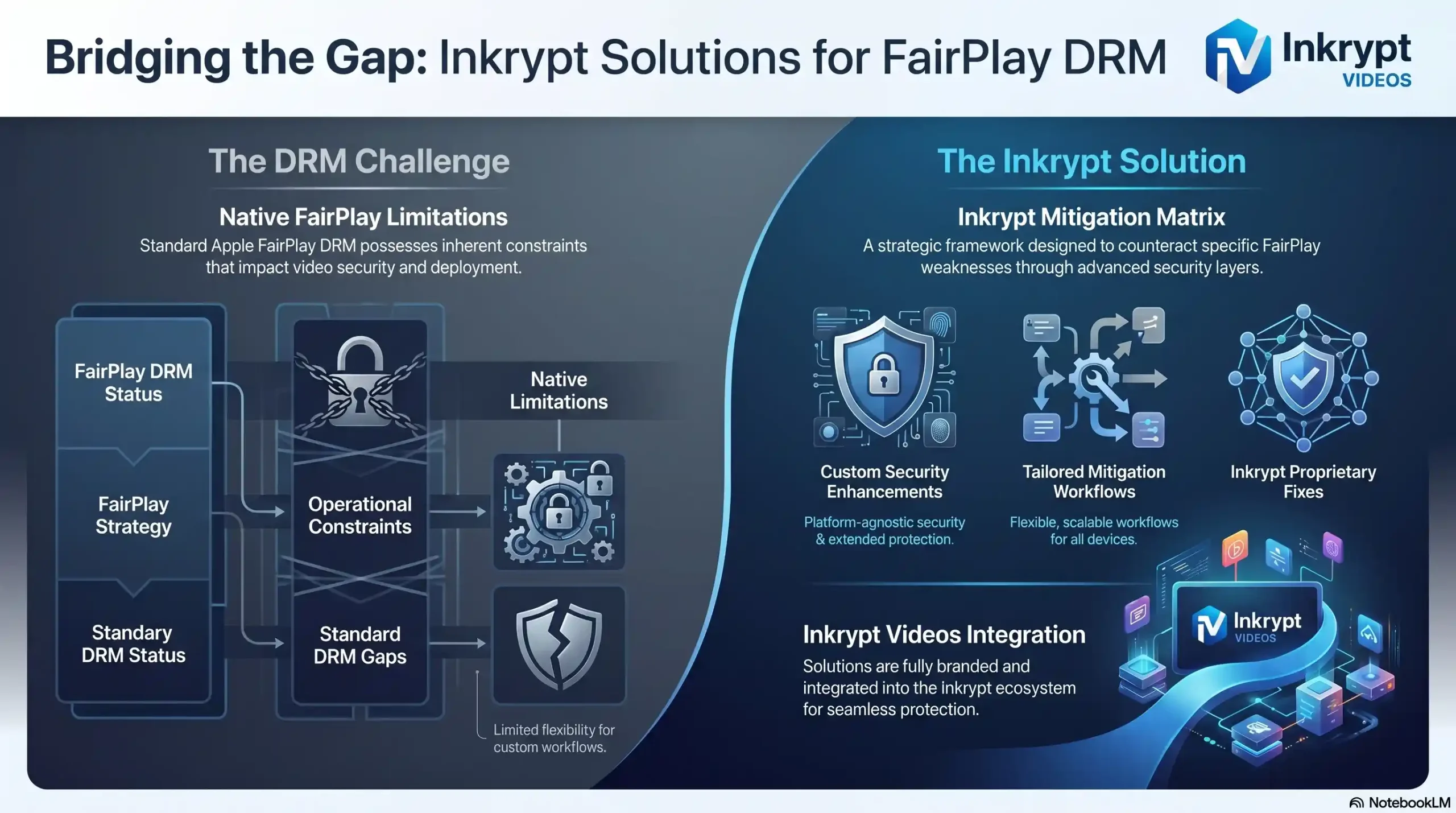
Safari-only browser playback 🔴 High
- Mitigation strategy: Combine with Widevine + PlayReady (Multi-DRM)
Screen recording on Mac 🔴 High
- Mitigation strategy: Dynamic watermarking for forensic tracking
Complex KSM implementation 🟡 Medium
- Mitigation strategy: Use a managed platform (e.g., Inkrypt Videos)
No Android/Chrome support 🔴 High
- Mitigation strategy: Multi-DRM delivery pipeline
Requires Apple Developer account 🟡 Medium
- Mitigation strategy: Platform handles licensing on your behalf
How to Implement FairPlay DRM Without Being a Developer
The Traditional Route — What Enterprise Implementation Looks Like
Enterprise FairPlay implementation typically involves: registering as an Apple Developer, completing Apple’s FairPlay Streaming license agreement, building or licensing a KSM-compliant license server, integrating your video packager with HLS encryption, and establishing a certificate rotation schedule for ongoing security maintenance.
End-to-end, this process routinely takes weeks to months and requires dedicated backend engineering resources. For large studios and streaming platforms with engineering departments, this is an acceptable investment. For everyone else, it is an unnecessary obstacle.
The Smart Route — Using a Managed DRM Platform
Managed video platforms with built-in FairPlay support abstract the entire implementation layer. The platform maintains the Apple licensing agreements, operates the license server infrastructure, and handles KSM integration — you simply upload your content and configure your access rules.
The difference in time-to-protection is dramatic: enterprise DIY implementation versus a 30-minute setup on a purpose-built platform.
What to Look For in a FairPlay-Compatible Video Host
When evaluating platforms, verify the following capabilities explicitly:
- ✅ Native FairPlay DRM (not simulated HLS-only encryption)
- ✅ Multi-DRM support (Widevine + PlayReady alongside FairPlay)
- ✅ Dynamic watermarking for post-breach forensics
- ✅ Token authentication for session-level control
- ✅ Real-time analytics and anomaly detection
- ✅ Global CDN delivery for performance at scale
Inkrypt Videos handles FairPlay DRM, Widevine, and PlayReady — setup in 30 minutes, not 30 days.