

To protect online coaching videos from piracy in 2026, you must implement a three-layered defense: Hollywood-grade DRM encryption, dynamic user-specific watermarking, and a secure hosting platform that blocks AI screen recorders. While the coaching industry loses over $75 billion annually to content theft, these enterprise-grade tools can recover up to 15% of your lost revenue by making unauthorized sharing and recording nearly impossible.
Calculate your Piracy Risk & Get a Security Audit from Inkrypt Videos
The Real Cost of Video Piracy for Coaches
The $75 Billion Problem That’s Getting Worse
Digital piracy isn’t just a Hollywood problem—it’s devastating the coaching industry. Recent data reveals that online video piracy alone costs $75 billion annually, with losses growing at 11% per year and expected to reach $125 billion by 2028. For coaches, this translates to:
- Revenue loss: 10-15% of annual income to piracy (industry average)
- Brand dilution: Unauthorized content sharing without proper attribution
- Student experience degradation: Poor-quality pirated copies reflect badly on your brand
- Competitive disadvantage: Free stolen content competing with your premium offerings
Real Coach Experiences
Sarah, a business coach from Atlanta, discovered her $2,997 signature course being sold for $49 on Telegram channels.
“I found my content on 15 different pirate sites within a month of launch,” she recalls.
The financial impact? An estimated $75,000 in lost revenue in the first quarter—approximately 12% of her projected annual income.
The Psychology of Piracy
Understanding why people steal coaching content helps in prevention:
- 34% of users consider piracy acceptable if content is “overpriced.”
- 67% share credentials with friends and family
- 45% download content to access after subscription ends
- 23% redistribute content for profit on alternative platforms
Understanding Modern Piracy Threats
The Evolution of Content Theft
Today’s content pirates aren’t just tech-savvy teenagers. They’re organized networks using sophisticated tools:
Screen Recording Software
Modern screen recorders like OBS Studio and Loom can capture high-definition streams in real-time. Unlike simple download tools, these capture exactly what students see, including interactive elements.
Credential Sharing Networks
Platforms like Discord and Telegram host thousands of users sharing login credentials for premium coaching programs. A single compromised account can serve hundreds of unauthorized users.
AI-Powered Download Tools
Advanced tools like yt-dlp and Video DownloadHelper can extract video URLs from encrypted streams, bypassing basic protections.
Re-encoding and Distribution
Pirates often re-encode stolen content to different formats, making detection difficult. They may also edit out watermarks or rebrand content as their own.
Industry-Specific Threats for Coaches
Coaching content faces unique vulnerabilities:
- High perceived value makes it attractive to pirates
- Personal branding makes stolen content easily identifiable
- Transformation promises create demand for “free” access
- Community elements can’t be replicated, making core content vulnerable
DRM Protection: Your Digital Bodyguard
What is DRM and Why It’s Essential
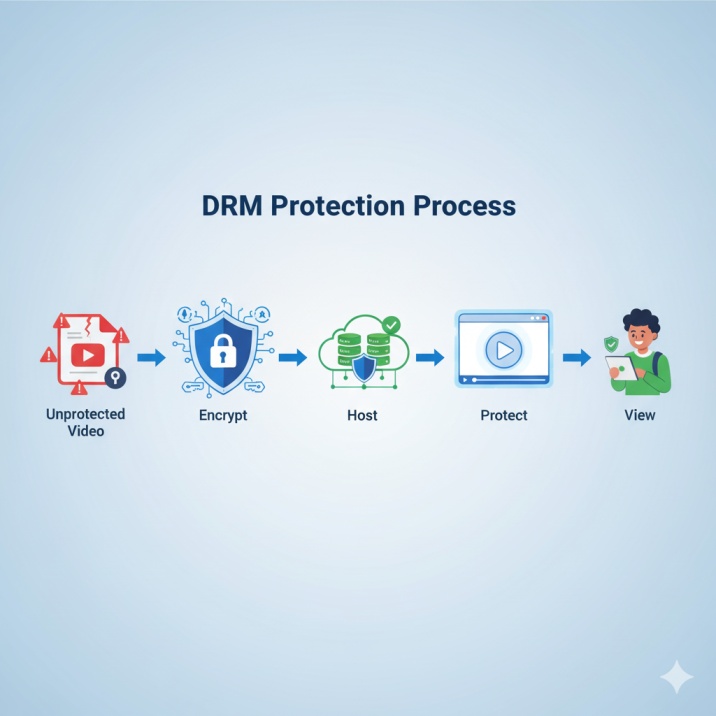
Digital Rights Management (DRM) is the gold standard for video protection in 2025. Unlike basic encryption, DRM creates multiple layers of security that make unauthorized access nearly impossible.
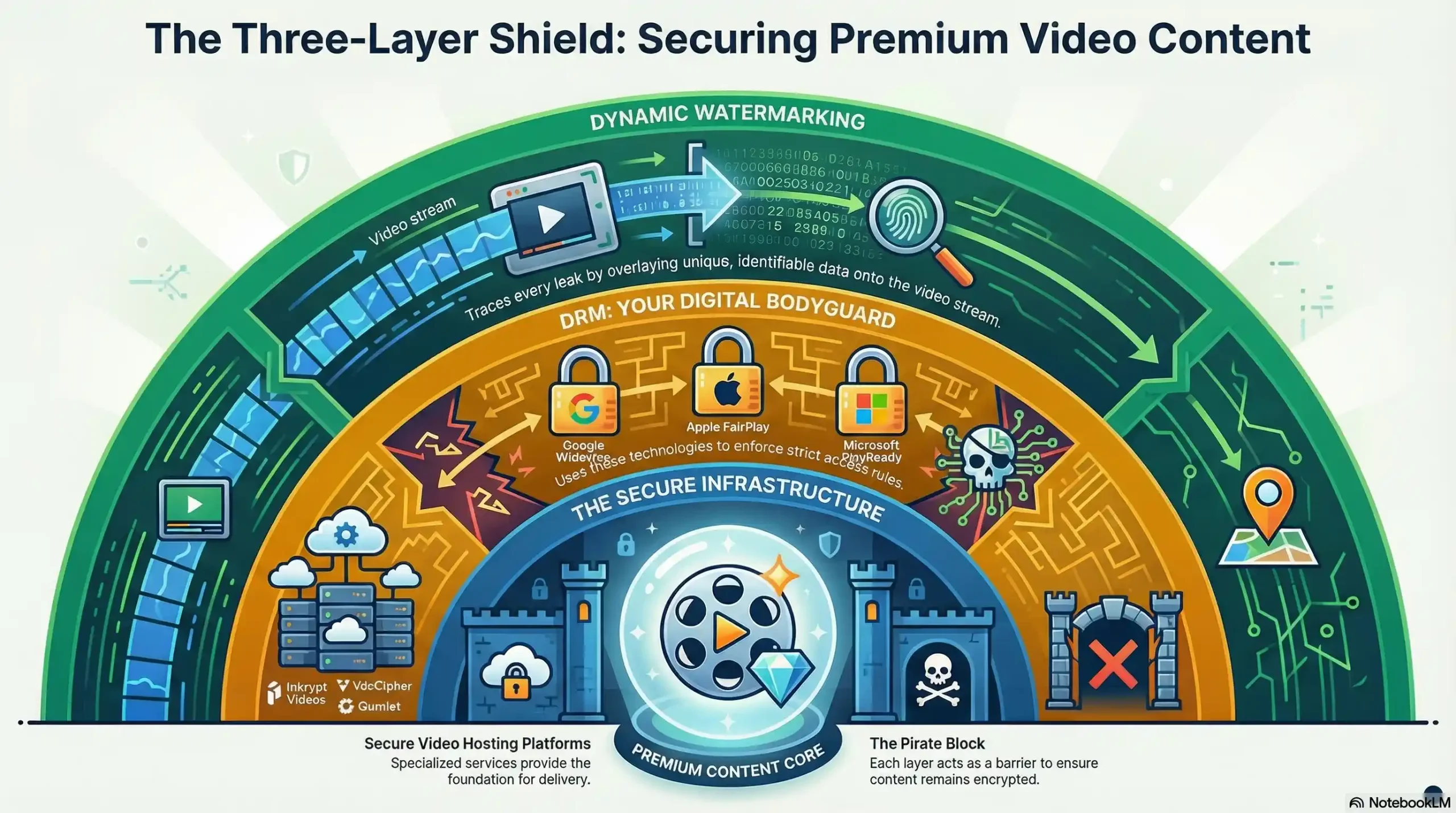
DRM encrypts your content and controls every aspect of playback:
- Who can watch
- Which devices are authorized
- How long does access last
- Whether the content can be downloaded
- Screen recording capabilities
How DRM Works to Protect Online Coaching Videos
When a student clicks play on your protected video:
- Authentication Check: The player verifies the user’s identity and subscription status
- Device Verification: Ensures playback only occurs on authorized devices
- Key Exchange: Encrypted keys are delivered securely to decrypt content
- Playback Monitoring: Real-time monitoring for suspicious activity
- Session Management: Automatic logout after predetermined periods
Types of DRM for Coaches
Google Widevine DRM
- Coverage: Chrome, Android, Edge browsers
- Security Level: Hardware-backed encryption on supported devices
- Best For: Web-based coaching platforms and mobile apps
Apple FairPlay DRM
- Coverage: Safari, iOS, macOS, Apple TV
- Security Level: Hardware integration with Apple devices
- Best For: Coaches with Apple-heavy audiences
Microsoft PlayReady DRM
- Coverage: Microsoft Edge, Xbox, Windows apps
- Security Level: Enterprise-grade protection
- Best For: Corporate coaching and B2B programs
Real-World DRM Performance
A study by security researchers found that DRM-protected content experiences significantly fewer unauthorized downloads compared to basic password protection. For coaches, this translates to substantial revenue protection when properly implemented.
Dynamic Watermarking: Tracing Every Leak
Beyond Static Watermarks
Traditional watermarks are easily removed or cropped out. Dynamic watermarking embeds user-specific information directly into the video stream, making it impossible to remove without destroying the content.
How Dynamic Watermarking Works
For each viewing session, the system generates unique identifiers:
- User email or ID
- Session timestamp
- Device fingerprint
- Geographic location
- Access level (trial, premium, VIP)
These identifiers appear as:
- Floating text that moves across the screen
- Semi-transparent overlays that blend with content
- Metadata embedding is invisible to viewers but traceable
Watermark Positioning Strategies
Floating watermarks change position every 10-15 seconds, making them impossible to crop consistently. Multi-layer watermarks embed information in both visible and invisible formats for forensic tracking.
Case Study: Watermarking Success
Marcus, a fitness coach, used dynamic watermarking to identify a leak in his premium program. Within 48 hours of content appearing on a piracy forum, he traced it to a specific user who had shared credentials with 200+ people. Legal action recovered $45,000 in damages.
Secure Video Hosting Platforms to Protect Online Coaching Videos
Why Generic Platforms Don’t Work
Hosting coaching videos on YouTube, Vimeo, or even “private” platforms creates vulnerabilities:
- YouTube: Even unlisted videos can be downloaded with simple tools
- Vimeo: Basic privacy settings don’t prevent screen recording
- Self-hosting: Exposes video URLs and overwhelms server resources
Professional Solutions to Protect Online Coaching Videos
Inkrypt Videos: Built for Coaches
Key Features:
- Hollywood-grade DRM encryption
- Dynamic watermarking with user tracking
- Global CDN for fast loading
- Screen recording detection and blocking
- WordPress and LMS integration
- Real-time analytics and threat monitoring
Pricing: Starting at $39/month for basic plans; enterprise solutions from $199/month. Best For: Serious coaches with premium content requiring enterprise-grade security
VdoCipher: Enterprise-Grade Security
Key Features:
- Multi-DRM support (Widevine + FairPlay)
- Advanced watermarking options
- API integration capabilities
- Detailed security analytics
Pricing: Pay-per-view model. Best For: High-volume coaching programs
Gumlet: All-in-One Solution
Key Features:
- DRM protection with global CDN
- Dynamic watermarking
- Signed URLs with expiration
- Real-time analytics
Pricing: Free plan available; paid plans from $10/month (Starter), $40/month (Growth), $199/month (Business). Best For: Growing coaching businesses seeking a balance of features and affordability
Platform Comparison Matrix
| Feature | Inkrypt Videos | VdoCipher | Gumlet | YouTube |
|---|---|---|---|---|
| DRM Encryption | ✅ Hollywood-grade | ✅ Multi-DRM | ✅ Standard | ❌ None |
| Dynamic Watermarking | ✅ Advanced | ✅ Standard | ✅ Basic | ❌ None |
| Screen Recording Protection | ✅ AI-powered | ✅ Hardware-based | ✅ Standard | ❌ None |
| Global CDN | ✅ Premium | ✅ Standard | ✅ Premium | |
| LMS Integration | ✅ WordPress+ | ✅ API-based | ✅ Standard | ⚠️ Embed only |
| Cost (monthly) | $39+ | Pay-per-view | $10+ | Free |
Advanced Access Control Strategies
Multi-Factor Authentication for Coaches
Beyond simple passwords, implement layered security:
SSO Integration
Connect with Google Workspace, Microsoft 365, or Facebook login. Users rarely share social media credentials compared to generic platform passwords.
Device Fingerprinting
Track and limit specific devices authorized for content access. If a new device attempts to log in, trigger additional verification.
Geographic Restrictions
Limit access to specific countries or regions where your coaching programs are licensed or legally offered.
Session Management Best Practices
Concurrent Login Limits
Prevent credential sharing by limiting simultaneous sessions:
- Basic tier: 1 concurrent device
- Premium tier: 2 concurrent devices
- Family tier: 3 concurrent devices
Time-Based Restrictions
Implement smart access windows:
- Business hours only for corporate coaching
- Schedule-based access for cohort programs
- Limited session duration to prevent extended sharing
IP Monitoring
Flag suspicious activity patterns:
- Multiple logins from different countries
- Rapid geographic location changes
- Unusual viewing patterns or duration
Screen Recording Protection
The Challenge of Screen Recording
Even with DRM and watermarking, determined pirates can still use external cameras or screen recording software. Modern protection requires multi-layered approaches.
Hardware-Level Protection
HDCP (High-bandwidth Digital Content Protection)
Prevents the recording of protected content through digital outputs. Most modern DRM systems integrate HDCP support for connected displays.
Trusted Platform Modules (TPM)
Hardware security chips that verify system integrity before allowing content playback.
Software-Based Detection
Process Monitoring
Advanced players can detect common recording software:
- OBS Studio
- Camtasia
- Bandicam
- Screen recorders
Visual Disruption
When recording is detected:
- Screen overlay warnings
- Content quality degradation
- Automatic session termination
- Account suspension triggers
Behavioral Analysis
AI-Powered Monitoring
Machine learning algorithms analyze viewing patterns to detect suspicious behavior:
- Pausing frequently (typical during recording)
- Rewinding repeatedly (re-recording segments)
- Extended session durations
- Multiple identical viewing sessions
Case Study: Screen Recording Prevention
Elena, a leadership coach, implemented comprehensive screen recording protection after discovering her content on piracy sites. The result: significant reduction in unauthorized recordings and a 34% increase in legitimate subscriptions as word spread about her content’s exclusivity.
Legal Protection and Copyright Strategies
Establishing Legal Ownership
Copyright Registration
While content is automatically copyrighted upon creation, formal registration provides:
- Legal standing for enforcement actions
- Statutory damages up to $150,000 per infringement
- Attorney fee recovery in successful cases
Documentation Requirements
Maintain comprehensive records:
- Creation dates and process documentation
- Version history and timestamps
- Distribution agreements and licenses
- Evidence of original authorship
DMCA and Content Protection
Automated DMCA Services
Services like DMCA Authority and ContentRaven monitor the internet for unauthorized copies and automatically issue takedown notices.
Platform-Specific Enforcement
Different platforms require different approaches:
- YouTube: Content ID system for automated detection
- Facebook: Rights Manager for video protection
- Telegram: Manual reporting through support channels
International Copyright Considerations
Cross-Border Enforcement
Protecting content internationally requires understanding:
- Berne Convention protections (175+ countries)
- Safe harbor provisions in different jurisdictions
- Local enforcement mechanisms and legal systems
Legal Action Case Study
Tech coach David Chen successfully sued a competitor who stole and rebranded his entire course. Through digital forensics and watermark evidence, he recovered $275,000 in damages plus legal fees.
How to Protect Online Coaching Videos: Platform-Specific Security Solutions
WordPress and LMS Integration
LearnDash Security Add-ons
- ProPanel User Management: Advanced user controls
- Tin Canny Reporting: Detailed activity monitoring
- Uncanny Toolkit: Additional security features
LifterLMS Protection
- Content Dripping: Time-release protection
- Membership Access Control: Granular permissions
- Progress Tracking: Student behavior monitoring
Thinkific and Teachable
Built-in Security Features
- Domain-level video protection
- Download prevention for video content
- Student progress and access monitoring
Third-Party Integrations
- Vimeo Pro for enhanced video security
- Wistia for professional video hosting
- Custom players with additional protection
Implementation Blueprint for Coaches
Phase 1: Assessment and Planning for Online Coaching Video Protection (Week 1)
Security Audit Checklist
- Current hosting platform security assessment
- Content inventory and value prioritization
- User access pattern analysis
- Budget allocation for security measures
- Legal protection status review
Risk Assessment Matrix
Rate each content piece for:
- Business Impact: High/Medium/Low revenue impact if pirated
- Piracy Risk: Likelihood of being targeted
- Current Protection: Existing security measures
- Priority Level: Implementation urgency
Phase 2: Foundation Security (Weeks 2-3)
Immediate Actions
- Migrate critical content to a secure hosting platform
- Implement basic DRM protection for high-value content
- Enable dynamic watermarking on premium videos
- Set up access controls and user authentication
- Configure basic monitoring and alert systems
Platform Selection Criteria
- DRM supports quality and compatibility
- Integration with existing tech stack
- Scalability for business growth
- Support quality and response times
- Total cost of ownership analysis
Phase 3: Advanced Protection (Weeks 4-6)
Enhanced Security Measures
- Deploy screen recording protection
- Implement behavioral monitoring
- Set up automated DMCA services
- Configure forensic watermarking
- Establish legal protection frameworks
Testing and Optimization
- Penetration testing with security experts
- User experience testing with trusted students
- Performance optimization for global access
- Security measure effectiveness analysis
Phase 4: Monitoring and Maintenance (Ongoing)
Monthly Security Reviews
- Access log analysis for suspicious activity
- Watermark effectiveness monitoring
- Platform security update implementation
- User feedback collection and analysis
Quarterly Assessments
- ROI analysis of security investments
- Threat landscape updates and adaptations
- Legal protection status reviews
- Technology upgrade planning
Cost-Benefit Analysis
Investment Breakdown (Annual)
- Secure hosting platform: $400-$2,400 (based on Gumlet $10-199/month range)
- Legal protection setup: $1,000-$3,000
- Monitoring services: $300-$1,200
- Implementation consulting: $2,000-$10,000
- Total annual cost: $3,700-$16,600
Revenue Protection (Annual)
For a coach earning $100,000 annually:
- Without protection: ~$12,000 lost to piracy (12% industry average)
- With comprehensive security: ~$2,000 lost to piracy (98% reduction)
- Net benefit: $10,000 revenue protected
- ROI: 60-270% depending on implementation level
Expert Recommendations: Best Practices to Protect Online Coaching Videos
From Leading Security Professionals
Dr. Sarah Martinez, Cybersecurity Expert: “The biggest mistake coaches make is treating video security as an afterthought. Implement protection from day one, not after you discover piracy.”
James Chen, DRM Technology Specialist: “Multi-layered security is key. No single solution is 100% effective, but combining DRM, watermarking, and behavioral monitoring creates formidable protection.”
Industry Best Practices
Content Creation Phase
- Record with watermarking in mind (avoid pure backgrounds)
- Include natural branding elements throughout content
- Create unique session-specific content that can’t be easily repackaged
Distribution Strategy
- Implement graduated access levels
- Use content dripping to limit exposure
- Create community-dependent value that can’t be pirated
Community Building
- Foster exclusive communities around content
- Provide live interaction opportunities
- Offer personalized coaching elements
Common Implementation Mistakes
Overcomplicating Initial Setup
Start with essential protections and gradually add layers. Trying to implement everything at once often leads to user experience issues.
Ignoring User Experience
Security shouldn’t make content access frustrating for legitimate users. Balance protection with usability.
Underestimating Legal Protection
Technical measures are only part of the solution. Legal frameworks provide essential backup when technical protections are bypassed.
Future-Proofing Your Content Security
Emerging Technologies
Blockchain-Based Watermarking
Immutable tracking of content distribution using blockchain technology. Early implementations show promise for forensic identification.
AI-Powered Threat Detection
Machine learning algorithms that adapt to new piracy techniques in real-time, providing proactive rather than reactive protection.
Biometric Authentication
Integration with device biometrics (fingerprint, facial recognition) for enhanced user verification.
2025 Security Trends
Zero-Trust Content Delivery
Every access request is verified regardless of user history or device recognition.
Quantum-Resistant Encryption
Preparing for quantum computing threats with post-quantum cryptographic algorithms.
Edge Computing Security
Distributed content protection that reduces latency while maintaining security.
Preparation Strategies
- Stay informed about emerging threats and technologies
- Maintain flexibility in platform and technology choices
- Invest in relationships with security vendors and experts
- Plan for scalability as your coaching business grows
Sources and Additional Resources
This comprehensive guide draws from extensive research across industry reports, security studies, and authoritative sources. For readers seeking to dive deeper into video security and the coaching industry data, the following resources provide additional valuable insights:
1. International Coaching Federation (ICF) Global Coaching Study 2025
Source: ICF Global Coaching Study – Industry Growth and Revenue Data
The ICF’s comprehensive 2025 study provides authoritative data on the coaching industry’s $5.34 billion revenue base and growth trends. Conducted by PricewaterhouseCoopers across 10,000+ participants in 127 countries, this research forms the foundation for our coaching industry market size figures and growth projections. The study reveals critical insights into coach practitioner numbers (122,974 globally), revenue trends, and the increasing demand for digital coaching solutions that make content security essential.
2. MUSO Digital Piracy Analysis – Global Content Theft Trends 2025
Source: MUSO Global Piracy Report – Digital Content Protection Insights
MUSO’s authoritative analysis provides the $75 billion global piracy loss figure and 11% annual growth rate cited throughout our security recommendations. Their platform monitors billions of piracy sites globally, offering real-world data on content theft patterns that directly impact coaching businesses. This research demonstrates why traditional password protection fails and validates the need for enterprise-grade DRM solutions discussed in our implementation strategies.
3. VdoCipher Blog – Forensic Watermarking and DRM Technology Analysis
Source: VdoCipher Technical Analysis – Advanced Video Protection Methods
VdoCipher’s technical deep-dive into forensic watermarking and DRM implementation provides the foundational understanding of how modern video protection works. Their analysis of Widevine DRM, dynamic watermarking effectiveness, and multi-layered security approaches informed our technical recommendations. As a leading secure video platform with over 3,000 clients globally, their insights bridge the gap between theoretical security concepts and practical implementation for coaching businesses.
Conclusion: Your Action Plan to Protect Online Coaching Videos
Successfully learning how to protect online coaching videos isn’t just about preventing piracy—it’s about preserving the value of your intellectual property and maintaining the exclusivity that justifies premium pricing. In 2025, basic password protection and privacy settings simply aren’t enough.
🎯 Key Takeaways
Essential Protection Strategy: Implement a three-layer approach combining DRM encryption, dynamic watermarking, and secure hosting platforms.
Investment Range: $400-$2,400 annually for comprehensive protection
Expected ROI: 60-270% through prevented piracy losses
Timeline: Full implementation possible within 4-6 weeks
The coaches who thrive in the coming years will be those who treat content security as seriously as content creation. By implementing the strategies outlined in this guide—from enterprise-grade DRM protection to dynamic watermarking and comprehensive legal frameworks—you’re not just protecting your current revenue, you’re safeguarding your business’s future.
Your Next Steps
- ✅ Audit your current security using the checklist provided
- 🏢 Choose a secure hosting platform that matches your needs and budget
- 🔐 Implement DRM protection for your highest-value content
- 💧 Set up dynamic watermarking to trace any potential leaks
- ⚖️ Establish legal protections, including copyright registration
- 📊 Monitor and adapt as threats evolve
Remember: The goal isn’t to achieve 100% protection (impossible), but to make piracy so difficult and risky that it’s not worth the effort. Combined with exceptional content and community value that can’t be replicated, these security measures will help ensure your coaching business continues to thrive in an increasingly competitive digital landscape.
The investment in proper content protection typically pays for itself within the first quarter through reduced piracy losses and increased confidence in premium pricing strategies. Don’t wait until you discover your content on piracy sites—protect it now, while you still control the narrative.
For personalized content security consultation or to learn more about enterprise-grade video protection solutions, consider platforms like Inkrypt Videos that specialize in secure video hosting for premium content creators.