Revolutionizing Online Education: Secure Video Platforms for E-Learning

Online Education

Course piracy and unauthorized sharing are actively draining revenue from e-learning creators and institutions. To protect your intellectual property in 2026, you need a secure video platform equipped with enterprise-grade Digital Rights Management (DRM), dynamic watermarking, and seamless LMS integration. By locking down your content with these tools, you prevent screen recording, safeguard student privacy, and ensure your premium lectures remain exclusively accessible to enrolled learners.

Key Takeaways: Secure Video Platforms in 2026 E-Learning

  • DRM Is Non-Negotiable: Modern Digital Rights Management blocks piracy with forensic watermarking, screen-capture prevention, and licensed access control—protecting both revenue and IP.

  • AI Personalization Supercharges Learning: AI-driven video platforms adapt the content in real-time, boosting retention, reducing dropouts, and turning passive videos into dynamic, student-specific journeys.

  • LMS Integration Maximizes Impact: Seamlessly embedding secure videos into LMS dashboards enhances engagement, simplifies management, and ensures airtight compliance without adding complexity.

  • Security Enhances Trust and Scale: Military-grade encryption, zero-trust conferencing, and role-based access controls create a safe, scalable foundation for global digital classrooms.

  • Compliance Is Built-In, Not Bolted On: Top platforms automate GDPR, FERPA, and COPPA safeguards through encryption, consent management, and jurisdictional data controls—reducing legal risk and increasing institutional confidence.

Robust Content Protection via Encryption

Leading secure video platforms deploy military-grade encryption to shield e-learning assets at every stage:

  • End-to-end encryption (E2EE) secures live classes and on-demand videos against interception

  • AES-256/TLS protocols protect stored resources (lectures, exams, textbooks)

  • Digital Rights Management (DRM) blocks unauthorized downloads or redistribution
    This multi-layered approach preserves intellectual property integrity, ensuring educator-created materials and licensed content remain exclusively accessible to authorized users—safeguarding institutional investments and academic credibility.
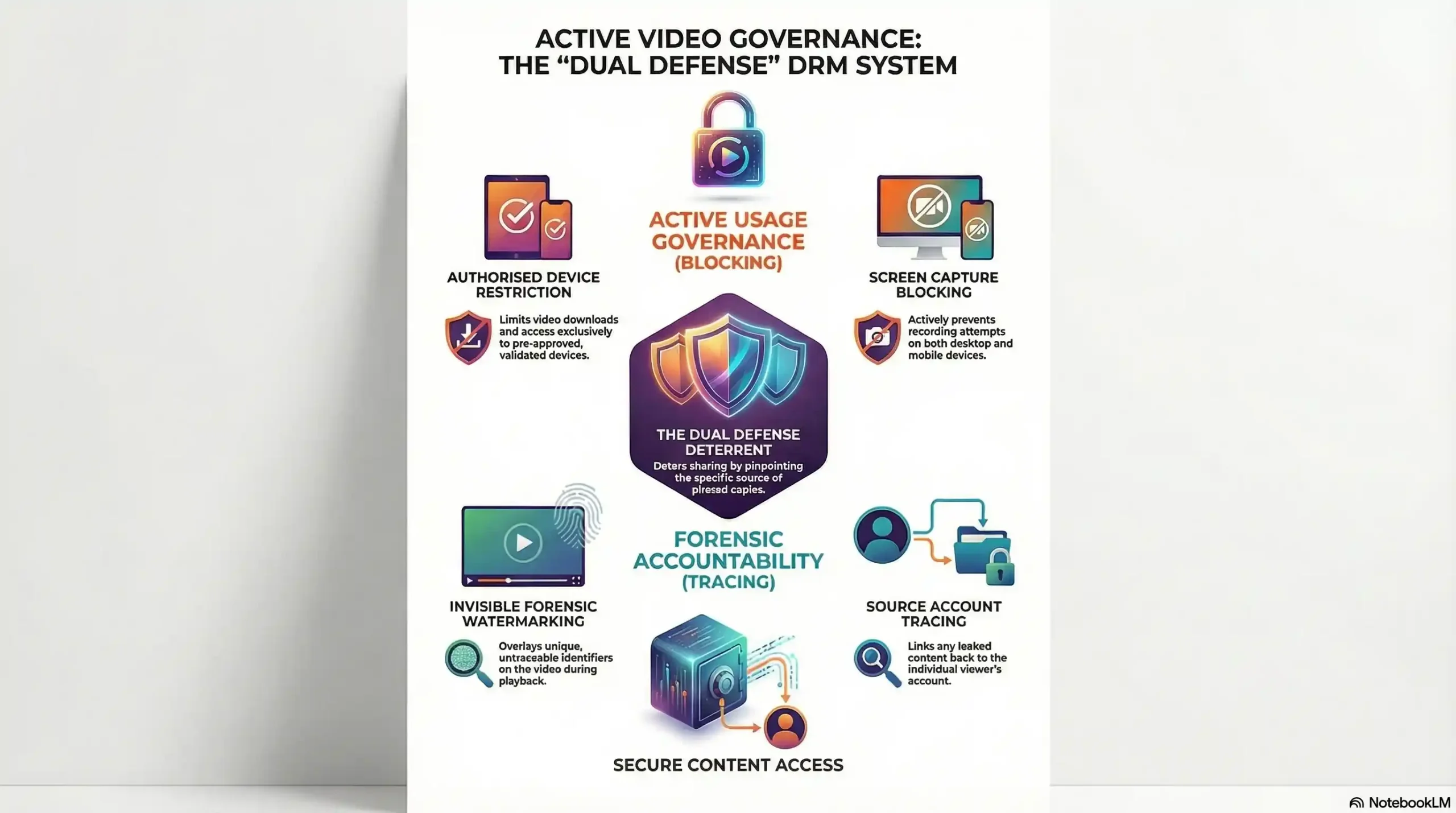
Diagram illustrating how multi-layered DRM, end-to-end encryption, and dynamic watermarking block screen capture and unauthorized downloads for e-learning platforms.

Digital Rights Management (DRM)

DRM is a critical shield against e-learning video piracy. This technology actively blocks unauthorized access, copying, or distribution of your premium course content. For educators and creators, robust DRM:

  • Restricts access exclusively to enrolled students

  • Protects revenue streams by preventing content leaks

  • Safeguards intellectual property with military-grade encryption, licensing controls, and dynamic watermarking
    Forget basic password gates—modern DRM deploys multi-layered security for bulletproof video protection.

See How Advanced DRM Protects Your Course Revenue (Start Free Trial)

Hollywood-Grade DRM: Beyond Basic Encryption

Unlike traditional encryption—which only scrambles data—enterprise-level DRM actively governs video usage. Think studio-level security for your courses:

  • Blocks screen capture attempts (even on mobile devices)

  • Restricts downloads to authorized devices

  • Embeds forensic watermarks tracing leaks to individual viewers
    For high-value courses in competitive niches, this ironclad protection is non-negotiable.

Dynamic Watermarking + Screen Shield: Your Anti-Piracy Duo

How does invisible watermarking work? Unique identifiers are overlaid during playback—untraceable to viewers but pinpointing leaks. Paired with real-time screen capture blocking, this dual defense:

Deters sharing by linking pirated copies to source accounts

Why Institutions Are Moving to Advanced DRM

Enterprise-grade video security has become standard practice across e-learning, not just for major platforms but for individual course creators protecting premium content. The tools matter less than the layers: encryption controls access, watermarking traces leaks, and both together create real deterrence. The difference between basic password protection and multi-layered DRM is the difference between a locked door and a vault.

How Secure Platforms Prevent Unauthorized Access

Trusted e-learning platforms deploy enterprise-grade authentication and granular access controls:

  • Strict identity verification: Mandatory 2FA (SMS/biometrics) or SSO (via SAML/OAuth) blocks credential theft

  • Role-based access control (RBAC): Limits content/tools by user type:

    • Students: Course materials, discussion boards

    • Instructors: Gradebooks, content uploads

    • Admins: User management, analytics

  • Session timeouts: Auto-logoff protects unattended devices
    This layered security upholds compliance (GDPR/COPPA) while ensuring resources remain exclusively accessible to verified users—reducing breaches and maintaining a trusted learning environment.

Student Privacy & Regulatory Compliance

Top-tier e-learning platforms treat student data protection as both a legal obligation and ethical responsibility, rigorously implementing:

  • Regulatory alignment:

Proactive compliance with GDPR (EU), FERPA (US), and regional frameworks through:

    • Data minimization (collecting only essential PII)

    • Automated consent management portals

  • Triple-Shield Data Safeguards:

    1. Encryption-at-rest: AES-256 for stored records (grades, IDs, submissions)

    2. Pseudonymization: Replacing identifiers in analytics to prevent student tracing

    3. Geofenced storage: Keeping data within jurisdictional boundaries
      This multi-layered approach transforms regulatory mandates into operational reality—ensuring student identities and academic records remain confidential while enabling trusted virtual learning.

Why LMS Integration is Non-Negotiable for E-Learning Platforms

Learning management systems like Moodle, Canvas, and Blackboard form the central hub of digital education. But true efficiency emerges when you integrate secure video hosting directly into your LMS. This seamless fusion:

  • Delivers DRM-protected videos inside course modules

  • Eliminates platform-switching for learners

  • Automates administrative tasks (access controls, analytics)
    Result? A unified, secure learning environment that protects content while boosting engagement.

How Secure Video-LMS Integration Works

Through LTI 1.3-compliant APIs or native plugins, enterprise video platforms:

  • Embed encrypted videos directly in LMS dashboards

  • Enforce real-time access rules (SSO, IP restrictions, expiration dates)

  • Sync permissions with course enrollment data
    Student benefit: One-click playback without logins or redirects.
    Admin advantage: Centralized control from your LMS backend.

4 Transformative Benefits of Video-LMS Integration

  1. Frictionless Learning Single sign-on (SSO) grants instant access to DRM-locked videos – no passwords or new tabs.

  2. Military-Grade Governance: Granular permissions (by user, date, IP) meaningfully reduce unauthorized sharing by controlling exactly who can access what, and for how long.

  3. Unified Analytics
    Track video engagement + quiz scores in one dashboard to pinpoint knowledge gaps.

  4. Enterprise Scalability
    Serve 10,000+ concurrent viewers with zero buffering or security compromises.

Fortifying Educator-Student Communications

Secure e-learning platforms transform virtual interactions with military-grade protections:

  • End-to-End Encrypted Messaging:

    • Private chat logs and discussion forums are shielded with TLS 1.3+

    • Message retention policies auto-delete sensitive conversations

  • Zero-Trust Video Conferencing:

    • DTLS-SRTP protocols prevent “Zoombombing” or eavesdropping

    • Host-controlled permissions (screen sharing/lobby controls)

    • Watermarked recordings deter unauthorized distribution
      This secure framework enables authentic academic dialogue—from vulnerable Q&A sessions to confidential feedback—while guaranteeing every shared document, whiteboard sketch, and spoken word remains exclusively accessible to your class roster.

AI-Powered Personalization: The Future of Video Learning

Artificial Intelligence (AI) is revolutionizing e-learning by transforming static videos into adaptive, personalized learning journeys.
Modern AI video platforms analyze every student interaction—pauses, rewinds, skips—to dynamically adjust content in real time. This creates custom pathways that respond to individual engagement patterns, making learning truly learner-centric.

4 Game-Changing AI Features Transforming E-Learning

Smart Content Adaptation

  • Videos auto-adjust difficulty and suggest resources based on performance metrics.

Precision Recommendations

  • AI curates content targeting specific skill gaps like a virtual tutor.

Engagement Intelligence

  • Behavior analysis (with privacy safeguards) flags confusion for instant support.

Global Accessibility

  • Real-time captions and translations in 50+ languages remove learning barriers.

The Triple Win of AI-Driven Learning

Learners: Personalized pacing keeps content matched to individual progress, rather than a one-size-fits-all playback speed

  • Educators: Predictive dashboards identify knowledge gaps before tests
  • Institutions: AI-triggered interventions can flag at-risk students earlier than manual tracking alone

How AI Personalization Shows Up in Practice

AI-driven personalization in e-learning generally takes a few recognizable forms:

  • Recommendation engines that surface the next lesson or resource based on a learner’s actual performance, rather than a fixed curriculum order
  • Engagement analytics that highlight which parts of a course learners struggle with most, so instructors know exactly where to improve content
  • Adaptive pacing tools that adjust based on demonstrated skill level, common in language-learning and skills-training platforms

These approaches are already in production use across major learning platforms — the common thread is using real interaction data instead of guesswork to decide what a learner sees next.

Unified Security Through LMS Integration

Leading secure video platforms deliver frictionless compatibility with major LMS (Canvas, Moodle, Blackboard), creating a fortified educational ecosystem by:

  • Automated security synchronization: User roles/permissions mirror LMS settings

  • Single-point content governance: Upload once to propagate encrypted videos across courses

  • Unified audit trails: Track access attempts across LMS and video systems
    This seamless integration eliminates security gaps while simplifying course management—ensuring compliance follows every lecture, quiz, and discussion without instructor overhead.

Building Trust in Digital Education

By adopting secure video platforms, institutions empower educators to focus on pedagogy, not privacy fears, through:

  • Proactive threat prevention: Neutralizing
    • Unauthorized access via RBAC
    • Content piracy through DRM
    • Data leaks with encryption
    FERPA/GDPR violations via compliance tools

  • Future-ready learning environments: Scalable security grows with enrollment

Conclusion

Online education’s evolution now hinges on trusted video platforms that safeguard learning’s core elements: content, data, and communications. By embedding enterprise-grade security—from content protection to LMS integration—institutions transform e-learning from vulnerable to vigilant. This creates resilient digital classrooms where educators innovate freely, students collaborate confidently, and academic integrity remains uncompromised by emerging threats.

Ready to Transform Your E-Learning Strategy?
Discover how secure video platforms can elevate your online education with advanced DRM, AI personalization, and interactive features.
Start delivering safe, engaging, and future-ready learning experiences today!

FAQs

Secure platforms use DRM encryption, dynamic watermarking, and screen capture prevention to protect content from piracy and unauthorized access

They implement user authentication, domain restrictions, and encrypted streaming protocols to block unauthorized downloads and sharing

Piracy leads to significant revenue loss, discourages content creation, and risks exposure of sensitive educational materials

By ensuring smooth playback with adaptive streaming, supporting subtitles, quizzes, and offline downloads while maintaining content security

Look for multi-DRM support, watermarking, analytics dashboards, customizable players, and integration options with LMS and websites

They offer DRM-locked offline downloads in native apps to prevent unauthorized sharing even when videos are accessed offline

Educational institutions, course creators, and businesses needing to protect premium content and ensure authorized, high-quality delivery

DRM encrypts videos to prevent illegal downloads and unauthorized playback, ensuring only licensed users can access content.

Yes, advanced platforms use screen capture blocking technology on Android and iOS apps to deter piracy

Dynamic watermarking embeds user-specific information visibly or invisibly to trace and discourage unauthorized sharing.

They use adaptive bitrate streaming to adjust video quality in real-time for smooth playback on varying internet speeds

Most platforms offer plugins and APIs for seamless integration with popular LMS like WordPress, Moodle, and Teachable

This article is published by Inkrypt Videos, a provider of secure e-learning video hosting featured throughout. Third-party platform capabilities and any statistics cited should be independently verified before making a purchasing or compliance decision.

Comments are closed.