Table of Contents
ToggleBuilding a successful online learning platform takes more than picking software — it means choosing the right delivery model, structuring content that keeps learners engaged, setting up monetization that actually pays out, and protecting the intellectual property you’re asking educators to trust you with. This guide walks through the full process: from choosing your platform approach through launch, with a dedicated deep-dive on the security practices that separate a platform learners trust from one that gets abandoned after the first data scare.
Key Takeaways: Building an Online Learning Platform
- Platform Choice Shapes Everything Downstream — whether you build custom, use a hosted LMS, or go with a course-marketplace model determines your speed to launch, ongoing costs, and how much control you have over security and branding.
- Content Structure Drives Completion Rates — bite-sized, sequenced modules with clear progress markers keep learners engaged far better than long, unstructured video dumps.
- Monetization Needs to Be Decided Early — one-time purchase, subscription, or cohort-based pricing each require different platform features; retrofitting payment models later is expensive.
- Secure Content Delivery is a Trust Anchor — protecting course materials and learner data isn’t just a technical requirement, it’s the foundation of platform credibility.
- AI-Powered Security is the New Standard — traditional tools can’t keep up with modern threats; real-time threat detection and behavioral analysis are increasingly table stakes.
- Proactive Security is Ongoing, Not One-Time — layered protections combined with continuous audits and monitoring keep you ahead of vulnerabilities as you scale.
How Online Learning Platforms Are Powering the Digital Revolution
Online learning platforms have reshaped education during the digital revolution, letting learners access diverse subjects, programs, and resources globally. These platforms break free from physical classrooms, creating accessible virtual learning spaces for students worldwide.
They now serve:
- Formal education students
- Working professionals advancing careers
- Lifelong learners pursuing interests
Through intuitive interfaces, platforms deliver courses spanning academic disciplines to specialized skill development.
Choosing Your LMS or Platform Approach
The first real decision in building an online learning platform is how much you build versus how much you buy. Three common paths:
- Hosted LMS platforms (Teachable, Thinkific, Kajabi) get you live fastest — course creation tools, payment processing, and basic security are built in, but you’re limited to what the platform offers and typically pay a percentage of revenue or a monthly fee regardless of sales volume.
- Open-source LMS software (Moodle, Open edX) gives you full control and no revenue-share fees, but you’re responsible for hosting, security, and maintenance yourself — a real cost in time or developer budget that’s easy to underestimate.
- Custom-built platforms make sense once you have proven demand and specific requirements a template can’t meet — cohort scheduling, proprietary assessment tools, or integration with existing enterprise systems. This is the most expensive and slowest path to launch, and usually makes more sense after validating demand on a simpler platform first.
Whichever path you choose, video hosting is worth evaluating separately from the LMS itself — most hosted LMS platforms use basic video embedding without DRM or watermarking, which is where a dedicated secure video hosting layer (covered in the security section below) becomes necessary once your content has real value to protect.
Creating and Structuring Your Course Content
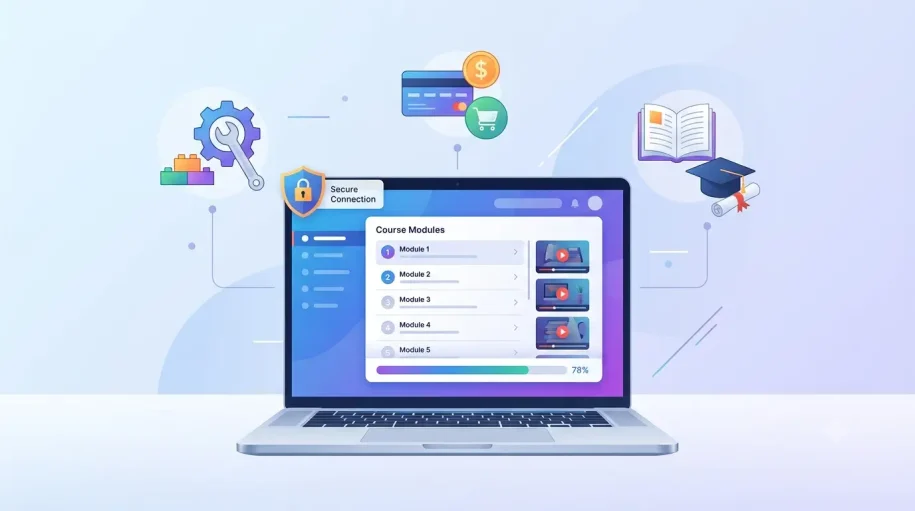
Strong course content follows a predictable structure: break material into short modules (5-15 minutes each) organized around a single learning objective, sequence them so each builds on the last, and include a way for learners to check their own progress — quizzes, checkpoints, or completion markers. Platforms that show learners exactly how much progress they’ve made see meaningfully higher completion rates than ones that don’t.
Video remains the dominant format for course content, but it shouldn’t be the only one — pairing video lessons with downloadable resources, written summaries, and practical exercises accommodates different learning styles and gives students a reason to return to the material after the video ends.
Before recording anything at scale, pilot your first module with a small group and get direct feedback on pacing and clarity. It’s far cheaper to fix a structural problem in one module than after you’ve recorded an entire course around a flawed format.
Setting Up Payments & Monetization
How you charge for access shapes the rest of your platform’s requirements. The three most common models:
- One-time purchase: Simplest to implement and understand, but ties revenue directly to new-customer acquisition with no recurring income.
- Subscription: Recurring revenue and lower price-per-purchase friction, but requires ongoing content updates to justify continued payment, and typically has higher churn to manage than one-time sales.
- Cohort-based pricing: Charges for a scheduled, live-supported course run rather than perpetual access — works well for higher-touch programs but caps how many students you can serve at once without adding instructor capacity.
Whatever model you choose, use a PCI DSS-compliant payment processor with tokenized transactions from day one — retrofitting compliant payment handling after you’ve already processed real transactions is far more painful than building it in from the start.
Security & Trust: Protecting Your Learners and Content
Educators invest real effort creating course materials — video lessons, assessments, downloadable resources — and protecting that intellectual property is what earns their trust in your platform. Students need the same assurance: a learning environment free of unauthorized access or piracy concerns, so they can focus on the material instead of worrying about their data.
Balancing that protection with accessibility is the core ongoing responsibility of running a learning platform — security measures that create friction for legitimate users just push them toward workarounds that undermine the protection anyway.
Core Security Practices
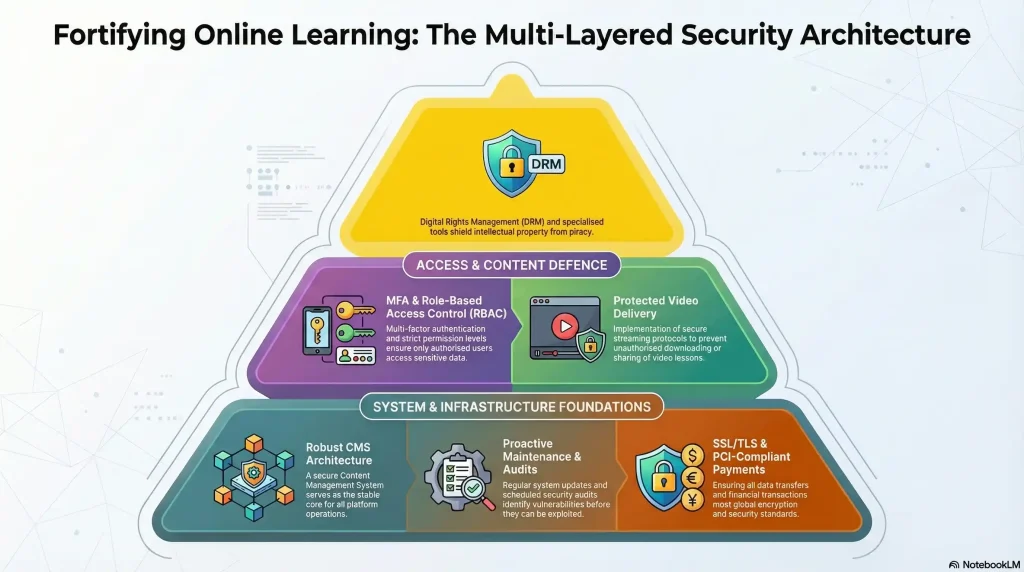
- Secure CMS Foundation — choose a content management system with enterprise-grade security, regular vulnerability patches, and end-to-end encryption.
- Multi-Factor Authentication (MFA) — require unique credentials and two-factor verification for every account, student and instructor alike.
- SSL/TLS Encryption — encrypt all data in transit, including login and payment details.
- Role-Based Access Control (RBAC) — admins get full access, instructors get their own course materials, students get only what they’ve enrolled in.
- Content Protection Tools — dynamic watermarking to trace leaks, and file encryption requiring decryption keys.
- Scheduled Security Audits — review access logs and detect unusual activity monthly, not just after something goes wrong.
- PCI-Compliant Payments — certified, tokenized payment processing (see the payments section above for choosing a pricing model).
- Protected Video Delivery — DRM-protected playback, AES-256 encryption, and dynamic watermarking to block downloads and screen recording. For a deeper dive specifically on video protection, see our full e-learning video protection guide.
- Proactive Maintenance — automatic CMS updates, immediate patch deployment, and offsite encrypted backups.
AI-Powered Protection
Legacy security tools struggle to keep pace with modern threats. AI and machine learning add real-time threat monitoring, behavioral anomaly detection that learns normal usage patterns to flag suspicious activity, predictive risk analysis based on historical attack data, and automated responses that isolate breaches before they spread.
Accessibility Without Compromise
Security shouldn’t create barriers for legitimate learners. Adaptive MFA (biometrics or push notifications instead of complex passwords), role-based permissions that stay invisible to users who don’t need them, and accessibility-first design compatible with screen readers keep protection frictionless for K-12 students and working professionals alike.
Mobile-Specific Protection
Phones and tablets face their own risks — unsecured public Wi-Fi, device loss, and outdated apps with unpatched vulnerabilities. Distribute apps exclusively through official app stores, enforce mandatory security updates, encrypt data both in transit and at rest, and maintain remote-wipe capability for lost or stolen devices.
Launch Checklist
Before opening enrollment:
- Test the full learner journey end-to-end — signup, payment, course access, video playback, and progress tracking — on both desktop and mobile.
- Confirm your security layer is active, not just planned: DRM playback, watermarking, and access controls should be verified working on real content, not assumed from a settings toggle.
- Set up analytics before your first student enrolls, so you have baseline data on engagement and drop-off from day one rather than trying to reconstruct it later.
- Prepare a support path — even a simple contact form — so learners have somewhere to go when something breaks, which it will.
- Soft-launch to a small group before a full public launch, the same way you piloted your first course module.
Conclusion
Building an online learning platform that succeeds means getting the full picture right — the platform approach that fits your resources, course content structured for real engagement, a payment model that sustains the business, and security practices that protect the intellectual property and trust you’re asking educators and students to place in you. None of these pillars works well in isolation: a beautifully structured course on an insecure platform loses educator trust just as fast as bulletproof security on a platform nobody can figure out how to use.
Ready to build a secure, future-ready online learning platform? Start protecting your content and users today—request a demo or learn more about advanced security solutions to stay ahead in the digital education revolution.
FAQs
Phishing, malware, DDoS attacks, insider threats, and data breaches are significant risks
Implement strong data encryption, access controls, and comply with global data privacy laws like GDPR
MFA requires multiple verification methods, adding an extra layer of security beyond just passwords
Perform penetration tests bi-annually and ISO 27001/SOC II audits annually for compliance
Follow your incident response plan, which should outline steps for detecting, responding to, and recovering from security incidents
Encrypt data, distribute apps through trusted stores, and require regular app updates
Data breaches, privacy violations, intellectual property theft, and reputational damage
Use email filtering, anti-phishing software, and conduct simulated phishing campaigns to train users
Encryption protects sensitive data by rendering it unreadable, even if unauthorized access occurs
Use user-friendly MFA methods and role-based access controls to ensure ease of use
Updates patch known vulnerabilities, protecting against emerging threats
Most creators should start with a hosted LMS (like Teachable or Thinkific) to validate demand quickly, then consider open-source or custom platforms once they have proven traction and specific needs a template can’t meet.
Choose based on your content format: one-time purchase for self-paced evergreen content, subscription for continuously updated material, or cohort-based pricing for live, instructor-supported programs.
Short, focused modules (5-15 minutes) sequenced around single learning objectives, with visible progress tracking, tend to see meaningfully higher completion rates than long-form, unstructured video.
This guide is published by Inkrypt Videos, which is mentioned in the security section as a DRM and secure video hosting provider. Platform names mentioned (Teachable, Thinkific, Kajabi, Moodle, Open edX) are for reference — evaluate current features and pricing directly with each before choosing.