

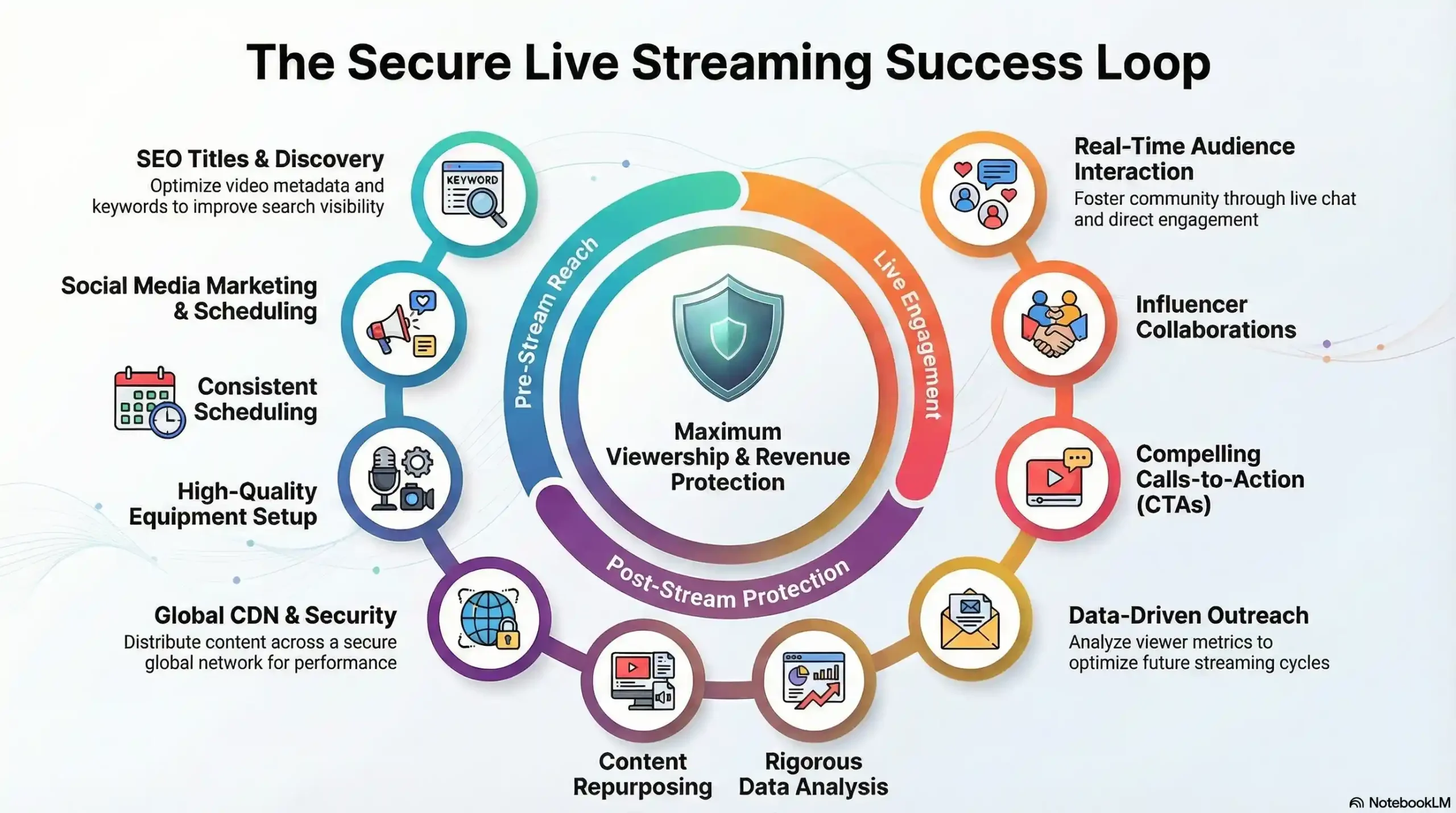
Stop clicking “Go Live” and hoping for the best. To scale a professional live stream, you need a strategy that combines high-engagement tactics with enterprise-grade delivery to ensure your audience actually sees your content without buffering or unauthorized redistribution. At Inkrypt Videos, we’ve distilled the process into 13 proven strategies—from SEO-optimized titles to global CDN deployment—that turn casual viewers into loyal, protected subscribers.
Stop Piracy & Scale Your Stream — Get a Free Security Audit
1. Draft SEO-Optimized Titles and Descriptions That Pique Interest
Your live stream title should serve the same function as newspaper headlines: to draw viewers in. A great title should be clear, succinct, and keyword-rich to capture attention quickly and draw them further in. Use phrases likely to be searched such as “Tips to Grow Your Live Stream Audience Fast” or “Boost Your Viewership Fast.” Avoid vague titles; give viewers clear expectations.
Your description should also be engaging and include long-tail keywords like “how to increase live viewers” and “live stream engagement tactics.” Don’t forget to add a strong call-to-action (CTA), such as: “Subscribe now to never miss out!”
Pro Tip: Use tools such as Google Keyword Planner or Ahrefs to discover the optimal keywords for your content. Need help dialing in your keywords and titles? Get in touch with our team.
2. Market Your Stream on Social Media
Wanting more eyes on your stream? Social media is your ally. Get ready by starting promotional efforts at least a week in advance across all platforms–Facebook, Instagram, Twitter, TikTok, and LinkedIn–by sharing teaser videos, sneak peeks, countdowns, etc.
Create excitement through engaging visuals and captivating copy. Utilizing Instagram Stories or TikTok clips to give an exclusive behind-the-scenes glimpse or highlight an amusing moment from your last stream is an easy way to do this; just don’t forget to include the date, time, and a link back! When possible collaborate with influencers or brands for further exposure; otherwise boost posts or run targeted ads to maximize visibility if available in your budget.
Quick Tips: Suggested Strategies for Livestreams: Schedule multiple posts leading up to the stream; utilize platform-specific features, such as Instagram Reels or Facebook Events; engage followers by asking them questions or running polls related to it.
3. Establish a Regular Streaming Schedule
Consistency is key. Just like with television shows, your audience needs to know when and where they can find you online. Set an ideal day and time for streaming sessions — such as every Tuesday evening or the first Friday of each month. Get into a habitual rhythm of streaming. Your viewers will thank you.
Promote your schedule everywhere from your website and social media profiles to email newsletters and live streams. Maintaining consistent timing helps build anticipation among viewers who know when to expect new content from you.
Why It Works: A regular schedule helps increase engagement metrics, which in turn increases SEO ranking and visibility.
4. Invest in High-Quality Streaming Equipment
Poor video or audio quality can quickly turn off viewers. Invest in quality equipment–HD camera, microphone, and lighting are among the essentials–that won’t break the bank but still ensure a reliable streaming experience for viewers. Ensure your internet connection is strong and stable to prevent buffering or lagging issues as well.
Test runs before going live are essential in evaluating audio levels, lighting levels, and internet speed. Software platforms like OBS Studio or Streamlabs provide useful features such as overlays and transitions that add professional touches.
If you’re streaming from a phone rather than a full studio setup, see our mobile live streaming tips for a practical, budget-friendly gear list.
Tools to Consider: OBS Studio: Ideal for overlays and customizing your stream. Streamlabs: An interactive platform offering interactive features and engagement tools. Logitech or Blue Yeti microphones: These affordable microphones produce excellent sound quality.
5. Engage Your Viewers Actively Through the Stream
Engagement is of utmost importance; make an effort to connect directly with your viewers by speaking directly, asking questions, and inviting participation in chat rooms or using features like live polls, Q&A sessions, or comment highlights to make viewers feel part of the action.
Be sure to acknowledge both new viewers and loyal viewers; people enjoy being recognized. Keep things engaging by adding spontaneous moments, fun challenges, or viewer shoutouts – the more engaged your viewers feel the longer they’ll stay around!
Professional Engagement Tips: Run a giveaway or contest to keep audiences excited, use chatbots to moderate and highlight key comments, and request real-time feedback to create an interactive conversation.
6. Collaborate With Influencers and Industry Experts
Influencer collaborations are the ultimate power booster for live streams. Work with influential figures or industry experts with similar target audiences as guest speakers, co-hosts, or interviewees on your stream to open it up to an entirely new audience while increasing the credibility of the live stream itself.
As soon as your collaboration is announced, make sure both parties promote it across their networks using shared hashtags and cross-tagging techniques to increase reach. Keep the focus on high-value, engaging content rather than the numbers alone — the strongest partnerships create content with genuine appeal to both audiences, and the growth follows from that.
7. Employ Email Marketing to Reach Target Customers
Your email list is invaluable–use it wisely by sending out multiple announcement emails at least a week in advance of a live stream and reminder emails a day or so beforehand and an hour before going live.
Bring life and urgency to your emails by crafting compelling subject lines, engaging visuals, and offering clear CTAs that lead recipients directly to your stream. Showcasing exclusive content or special guests can add excitement and urgency.
Email Strategy: Announce, Remind, and Go Live. Personalize emails by including their name and interests in them. Utilise clickable CTAs that direct subscribers directly toward your stream.
8. Analyze Your Audience Data
Data can be your greatest ally. Utilizing analytics tools on platforms like YouTube, Facebook or Twitch will give you insight into who your viewers are, when they tune in, what content keeps them engaged, peak viewership times, demographics, and watch-duration and engagement rates – these metrics should all play into optimizing for optimal success.
Apply these insights to modify your strategy. If audience participation declines at certain points, research why and make adjustments. Regularly revisit and revise your approach in order to remain engaging and effective.
Tools for Data Analysis: YouTube Analytics offers insights into viewer behavior and demographics. Google Analytics can be useful in tracking referral traffic to live streams. Social media insights offer data regarding engagement, reach, and audience demographics.
9. Repurpose Your Live Stream Content for Maximum Reach
Your live stream doesn’t have to come to an abrupt halt once it hits “End Stream,” either! Repurposing its content to keep it alive and vibrant by cutting the full stream into smaller clips for posting on social media channels such as YouTube and sharing them on these networks, as well as creating blog posts summarizing main points or infographics with key takeaways, is another effective strategy to maximize reach and keep engagement alive and well.
Your stream could also be converted into a podcast or downloadable guide for maximum impact and reach. Not only can this extend your reach and offer more value in different forms, but also improves SEO by keeping content engaging and fresh.
Creative Repurposing Ideas: Make highlight reels and share them across platforms. Post key points as social media posts. Utilise Descript to turn live streams into podcast episodes.
10. Make Your Calls to Action Clear and Compelling
A strong call-to-action (CTA) is essential to any stream. Encourage viewers to like, share, subscribe to your channel, or click links throughout your stream to drive viewers’ engagement – don’t wait until the end to introduce these CTAs; spread them throughout your stream to capture those viewers who may leave before then.
Keep your audience engaged by providing them with guidance as to what the next step should be. For example: “Subscribe now to get notifications about our next big event!” or “Share this stream with those who might enjoy this content!” Keep their interest by showing them exactly what to do next.
Effective Call to Action Ideas: Whilst hitting subscribe, be sure to leave comments with your thoughts below, share this stream to reach more viewers, etc.
11. Spice Up Your Content to Stay Engaged
Switch up your content regularly to keep things interesting for viewers and attract new ones. Experiment with various forms of media (tutorials, interviews, behind-the-scenes footage, product launches, Q&A sessions, etc.). Keep things dynamic to retain viewers while drawing in new ones.
Change formats and themes regularly to keep audiences coming back for more. By constantly creating innovative solutions, you are creating more opportunities to engage and excite them.
12. Optimize for Each Platform’s Discovery Algorithm
Every major streaming platform has its own way of surfacing live content to viewers who aren’t already following you — and using it is often faster than any promotion you do yourself.
- YouTube: Schedule a Premiere or use the “notify subscribers” toggle when you go live so your existing audience gets pinged the moment you start. Consistent live-streaming also improves how often YouTube surfaces your channel in its Live tab and recommendations.
- Twitch: Getting listed in your category’s directory matters more than almost anything else for new-viewer discovery. Raids and hosts from other streamers — and doing the same for others — are one of the fastest ways to get in front of a genuinely relevant audience.
- Facebook and Instagram Live: Both platforms push a notification to followers when you go live, and Instagram surfaces active lives at the front of the Stories bar, a placement recorded posts don’t get.
- Beyond the big three: platforms like Dailymotion and Sooplive also have their own live discovery feeds, worth testing if your audience already spends time there.
If you want a channel that isn’t dependent on any platform’s algorithm at all, you can also embed your live stream directly on your own website — full control over the audience, with none of the discovery-algorithm dependency.
13. Use a CDN
CDNs can help your livestream reach viewers across the world more effectively while simultaneously decreasing latency and improving streaming quality, but before selecting one you must understand its technical considerations and suitability for your use case.
So when Alice speaks “Hello world” in her kitchen, the app sends this encoded and compressed segment to a content delivery network server which serves it to Bob’s smartphone – this reduces buffering and crashes and provides a unified viewer experience while handling heavy traffic without breaking.
Growing your live-streaming audience requires more than simply increasing viewer numbers; it requires building meaningful connections and offering engaging content that keeps viewers coming back for more. By optimizing your content, actively engaging with your viewers, and employing effective strategies you can significantly expand the viewership of your stream. At Inkrypt Videos, we offer assistance in optimizing each livestream broadcast so that every livestream maximizes viewership potential.
Ready to increase the viewing audience for your live stream? Reach out and let’s start crafting compelling streams together! Contact us