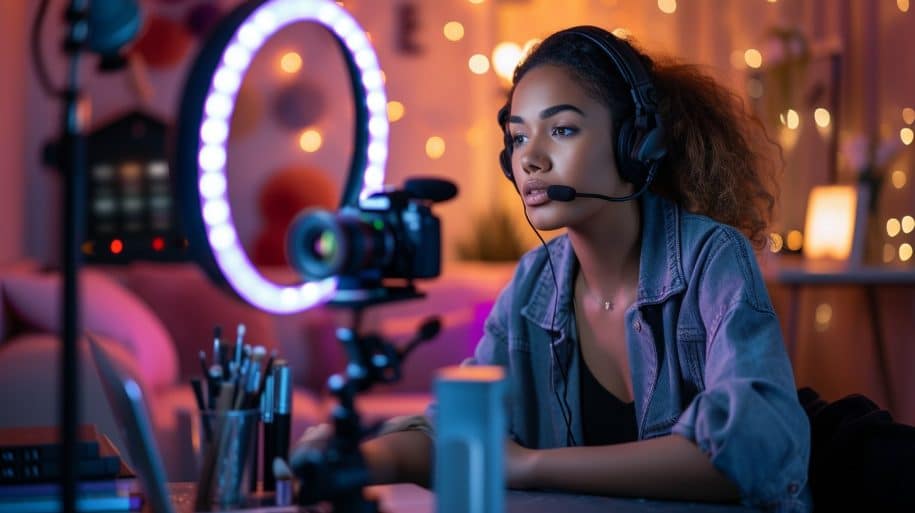
Professional mobile live streaming allows you to broadcast high-definition video directly from a smartphone to a global audience using RTMP ingest and HLS delivery. Doing it well means balancing portable hardware — like a stabilizer and an external mic — with robust DRM encryption to prevent unauthorized restreaming and content theft.
Secure Your Live Stream: Get Started with Inkrypt DRM
Mobile Live Streaming: The Trend of the Century
Mobile live streaming can be an efficient and cost-effective way to expand your audience reach, whether for business or personal purposes. A live stream on mobile can help you meet all of your goals at an optimal cost/efficiency ratio.
The use of mobile phones for streaming can be highly advantageous as it eliminates the need for expensive equipment and allows live-streaming from any location – perfect for events like roadshows, company gatherings, local newsworthy happenings, or fundraising initiatives. Furthermore, making your brand visible to a larger audience increases engagement and visibility for greater brand recognition and growth.
Wi-Fi connections may become congested in densely packed areas or when streaming over public networks, leading to lag and latency issues. Cellular data can be less susceptible to this kind of congestion, which is worth testing if your Wi-Fi feels unreliable on stream day.
What is Mobile Live Streaming?
Mobile live streaming is an innovative content production strategy that allows creators to broadcast videos directly from their smartphones, providing real-time interactions between creators and audiences. Mobile live streaming enables brands, businesses, and influencers to foster an atmosphere of community by producing authentic, engaging video content for their viewers.
Smartphones equipped with high-resolution cameras and a reliable internet connection are the core requirement — everything else is an upgrade. A practical starter kit looks like this:
- A tripod or phone mount: keeps the frame steady and frees up your hands.
- An external microphone: a clip-on lavalier or small shotgun mic makes a bigger difference to perceived quality than any camera upgrade.
- A small clip-on light: fixes the low-light, grainy footage most phone cameras struggle with.
- A power bank: live streams drain battery fast, especially with the screen on and a data connection active.
None of this needs to be expensive — the goal is stability and clarity, not studio production value.
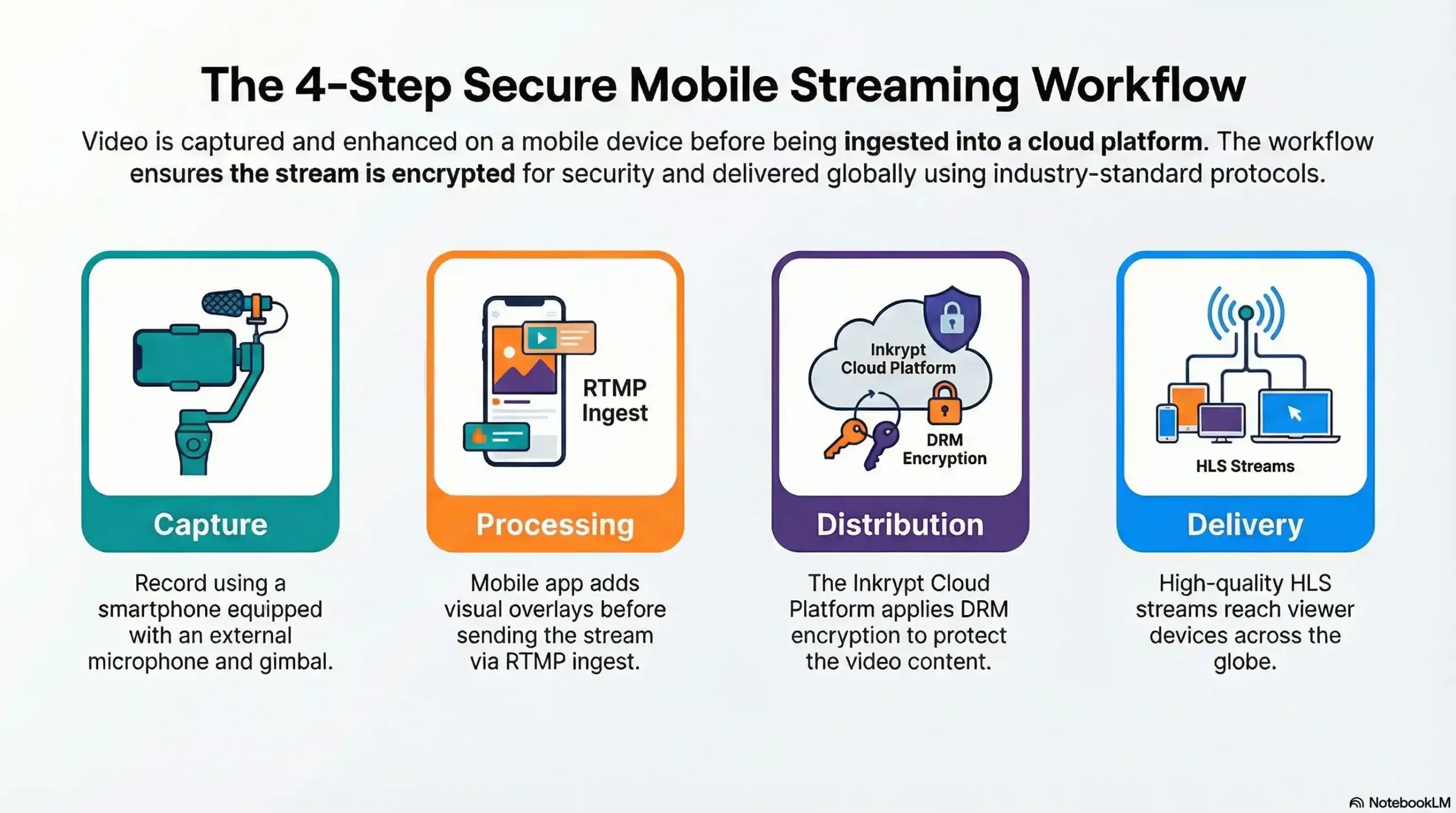
Once recorded, your video is processed by a mobile streaming app that adds any visual overlays or aspects you choose to include into the stream before sending it off using RTMP ingest to an online video platform and then HLS to reach user devices. A tethered internet connection is ideal, though cellular data or Wi-Fi may be substituted if necessary.
Following Steps For A Successful Live Stream
To go live from your phone, you’re choosing between two paths: a native platform app, which is fastest and least flexible, or a dedicated broadcast app using RTMP or SRT, which takes more setup but gives you far more control. Here’s how each works.
Path 1: Stream Directly From a Platform’s App
- Open the app for wherever you want to broadcast — YouTube, Twitch, Facebook Live, Instagram Live, and TikTok Live all have a built-in “Go Live” option.
- Grant camera and microphone permissions if you haven’t already.
- Set your stream title and privacy setting.
- Tap Go Live. The platform handles encoding and delivery for you — no extra setup required.
Path 2: Stream Using a Dedicated Broadcast App (RTMP/SRT)
This path gives you more control — one broadcast pushed to multiple destinations, custom bitrate, and the option to route your stream through a secure platform like Inkrypt Videos instead of, or alongside, a social platform.
- Install a mobile broadcast app that supports RTMP or SRT output, such as Larix Broadcaster.
- In your streaming platform’s dashboard, generate an RTMP ingest URL and stream key — this is the address your phone sends video to.
- Enter that RTMP URL and stream key into the broadcast app’s settings.
- Set your resolution and bitrate. 1080p at 3,000–6,000 kbps is a reasonable starting point on a strong connection; drop to 720p if your upload speed can’t keep up.
- Run a private test stream first to confirm audio, video, and connection stability before your real broadcast.
- Go live. The broadcast app pushes your RTMP stream to the platform, which then delivers it to viewers.
Either way, test your connection and settings before every stream — a quick private test catches most problems before your audience ever sees them.
If you eventually want that stream living permanently on your own website instead of only on a social platform, see how to embed a live stream on your website.
If you are using the front “selfie” camera of your smartphone, hold it at arm’s length to avoid pixelation and create a more flattering angle. And charge your phone or use a portable power bank so your streaming time isn’t cut short.
Latest Trends & Statistics of Mobile Live Streaming
Mobile live streaming provides businesses with an opportunity to reach out directly to their audiences and increase brand visibility by connecting in real-time. This makes mobile live streaming an attractive option.
Live streams allow brands to engage directly with audiences, leading to improved brand loyalty and customer satisfaction. Furthermore, these videos can be shared immediately on platforms like YouTube, Twitch, Facebook Live, Instagram Live, and TikTok Live in order to drive traffic and foster audience growth.
Mobile live streaming has quickly gained popularity due to its convenience and ease of use, making it the ideal solution for broadcasting news, events, and other content globally. Two trends are shaping how it’s used heading into 2026: shorter, more frequent streams are replacing long, over-produced broadcasts, and creators are increasingly multistreaming — pushing one mobile broadcast to several platforms at once instead of picking just one.
As mobile networks continue to improve, audiences increasingly expect a consistent viewing experience regardless of whether they’re on Wi-Fi or cellular data.
Must-Have Features For Mobile Live Streaming
Mobile live streaming is appealing to creators because all that’s required to go live is a smartphone and an internet connection. This on-the-go capability enables creators to capture and share spontaneous moments, behind-the-scenes glances, community events, and more with their audiences on-demand – saving both time and money by not needing a full production crew for video content creation.
Mobile streaming applications should provide a simple user interface that enables streamers to start and stop broadcasts effortlessly, as well as features allowing viewers to interact in real-time with users’ broadcasts, creating an atmosphere of community among viewers as they help strengthen brand loyalty among their viewer base. For more ways to grow that audience, see 13 proven strategies to boost your live stream viewership.
An excellent mobile streaming app should support high-quality video and audio streams with adaptive bitrate streaming technology to ensure viewers receive the highest-quality stream based on their internet connection speed.
The Future of Live Streaming: Trends and Innovation
Mobile Live Streaming has created many exciting opportunities for both content creators and viewers. By offering features such as instant feedback and real-time chat, Mobile Live Streaming enables content creators to build deeper relationships with audiences – potentially building brand loyalty while even monetizing videos through Patreon or SuperChat platforms.
AI represents another significant development. AI can improve video encoding and streaming quality while increasing viewer engagement by offering customized recommendations. Furthermore, it can create a superior viewing experience through features like live polling or Q&A sessions that let viewers interact directly with the content.
Another fascinating trend is the increasing fusion between Augmented and Virtual Reality (AR/VR). AR/VR technology can significantly enhance viewers’ content experience by blurring the boundaries between physical and digital realms, and enabling viewers to see products in real-time, increasing brand recognition and conversion rates on eCommerce websites.
Why You Should Choose Inkrypt Videos for Mobile Live Streaming
When it comes to mobile live streaming, choosing the right platform is crucial for protecting your content and ensuring seamless delivery to your audience. Inkrypt Videos is the perfect partner for creators, businesses, and influencers who are serious about safeguarding their intellectual property while leveraging innovative live-streaming technology.
1. Comprehensive Content Protection Inkrypt Videos provides advanced Digital Rights Management (DRM) software, video watermarks, and other cutting-edge security measures that help you prevent content theft. Unlike other platforms, our solutions do not require any technical expertise to implement, making them accessible to all creators. With Inkrypt, you can stream with confidence, knowing your videos are secure. For a closer look at how creators lose content to piracy and what actually stops it, see how to keep your videos safe from downloading.
2. Easy Integration One of the most significant challenges content creators face is finding a security solution that integrates smoothly with their existing platforms. Inkrypt Videos addresses this issue with an easy-to-integrate solution that seamlessly fits into your website or streaming app, ensuring a hassle-free setup and providing you peace of mind.
3. Reliable Video Delivery Inkrypt Videos offers a complete package, including video CDN and hosting services, to ensure your content reaches your audience without interruption. With a robust infrastructure supporting your streams, you can deliver high-quality videos to your viewers, whether on cellular data or Wi-Fi, without worrying about latency or lag.
4. Enhance Brand Loyalty and Monetization Opportunities With secure and stable live streams, you can focus on creating engaging content that builds deeper relationships with your audience. Inkrypt Videos’ solutions enable you to monetize your content securely, leveraging platforms like Patreon or SuperChat while maintaining complete control over your intellectual property.
5. Future-Proof Your Content Strategy As live streaming technology evolves, so do the threats to your content. Inkrypt Videos stays ahead of the curve by continuously innovating and adapting to new piracy methods. By choosing Inkrypt, you are not just protecting your content today; you’re investing in a long-term strategy that ensures your work remains secure in the future.
With Inkrypt Videos, you get a partner who is committed to empowering content creators by providing the best security tools and services in the market. Protect your content, engage your audience, and grow your brand with the confidence that comes from using a trusted solution like Inkrypt Videos.
Conclusion
Mobile live streaming is rapidly becoming a powerful tool for content creators, businesses, and influencers to reach wider audiences, foster engagement, and build brand loyalty in real time. As this medium continues to grow in popularity, it becomes increasingly important to safeguard your content against unauthorized use and piracy.