Protect your premium video content by using a multi-layered defense of DRM encryption, dynamic watermarking, and adaptive streaming to dramatically cut piracy risk. While digital piracy drains $75 billion annually from the global market, implementing these security protocols secures your online courses, enterprise training, and paid streams from unauthorized downloads and screen recording.
Get Your Free Video Security Audit
1. Understanding Video Download Threats in 2025
The video piracy landscape has become increasingly sophisticated, with threat actors employing advanced techniques that bypass traditional protection methods. Understanding these threats is essential for implementing effective countermeasures.
Common Download Attack Vectors
Browser Extensions and Plugins: Sophisticated browser extensions can intercept video streams and download content automatically. These tools have evolved to bypass basic protection measures, making them one of the most prevalent piracy methods.
Direct URL Exploitation: Tech-savvy users utilize browser developer tools to locate video file URLs in page source code or network traffic. Once discovered, these URLs can be accessed directly, circumventing webpage restrictions.
Screen Recording Software: Tools like OBS Studio and Camtasia capture screen output during playback. While this method produces lower quality copies, it remains effective against basic protection schemes that don’t address screen capture.
Credential Sharing Networks: Legitimate account credentials are distributed across multiple unauthorized users, exceeding permitted usage limits. This threat is particularly damaging for subscription-based platforms where revenue depends on individual account conversions.
2. The Business Impact of Video Piracy
Video piracy represents more than just lost sales—it undermines your entire business model, damages brand reputation, and erodes competitive advantages. Content creators who fail to implement robust protection measures face severe consequences.
Quantifiable Financial Losses
The movie industry alone suffers losses between $40 billion-97 billion annually from digital piracy. For online course creators and educational platforms, piracy directly impacts conversion rates—why would students pay for content available free on pirate sites?
Industry observations suggest e-learning platforms implementing comprehensive protection solutions can see meaningful revenue increases within the first year, as users who previously accessed pirated content convert to legitimate paying customers.
Hidden Costs Beyond Direct Revenue
Brand Reputation Damage: When your premium content circulates freely on pirate platforms, it diminishes perceived value and professional credibility. Potential customers question why they should pay premium prices for widely available material.
Competitive Disadvantage: Competitors who access your proprietary training materials or unique methodologies can replicate your approach, eliminating your competitive edge without investing in research and development.
Customer Support Burden: Pirated content often lacks updates and support. When users encounter problems with stolen materials, they may still contact your support team, creating workload without corresponding revenue.
3. DRM Encryption: Your First Line of Defense
Digital Rights Management (DRM) represents the gold standard for video content protection. Unlike basic encryption methods, DRM combines encryption with sophisticated licensing systems that control who can access content, on which devices, and for how long.
How DRM Technology Works
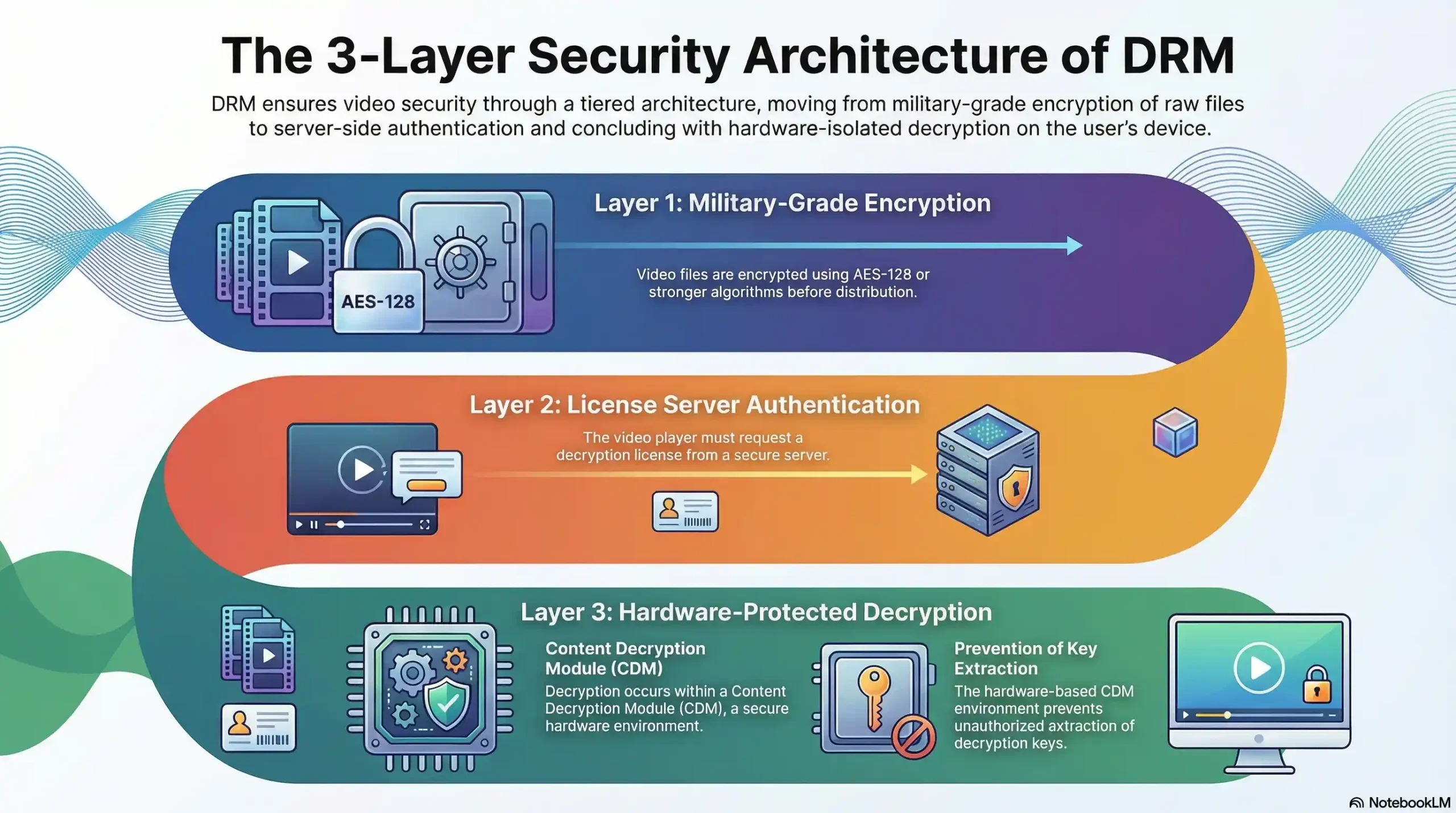
DRM operates through a three-layer security architecture:
Layer 1 – Content Encryption: Video files are encrypted using military-grade AES-128 or stronger algorithms before distribution. This encryption renders the content unreadable without proper decryption keys.
Layer 2 – License Server Authentication: When users attempt playback, the video player requests a decryption license from a secure server. This server validates user credentials, device authorization, and viewing permissions before issuing time-limited keys.
Layer 3 – Hardware-Protected Decryption: Modern DRM solutions decrypt content within a Content Decryption Module (CDM)—a secure, hardware-based environment that prevents key extraction. Even if someone downloads encrypted files, they cannot access decryption keys to view the content.
The Multi-DRM Ecosystem
No single DRM system works across all devices and platforms. Comprehensive protection requires implementing multiple DRM technologies:
Google Widevine DRM: Supports Chrome, Firefox, Edge browsers on desktop systems, plus Android devices, Android TV, and Chromecast. Widevine offers three security levels, with Level 1 providing hardware-backed protection for premium content.
Apple FairPlay DRM: Essential for iOS Safari, macOS Safari, and iOS applications. FairPlay integration requires Apple developer program membership and adherence to strict implementation guidelines.
Microsoft PlayReady DRM: Provides protection for Windows environments, Xbox consoles, and legacy devices. PlayReady excels in enterprise scenarios with offline playback requirements.
Platforms like Netflix, Disney+, and leading enterprise video solutions utilize all three DRM systems simultaneously, ensuring seamless protection across their entire user base without device compatibility compromises.
4. Adaptive Streaming Protocols (HLS/DASH)
Adaptive streaming protocols transform video delivery from vulnerable single-file downloads into secure, segmented transmission that’s inherently more difficult to pirate.
HTTP Live Streaming (HLS) Protection
HLS divides video content into small segments (typically 2-10 seconds each) and delivers them sequentially through standard HTTP connections. This segmentation creates multiple security advantages:
No Single Download Point: Unlike traditional streaming where entire files can be downloaded, HLS requires downloading hundreds of separate segments. Each segment can have unique encryption keys, making bulk piracy exponentially more complex.
AES-128 Segment Encryption: Each HLS segment can be encrypted with AES-128 encryption. The decryption keys are delivered separately through secure HTTPS connections, preventing simple extraction from browser caches.
Manifest File Control: HLS uses manifest files (M3U8 playlists) that reference segment locations and encryption keys. By controlling access to these manifests and implementing dynamic URL generation, you prevent unauthorized playback even if segment URLs are discovered.
Advanced HLS Security Implementation
Basic HLS encryption alone has weaknesses—sophisticated users can extract keys from network traffic or manifest files. Advanced implementations strengthen security through:
Dynamic Key Rotation: Instead of using a single key for the entire stream, rotate encryption keys every few segments. This limits the value of any compromised key to just seconds of content.
Token-Based Authentication: Generate time-limited authentication tokens that must be presented with each segment request. These tokens expire after short periods (5-30 minutes), preventing link sharing.
Obfuscated Key Delivery: Rather than including key URLs directly in manifest files, deliver keys through authenticated API endpoints that verify user sessions and device identity.
5. Dynamic Watermarking and Forensic Tracking
While DRM prevents unauthorized access and streaming protocols complicate downloads, watermarking addresses the final threat vector: screen recording. Dynamic watermarking doesn’t prevent piracy—it identifies the source, creating powerful legal deterrence.
How Dynamic Watermarking Works
Traditional static watermarks (logos or copyright notices) are easily cropped or edited out. Dynamic watermarking embeds unique, user-specific identifiers directly into video streams during playback:
Session-Specific Identifiers: Each viewing session generates a unique watermark containing the viewer’s email, user ID, IP address, or device identifier. This information overlays the video at random positions, making removal impractical.
Forensic-Grade Tracking: When pirated content surfaces, forensic analysis extracts watermark data to identify the original viewer. This creates legal accountability—users know their identity is embedded in every frame they watch.
Psychological Deterrence: The visible presence of personal watermarks reduces piracy from legitimate users. Knowing that identifying information is embedded in every frame is itself a meaningful deterrent against screen recording attempts.
Implementation Best Practices
Rotating Position: Display watermarks at changing screen positions every few seconds. Static positioning allows pirates to crop or mask watermarks; rotation makes this impractical.
Transparency Balance: Watermarks must be visible enough to deter piracy but subtle enough not to disrupt legitimate viewing experiences. Optimal transparency typically ranges from 20-40%.
Multiple Identifier Layers: Combine visible watermarks with invisible forensic markers embedded in video metadata. This creates redundancy—even if visible watermarks are removed, forensic analysis can still identify sources.
6. Advanced Access Control Strategies
Beyond encryption and watermarking, sophisticated access control mechanisms create additional protection layers that limit piracy opportunities.
Domain and Referrer Restrictions
Configure video players to verify the domain hosting your content. Videos refuse to play when embedded on unauthorized websites, preventing pirates from rehosting content on their platforms. Referrer checks ensure playback requests originate from legitimate sources.
Geographic and IP-Based Restrictions
Implement geo-blocking to restrict content access to specific regions based on licensing agreements or market strategies. IP address monitoring identifies suspicious patterns—single IP addresses accessing hundreds of videos might indicate bot activity or content scraping operations.
Device and Concurrent Session Limits
Restrict the number of devices that can access content under a single account. Limit concurrent viewing sessions to prevent widespread credential sharing. When a user exceeds device limits, require re-authentication and potentially flag the account for review.
Time-Limited Access Windows
Rather than granting permanent access, implement expiring access periods (24-48 hours for rentals, 6-12 months for courses). This reduces the window for piracy and devalues stolen credentials that quickly become useless.
7. Implementation Best Practices
Successful video download prevention requires strategic implementation that balances security with user experience. Follow these proven practices:
Layered Security Architecture
No single protection method is foolproof. Implement multiple overlapping security layers:
- Multi-DRM encryption (Widevine + FairPlay + PlayReady)
- Adaptive streaming with segment encryption (HLS/DASH)
- Dynamic watermarking with session identifiers
- Domain restrictions and referrer validation
- Device limits and concurrent session controls
- Behavioral analytics and anomaly detection
Each layer addresses different threat vectors. When combined, they create comprehensive protection that’s exponentially more difficult to bypass than any single measure.
Choosing the Right Protection Level
Premium Content: High-value content (paid courses, exclusive training, proprietary research) requires maximum protection: Multi-DRM + HLS encryption + dynamic watermarking + strict access controls.
Standard Content: Moderate-value content benefits from: Single DRM system + HLS encryption + static watermarking + domain restrictions.
Public/Marketing Content: Free or promotional videos need minimal protection: Domain restrictions + analytics tracking + optional watermarking for brand visibility.
Balancing Security and User Experience
Overly aggressive protection frustrates legitimate users and increases support burden. Optimize the security-experience balance:
- Minimize authentication friction—use single sign-on and remember device settings
- Set reasonable device limits (3-5 devices is industry standard)
- Provide clear messaging when restrictions apply
- Ensure watermarks don’t obstruct critical content
- Test across all target devices and browsers before launch
References and Citations
1. Content Piracy Predictions for 2025: Challenges & Responses – DoveRunner
2. Axinom (2025) – ‘DRM Best Practices: Secure Your OTT Content’
Conclusion: Building Your Protection Strategy
Video download prevention requires a sophisticated, multi-layered approach combining technological protection with strategic access controls. The most effective implementations include:
- Multi-DRM encryption providing hardware-backed content protection across all major platforms
- Adaptive streaming protocols (HLS/DASH) with segment-level encryption
- Dynamic watermarking creating forensic accountability and psychological deterrence
- Access controls including domain restrictions, device limits, and time-based expiration
- Behavioral analytics detecting suspicious patterns and anomalous usage
For content creators, educational platforms, and enterprises distributing premium video content, implementing these protections isn’t optional—it’s essential for business survival. The investment in robust security infrastructure typically pays for itself many times over through reduced piracy, increased conversions, and protected intellectual property.
Start by assessing your content value and threat landscape, then implement protection measures proportional to risk. For high-value content, partner with specialized video security platforms like Inkrypt Videos that provide turnkey solutions combining all protection layers with enterprise-grade performance and global CDN delivery.