
MP3 vs MP4: What’s the Difference? (Complete Format Guide)

A side-by-side visual comparison of an MP3 audio-only soundwave icon and an MP4 multimedia video container icon in bright blue tones.

MP3 is a compressed audio-only format, while MP4 is a multimedia container that holds video, audio, subtitles, and metadata. MP3 uses lossy compression to reduce audio file sizes — ideal for music and podcasts. MP4, built on the MPEG-4 standard, wraps multiple media types inside a single file using codecs like H.264 (video) and AAC (audio). For content creators and digital media professionals, MP4 is the industry-standard choice for video delivery, DRM protection, and secure streaming — while MP3 remains the go-to for standalone audio distribution.

What Is MP3? (The Audio-Only Standard)

MP3 — formally known as MPEG-1 Audio Layer III — is one of the most recognized file formats in digital media history. Introduced in 1993 and released publicly in 1994 by the Fraunhofer Society, MP3 was engineered to solve a very specific problem: how to store high-quality audio in the smallest possible file size without making the degradation noticeable to the human ear.

Before MP3, digital audio files were massive. A single CD-quality track could occupy 50MB or more — impractical for the storage limits and internet speeds of the era. MP3 changed that equation permanently.

Today, MP3 remains the universal standard for standalone audio content — music libraries, podcast downloads, voice recordings, and audio courses all continue to rely on it for its near-universal device compatibility and efficient compression.

How MP3 Compression Works

MP3 achieves its compact file sizes through a process called lossy compression — a method that permanently removes audio data deemed inaudible or imperceptible to most listeners. The algorithm works by applying psychoacoustic modeling: it analyzes the audio signal and discards frequencies above 20,000 Hz (beyond typical human hearing range), as well as quieter sounds masked by louder simultaneous sounds.

The result is a file roughly one-tenth the size of its uncompressed equivalent, with audio quality that most listeners find indistinguishable from the original — especially at bitrates of 256kbps or 320kbps.

The key variable in MP3 quality is bitrate — the amount of audio data encoded per second:

  • 128 kbps — Acceptable for casual listening; some degradation on complex audio
  • 192 kbps — Good quality; the standard for most streaming use cases
  • 256–320 kbps — Near-CD quality; recommended for professional audio content

MP3 Technical Specs at a Glance
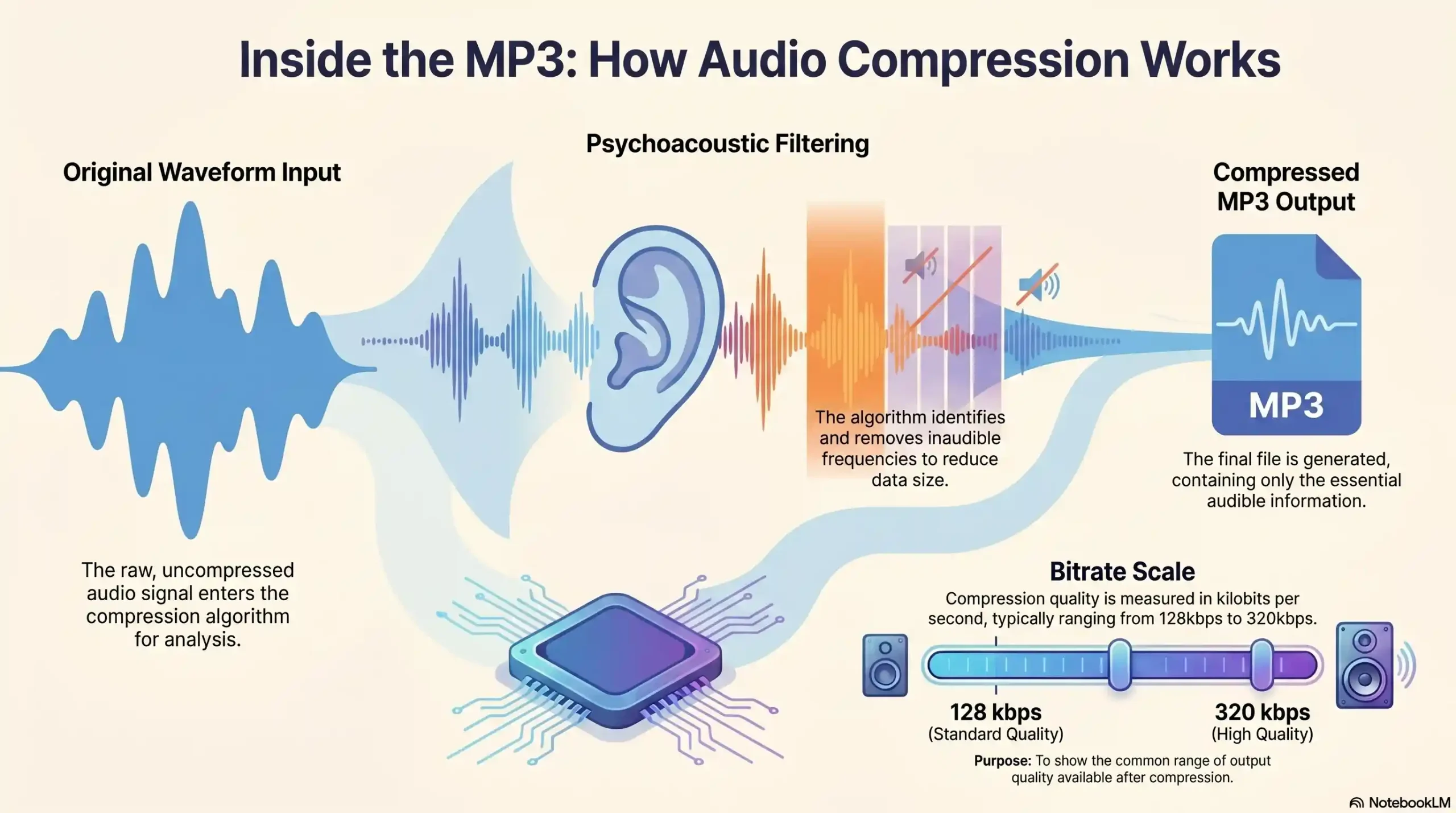
Infographic showing an original waveform entering a compression algorithm, psychoacoustic filtering, and the final compressed MP3 output
The MP3 compression algorithm removes inaudible frequencies to create a compressed output with a bitrate scale from 128kbps to 320kbps
SpecificationMP3 Detail
Full NameMPEG-1 Audio Layer III
Year Released1993 (standardized), 1994 (public)
Format TypeAudio codec + file format
Compression TypeLossy
Supported MediaAudio only
Typical Bitrates128 kbps – 320 kbps
Common File Extension.mp3
Typical File Size3–10 MB per track
Device CompatibilityNear-universal
DRM SupportLimited / not native
Best Used ForMusic, podcasts, audio-only courses

What Is MP4? (The Multimedia Container)

MP4 — formally MPEG-4 Part 14 — is not simply a “video format.” That distinction is critically important and widely misunderstood. MP4 is a digital multimedia container format, standardized by the Moving Picture Experts Group (MPEG) and released in 2001, loosely derived from Apple’s QuickTime MOV format.

Think of MP4 as a shipping container: it does not define what is inside — it defines how the contents are organized, labeled, and transported together. Inside a single MP4 file, you can simultaneously carry video streams, audio tracks, subtitles, chapter markers, still images, and rich metadata.

This architectural flexibility is precisely why MP4 became the global standard for video delivery across streaming platforms, social media, e-learning environments, and enterprise media systems.

Why MP4 Is a “Container,” Not Just a Format

The container-versus-codec distinction is one that confuses even experienced media professionals. Here is the clearest way to understand it:

  • MP3 is both a codec and a format — it defines exactly how audio data is encoded AND how the file is structured. There is no separation between the two.
  • MP4 is purely a container — it defines the file structure, but the actual compression of video and audio inside it is handled by separate codecs that you choose independently.

This means an MP4 file can contain audio encoded in AAC, MP3, FLAC, or AC3 — and video encoded in H.264, H.265/HEVC, VP9, or AV1. The container simply holds whatever codecs are placed inside it.

MP4 Technical Specs at a Glance

SpecificationMP4 Detail
Full NameMPEG-4 Part 14
Year Released2001
Format TypeMultimedia container format
Compression TypeDepends on codec (typically lossy)
Supported MediaVideo, audio, subtitles, images, metadata
Common Video CodecsH.264, H.265/HEVC, VP9, AV1
Common Audio CodecsAAC, MP3, AC3, FLAC
Common File Extension.mp4, .m4v, .m4a
DRM Support✅ Native (Widevine, PlayReady, FairPlay)
Best Used ForVideo streaming, e-learning, secure content delivery

Codecs Inside MP4: H.264, AAC, Widevine & Beyond

The most common — and recommended — codec pairing inside an MP4 container is H.264 video + AAC audio. This combination delivers an optimal balance of visual quality, audio fidelity, and file efficiency that is universally supported across browsers, mobile devices, smart TVs, and streaming platforms.

For content creators requiring maximum security, the MP4 container’s native compatibility with Widevine, PlayReady, and FairPlay DRM systems makes it the only viable format for encrypted, protected video delivery at scale.

MP3 vs MP4 — Head-to-Head Comparison

Infographic comparing MP3 (left) and MP4 (right) formats, featuring icons and visual bars that measure audio quality, file size, compatibility, streaming capability, security/DRM support, and multimedia capacity, styled in Inkrypt brand colors (#3A97ED and #7FCCFA)
A side-by-side visual comparison of MP3 and MP4 formats across key technical metrics
Comparison FactorMP3MP4
Media TypeAudio onlyAudio + Video + Subtitles + Metadata
Format ClassCodec + File FormatMultimedia Container
CompressionLossy (fixed)Depends on codec (lossy or lossless)
Audio QualityGood (up to 320kbps)Superior (AAC more efficient than MP3)
Video Support❌ None✅ Full support
File SizeSmall (3–10MB typical)Larger (varies widely by codec/resolution)
Streaming SupportLimited✅ Optimized for adaptive streaming
DRM / Encryption❌ Not supported natively✅ Widevine, PlayReady, FairPlay
Device CompatibilityNear-universalExcellent (all modern devices)
Subtitle Support
Best ForMusic, podcasts, audio downloadsVideo courses, streaming, secure media

Audio Quality

At equivalent bitrates, AAC-encoded audio inside an MP4 container consistently outperforms MP3 in measurable quality metrics. AAC achieves better frequency reproduction and fewer compression artifacts at the same file size — which is why Spotify, Apple Music, YouTube, and virtually every major streaming platform have transitioned from MP3 to AAC as their default audio codec.

For spoken-word content — such as online course narration or instructional audio — the quality difference between MP3 at 192kbps and AAC inside MP4 is negligible for most listeners. However, for music-rich content or cinematic productions, the gap becomes meaningful.

File Size & Compression

MP3 files are inherently smaller because they carry only audio data. A typical 4-minute song at 320kbps MP3 occupies roughly 9MB. An equivalent MP4 video file at 1080p resolution with the same audio track can range from 300MB to over 1GB depending on video complexity and encoding settings.

For audio-only distribution where file size is the priority — podcast feeds, downloadable audio supplements for courses — MP3 remains the more practical choice. For anything involving video, MP4’s compression efficiency via H.264 or H.265 makes it the clear winner.

Device & Platform Compatibility

Both formats enjoy broad device support in 2025. MP3 has a slight edge in legacy device compatibility — older car stereos, early-generation MP3 players, and basic mobile phones. MP4 dominates on every modern platform: browsers, smartphones, tablets, smart TVs, streaming boxes, and enterprise media systems all handle MP4 natively without additional plugins.

Streaming & Online Delivery

MP4 is purpose-built for internet streaming. Its internal file structure supports progressive download and adaptive bitrate streaming (ABR) — meaning viewers can begin watching before the entire file has downloaded, and the quality automatically adjusts to available bandwidth. MP3 supports basic streaming for audio but lacks the structural flexibility for adaptive delivery.

Which Format Should You Use? (Use Case Decision Guide)

Choosing between MP3 and MP4 is not a quality debate — it is a use case decision based on your content type, delivery method, and audience needs.

When to Use MP3

MP3 is the right choice when:

  • Your content is audio-only with no visual component
  • You are distributing podcast episodes via RSS feeds
  • You need maximum device compatibility, including legacy playback devices
  • File size and bandwidth efficiency are the primary constraints
  • You are offering downloadable audio supplements alongside video courses

When to Use MP4

MP4 is the right choice when:

  • Your content includes any video element — lectures, tutorials, demonstrations
  • You need DRM protection to prevent unauthorized downloading or piracy
  • You are delivering content through a secure streaming platform
  • Your audience spans multiple devices and you need adaptive playback
  • You require subtitle or chapter support for accessibility or navigation

For Online Course Creators & E-Learning Platforms

For the growing ecosystem of online educators, coaches, and e-learning platform operators, the answer is almost always MP4 — and the reasoning goes beyond simple format preference.

When you invest months building a premium video course, the format you choose determines whether that content can be meaningfully protected. MP4’s native support for Widevine and PlayReady DRM means your video files can be encrypted at the container level, preventing screen recording, illegal redistribution, and credential sharing.

MP3 audio content, by contrast, has virtually no native DRM pathway — once an MP3 file is downloaded, its protection depends entirely on platform-level access controls, which are far easier to circumvent.

🚀 Protect Your MP4 Content Like the Pros

You’ve chosen the right format. Now make sure it’s actually protected. Inkrypt Videos delivers enterprise-grade DRM encryption, dynamic video watermarking, and global CDN performance — purpose-built for course creators and premium content publishers.

MP3 vs MP4 for Content Security — Why Format Choice Matters

For casual media consumers, the MP3 vs MP4 debate is largely academic. For content creators whose livelihood depends on their video library, it is a business-critical decision.

Why MP4 Is the Industry Standard for DRM-Protected Streaming

Digital Rights Management — DRM — is the technology layer that controls how, where, and by whom digital content can be accessed and played. All major DRM systems in use today — Google Widevine, Microsoft PlayReady, and Apple FairPlay — are architected specifically around the MP4 container format.

This is not a coincidence. MP4’s multi-track container structure allows DRM license data, encryption keys, and content metadata to be embedded and managed within the file itself. When a user attempts to play a DRM-protected MP4, their device must first authenticate with a license server before decryption is permitted — making unauthorized playback technically infeasible without the correct credentials.

MP3 has no equivalent DRM architecture. It is structurally incapable of carrying the metadata and encryption scaffolding that modern DRM systems require.

The Hidden Risk of Unprotected MP4 Video Files

Choosing MP4 does not automatically mean your content is protected. An unencrypted MP4 file hosted on a basic server or unprotected platform is as vulnerable as any other digital file — it can be downloaded, copied, screen-recorded, and redistributed with minimal technical effort.

The protection does not come from the format itself. It comes from the combination of MP4’s DRM-compatible architecture and a secure video hosting platform that activates that architecture through encryption, token authentication, and dynamic watermarking.

Course creators who upload MP4 files to generic hosting solutions or unprotected CDNs often discover, too late, that their content has been redistributed on torrent sites, Telegram channels, and competing platforms — costing them significant revenue.

How Encrypted Video Hosting Solves the Problem

A purpose-built secure video platform takes the MP4 container’s DRM capabilities and activates them fully:

  • Widevine & PlayReady Encryption — Content is encrypted at rest and in transit; only authenticated users can decrypt playback
  • Dynamic Watermarking — Each viewer’s session carries a unique, invisible identifier embedded directly into the video stream, enabling forensic tracing of leaked content
  • Token-Based Access Control — Time-limited, device-specific playback tokens prevent URL sharing and credential abuse
  • Anti-Screen-Recording Protection — Platform-level measures actively interfere with screen capture attempts on supported browsers and devices

🔐 Your MP4 Content Deserves Military-Grade Protection

Unprotected video is stolen video — it’s only a matter of time. Inkrypt Videos combines Widevine DRM, dynamic watermarking, and Amazon CDN delivery to give your MP4 content the protection it was architecturally designed to support.

How to Convert Between MP3 and MP4

There are two common conversion scenarios content creators encounter: extracting audio from a video file, and wrapping an audio file inside a video container.

Converting MP4 to MP3 (Audio Extraction)

This is the most common conversion task — extracting a clean audio track from a video recording to create a standalone podcast episode, audio summary, or downloadable supplement.

Popular tools include FFmpeg (command-line, professional-grade), VLC Media Player (free, cross-platform GUI), Audacity (free, with editing capabilities), and various browser-based converters for occasional use.

A critical point: when you extract MP3 audio from an MP4 file, you are re-encoding the audio through a second compression pass. If the original audio was encoded at high quality (AAC 192kbps+), the resulting MP3 will be acceptable. However, re-encoding already-compressed audio at low bitrates introduces generation loss — compounding compression artifacts that degrade quality beyond the original encoding.

Converting MP3 to MP4 (Adding Visuals to Audio)

The reverse scenario — placing an MP3 audio track inside an MP4 container — is common for creators who want to distribute audio content through video platforms like YouTube, which require a video stream. This is typically done by pairing the audio with a static image, waveform visualization, or simple title card.

Tools like FFmpeg, Adobe Premiere Pro, DaVinci Resolve, and iMovie all handle this workflow efficiently.

What to Watch Out For During Conversion

  • Never re-encode lossless to lossy multiple times — each pass degrades quality
  • Match output bitrate to source bitrate — downgrading unnecessarily wastes quality; upgrading is pointless (you cannot recover discarded data)
  • Preserve metadata — artist tags, chapter markers, and subtitles can be lost during conversion if your tool does not explicitly carry them forward
  • Check DRM status before converting — DRM-protected MP4 files cannot be legally converted or re-encoded without license authorization

📚 Resources & Citations

ISO — International Organization for Standardization: ISO/IEC 14496-14:2020 (MP4 File Format Standard) The official international body that formally defines and maintains the MP4 file format specification (MPEG-4 Part 14) — reference this to verify the technical definition of MP4 as a multimedia container standard.

Fraunhofer IIS — The Official Inventors of MP3 The German research institute that created and standardized the MP3 format — visit for authoritative technical documentation on how MP3 compression, psychoacoustic modeling, and bitrate encoding actually work at the source level.

Library of Congress — Recommended Formats Statement (Audio & Moving Image) The U.S. government’s official guide identifying preferred and acceptable digital formats for long-term preservation — consult this to understand how authoritative institutions classify MP3 and MP4 for archival and content longevity decisions.

W3C — Media Source Extensions Specification The World Wide Web Consortium’s official technical specification governing how MP4 and other formats are handled for adaptive bitrate streaming inside web browsers — the foundational standard behind how your MP4 video content is delivered on the open web.

🎯 Ready to Deliver and Protect Your Premium Video Content?

Understanding formats is step one. Protecting what’s inside them is what separates professional content businesses from vulnerable ones. Inkrypt Videos gives your MP4 content unbreakable Widevine DRM encryption, forensic watermarking, and blazing-fast Amazon CDN delivery — all with a 30-minute integration.

Frequently Asked Questions

The main difference between MP3 and MP4 is their media scope. MP3 is an audio-only compression format designed exclusively for sound files like music and podcasts. MP4 is a multimedia container format that holds video, audio, subtitles, and metadata together in a single file — making it far more versatile for modern content delivery.

MP4 is not universally better than MP3 — it depends on your use case. For audio-only content, MP3 remains efficient and universally compatible. For video content, streaming, or any scenario requiring DRM content protection, MP4 is the superior choice. The two formats serve fundamentally different purposes rather than competing directly.

Yes, an MP4 file can contain only audio with no video stream. The MP4 container is flexible enough to hold audio-only content, commonly saved with the .m4a extension. This audio uses AAC encoding inside the MP4 container — typically delivering better sound quality than an equivalent MP3 file at the same bitrate.

MP4 is the standard format for online video courses. Unlike MP3, MP4 natively supports DRM encryption systems like Widevine and PlayReady, adaptive bitrate streaming, subtitle tracks, and chapter markers. For course creators who need to protect premium content from piracy and credential sharing, only MP4 provides the security architecture required.

MP4 generally delivers better audio quality than MP3 at equivalent bitrates. Audio encoded with AAC — the standard codec inside MP4 — preserves more detail and produces fewer compression artifacts than MP3 at the same file size. For spoken-word content the difference is subtle, but for music-rich or cinematic audio, AAC inside MP4 is measurably superior.

MP3 files cannot be protected with modern DRM encryption natively. MP3’s structure lacks the technical architecture required by DRM systems like Widevine, PlayReady, and FairPlay. These systems are built specifically around the MP4 container format. Content creators who need meaningful piracy protection must use MP4 with a DRM-enabled secure video hosting platform.

Video streaming platforms use MP4 instead of MP3 because MP4 supports the full technical stack required for professional streaming — including adaptive bitrate delivery, multi-language audio tracks, subtitle embedding, DRM encryption, and metadata management. MP3 supports audio streaming only and lacks the container architecture needed for video, interactivity, or content protection at scale.

MP4 supports chapter markers, images, and better mobile metadata, which improves podcast features and compatibility.

Use a lightweight converter app or an online converter that exports audio-only MP3 from an MP4 file—no re-recording needed.

Not necessarily; storage depends on codecs and bitrate—an audio-only MP4/AAC can be same size or smaller than an MP3 at comparable quality.

Most modern car stereos and smart speakers support MP3 and MP4/AAC; check your device specs if it’s older.

Streaming services typically use AAC or other modern codecs in container formats for efficiency, not raw MP3 files.

Disclaimer: This guide is for informational purposes only. Media format standards, codec efficiencies, and DRM compatibility may evolve over time. References to specific security features and encryption capabilities reflect the offerings of the Inkrypt Videos platform at the time of publication. Always verify current technical requirements before finalizing your media delivery strategy.

Comments are closed.