
To secure course videos on an LMS platform, creators need a multi-layered security approach that includes DRM encryption, dynamic watermarking, screen recording prevention, token-based authentication, and domain locking. Basic password protection offered by most LMS platforms is insufficient against modern piracy threats. A dedicated secure video hosting solution — integrated directly with your LMS — is the only reliable way to protect premium course content, prevent unauthorized sharing, and safeguard the revenue your content generates.
If you have spent months — or years — building a premium online course, your video content is your most valuable business asset. But right now, without the right protection in place, that asset is vulnerable. Students are downloading your videos, sharing login credentials, and screen-recording your lessons. And your LMS platform’s built-in security? It was never designed to stop any of it.
This guide gives you the complete, expert-level framework for securing your course videos — from understanding the real threats you face, to implementing military-grade protection that actually works.
Why Course Video Security Is a Business-Critical Priority
Most course creators discover their security problem the hard way — when a student finds their content uploaded to a piracy site, or when enrollment numbers stagnate despite growing organic traffic. Video piracy is not a hypothetical risk. It is an active, ongoing drain on your business.
The Real Cost of Video Piracy for Course Creators
Industry estimates suggest that digital content piracy costs creators and publishers billions of dollars annually. For individual course creators, the impact is deeply personal: a single pirated course upload can circulate across dozens of file-sharing platforms within days, permanently undermining your ability to monetize that content. Every unauthorized viewer is a paying student you will never convert.
Beyond direct revenue loss, piracy damages your brand authority. When your premium content is available for free — however illegally — it signals to the market that your course is not worth paying for.
How Credential Sharing Silently Drains Your Revenue
Credential sharing is the threat most course creators completely overlook. Unlike piracy, it happens quietly, inside your platform, committed by people who did legitimately purchase access. One student buys a course and shares their login with five friends. Your analytics show one active user. Your revenue reflects one sale. The reality is six people consuming your content.
At scale, this is catastrophic. A course with 500 enrolled students could realistically be consumed by 2,000–3,000 people. That gap between actual and potential revenue is your credential-sharing loss — and most LMS platforms have no mechanism to detect or prevent it.
Understanding the Threat Landscape
Before you can protect your content, you need to understand precisely how it is being attacked. Course video theft does not happen in one way — it happens in four.
Illegal Downloading & Redistribution
The most visible threat. Students use browser extensions, download managers, or network inspection tools to capture video files directly from your LMS. Once downloaded, that file can be uploaded to Telegram channels, piracy forums, or resold on grey-market course platforms. To understand just how many learners actively use video download and piracy tools, the numbers are far higher than most course creators expect. Standard video hosting with no DRM encryption makes this trivially easy.
Screen Recording Attacks
Even when downloading is blocked, screen recording remains a persistent threat. Software like OBS, Camtasia, or even built-in OS tools allow students to capture your video content in real time. Without player-level screen recording detection and blocking, every lesson you publish is one screen-record away from redistribution.
Login Credential Sharing
As detailed above, credential sharing is the silent revenue killer. Without concurrent session limits, device fingerprinting, or behavioral anomaly detection, your platform cannot distinguish between one legitimate user and five people sharing a single account.
Geo-Exploitation & Unauthorized Access
If your course is priced differently across markets — or restricted to specific regions for licensing reasons — geo-exploitation is a real risk. Students using VPNs or proxy servers can bypass geographic restrictions, access content they are not authorized for, or purchase at a lower regional price point and share access globally.
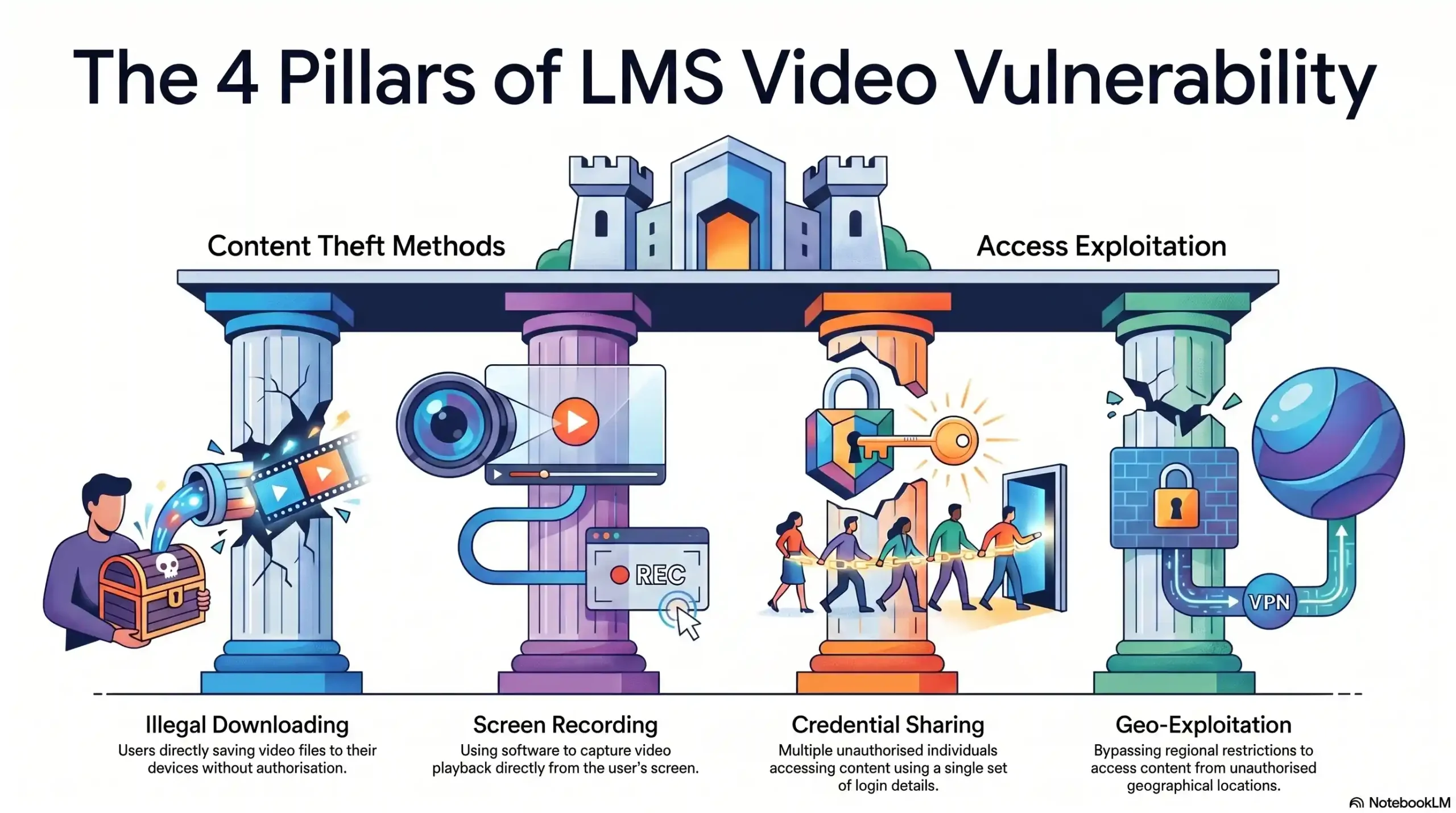
Illegal Downloading
- Method used: Browser extensions, download managers
- Detection difficulty: Low — easily automated
- Revenue impact: Very High
Screen Recording
- Method used: OBS, Camtasia, OS-native tools
- Detection difficulty: Medium — requires player-level blocking
- Revenue impact: High
Credential Sharing
- Method used: Single login shared across multiple users
- Detection difficulty: High — invisible in standard analytics
- Revenue impact: Very High
Geo-Exploitation
- Method used: VPNs, proxy servers
- Detection difficulty: Medium — requires IP intelligence
- Revenue impact: Medium–High
The Difference Between Basic Protection and Real DRM Security
This is the knowledge gap that leaves most course creators exposed. They believe they are protected. They are not.
What Password Protection Actually Does (And Doesn’t Do)
Password protection — the security layer built into virtually every LMS platform — does exactly one thing: it verifies that a user knows a password before granting access. That is the entirety of its protection.
It does not encrypt your video files. It does not prevent downloading. It does not block screen recording. It does not detect credential sharing. Once a student is authenticated, your video content is completely unprotected. The password was the only barrier, and it has already been cleared.
What True DRM Encryption Means for Your Content
Digital Rights Management (DRM) encryption operates at a fundamentally different level. Instead of simply gating access, DRM encrypts the video file itself — meaning the content cannot be played outside of an authorized, licensed environment, regardless of how it was obtained.
Industry-standard DRM systems such as Google Widevine and Apple FairPlay ensure that even if a student somehow captures the encrypted video file, it is completely unplayable without the license key — which is only issued to authenticated, authorized sessions. Your content remains protected at the file level, not just the login level.
Why Most LMS Platforms Leave You Exposed
Platforms like Teachable, Thinkific, Kajabi, and similar LMS solutions are built to deliver learning experiences — not to function as content security infrastructure. Their video handling typically relies on basic hosting with minimal encryption, no forensic watermarking, and no screen recording prevention. This is not a criticism — it is simply not their core function. The responsibility for real content security requires a dedicated solution built specifically for that purpose.
🔵 Discover how Inkrypt Videos delivers military-grade DRM protection built specifically for course creators.
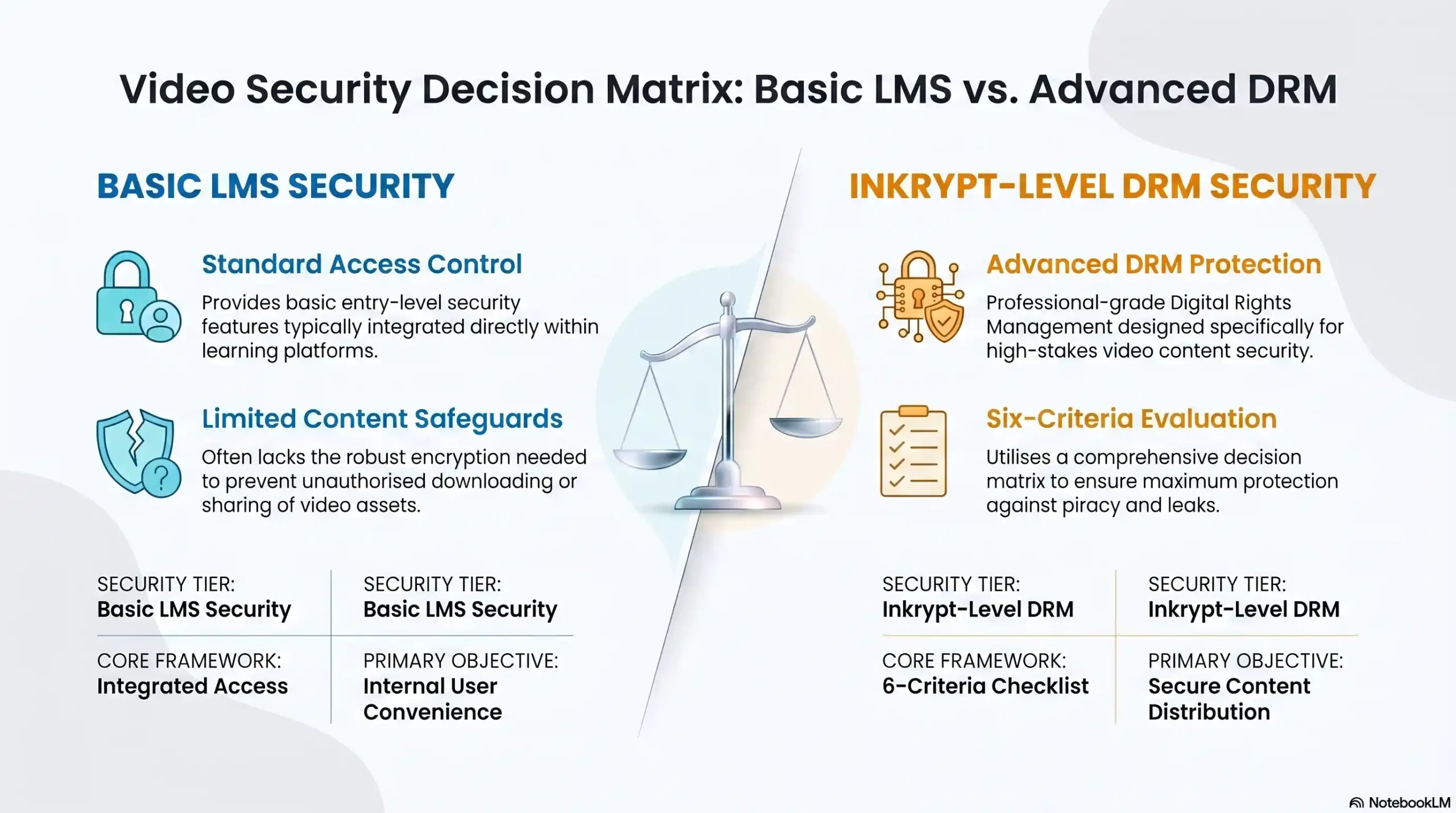
Video File Encryption
- Basic LMS security: ❌ None
- Inkrypt-level DRM security: ✅ Multi-DRM (Widevine, FairPlay, PlayReady)
Watermarking
- Basic LMS security: ❌ None or Static
- Inkrypt-level DRM security: ✅ Dynamic & User-Specific
Screen Recording Block
- Basic LMS security: ❌ Not Available
- Inkrypt-level DRM security: ✅ Player-Level Detection & Block
Credential Sharing Prevention
- Basic LMS security: ❌ No Detection
- Inkrypt-level DRM security: ✅ Token Auth + Session Limits
Geo-Restriction Controls
- Basic LMS security: ⚠️ Limited
- Inkrypt-level DRM security: ✅ Full Geo + VPN Detection
Real-Time Threat Analytics
- Basic LMS security: ❌ Basic Reporting
- Inkrypt-level DRM security: ✅ Forensic-Grade Dashboard
Inkrypt Videos — Built for Course Creators Who Can’t Afford a Breach
Inkrypt Videos was designed with a single, uncompromising mandate: to give course creators and content publishers the same level of content protection that major streaming platforms use — without the complexity, cost, or developer dependency that makes enterprise DRM inaccessible to independent creators.
Military-Grade DRM With Zero Buffering
Inkrypt’s multi-DRM encryption infrastructure secures your content at the file level across every device and browser environment — while its global delivery architecture ensures that security overhead never translates into buffering or playback degradation. Your students get a seamless viewing experience. Your content stays protected. These are not competing priorities at Inkrypt — they are simultaneous guarantees.
Dynamic Watermarking That Identifies Every Leak
Every video stream delivered through Inkrypt carries a unique, invisible watermark tied to the authenticated viewer’s identity. If your content is ever pirated, the watermark survives — even through screen recording and re-encoding — and traces the leak back to its source with forensic precision. This does not just protect you after a breach. It actively deters piracy before it happens, because sophisticated bad actors know that Inkrypt-protected content comes with accountability built in.
Global CDN Delivery Without Compromising Security
Powered by Amazon CDN infrastructure, Inkrypt delivers your course videos with zero-buffering performance to students anywhere in the world — from New York to Nairobi, from London to Jakarta. Choosing the right video delivery platform with CDN and encryption support is one of the most impactful decisions a course creator can make for both security and student experience. Global reach and uncompromising security are delivered as a single, unified solution.
Universal Device Compatibility Including Older Devices
Unlike enterprise DRM solutions that require modern browsers and devices — effectively excluding significant portions of global student populations — Inkrypt’s compatibility layer extends full DRM protection to older devices that most platforms simply abandon. For course creators with global student bases, this is not a minor convenience. It is a market-access advantage.
Step-by-Step: Securing Your LMS Videos with Inkrypt
Getting your course content protected with Inkrypt is designed to be completed in a single working session — no developer, no complex infrastructure project, no extended onboarding window.
Step 1 — Connect Your LMS or Upload Your Content
Begin by connecting Inkrypt to your existing LMS through the available WordPress plugin, direct API integration, or manual upload workflow. Inkrypt’s integration layer is built to work with the platforms course creators already use — without requiring you to migrate your entire course infrastructure.
Step 2 — Apply DRM Encryption & Watermarking Settings
Once your content is connected, apply your DRM encryption settings and configure your dynamic watermarking parameters — including which student-specific data fields (email, user ID, enrollment date) are embedded into each unique video stream. Before configuring your setup, it is worth reviewing the 7 key things to consider when selecting the right DRM software to ensure your settings align with your specific content protection needs. This configuration takes minutes, not hours.
Step 3 — Configure Access Controls & Domain Lock
Set your domain locking parameters to restrict playback to your authorized course domain. Configure geo-restriction rules if your course has regional licensing requirements. Establish concurrent session limits and token expiry windows to neutralize credential-sharing risk at the authentication level.
Step 4 — Go Live & Monitor via the Analytics Dashboard
With security configured, publish your content and activate real-time monitoring through Inkrypt’s analytics dashboard. Set alert thresholds for suspicious activity — unusual access patterns, concurrent session anomalies, repeated authentication failures — so your security system is actively watching your content, even when you are not.
📌 Local Resources & Citations
U.S. Copyright Office — The Digital Millennium Copyright Act (DMCA) The official federal authority on digital copyright law — refer here to understand the legal protections available to course creators against unauthorized circumvention of your video encryption and DRM systems.
World Intellectual Property Organization (WIPO) — Copyright & Digital Content Protection The international governing body for intellectual property rights — consult WIPO’s copyright framework to understand how your course content is protected under global IP law across the 193 member states where your students may be located.
U.S. Patent & Trademark Office (USPTO) — Digital Rights Management Technology Report The USPTO’s official technical report on DRM systems explains the legal and technological framework behind content encryption — valuable reading for course creators who want to understand the standards their security solution should meet.
Federal Trade Commission (FTC) — Data Security Guidance for Businesses The FTC’s official data security resource for businesses outlines the baseline practices expected of any platform handling user data — directly relevant to LMS operators managing student credentials, payment data, and access records.