

How to Encrypt Video Files: AES & DRM Methods Compared

A 3D illustration of a glowing video play button secured inside a digital vault, flanked by a padlock and a security shield, symbolizing the combined security of AES encryption and DRM.

Video file encryption works by converting your content into an unreadable format using a cryptographic key, ensuring only authorized users can access it. The two primary methods are AES encryption β€” which scrambles the video data itself β€” and DRM (Digital Rights Management), which controls how, where, and by whom the decrypted content can be played. For maximum protection, professionals combine both: AES to encrypt the file and DRM to enforce access rules.

Why Video Encryption Is No Longer Optional

Every 60 seconds, pirated content generates thousands of unauthorized views. For online course creators, media companies, and premium content publishers, that statistic is not an abstract threat β€” it is lost revenue, stolen intellectual property, and a direct attack on the business model they have spent years building.

The uncomfortable truth is that most video creators are operating with a false sense of security. Uploading content to a standard video hosting platform or password-protecting a webpage is not encryption. It is the digital equivalent of locking your front door while leaving the windows wide open.

Consider the real cost of video piracy prevention failures. A single leaked course module shared in a private Telegram group can circulate among hundreds of non-paying users within hours. An enterprise training video downloaded by a departing employee becomes a competitive liability overnight. A premium media publisher’s exclusive documentary, screen-recorded and re-uploaded to a piracy site, directly cannibalizes subscriber revenue for months after the breach.

The question is no longer whether to encrypt your video files. The question is which method to use β€” and whether the video content protection method you have chosen actually works in the real world.

What Is AES Video Encryption? (And How It Works)

AES stands for Advanced Encryption Standard. It is a symmetric encryption algorithm adopted by the U.S. National Institute of Standards and Technology (NIST) in 2001 and remains the global benchmark for securing digital data β€” including video files.

When AES encryption is applied to a video file, the algorithm processes the raw video data through a series of mathematical transformations using an encryption key. The result is an unreadable ciphertext that can only be reversed β€” decrypted β€” by someone who possesses the correct key. Without that key, the video file is meaningless data.

AES-128 vs AES-256 β€” Which Level Do You Actually Need?

AES encryption comes in two primary key lengths relevant to video protection: AES-128 and AES-256. The number refers to the bit length of the encryption key.

SpecificationAES-128AES-256
Key Length128 bits256 bits
Encryption Rounds10 rounds14 rounds
Processing SpeedFasterSlightly slower
Security LevelExtremely highMilitary-grade
Best ForStreaming platforms, course creatorsEnterprise, government, high-value media
Brute-Force Resistance3.4 Γ— 10³⁸ combinations1.1 Γ— 10⁷⁷ combinations

For the overwhelming majority of content creators and media businesses, AES-128 provides more than sufficient protection against real-world threats. AES-256 is the appropriate choice for enterprise media companies, government-adjacent content, or any situation where the content value justifies the marginal additional processing overhead.

How AES Encrypts a Video File: The Technical Process Simplified

The AES encryption process for video operates as follows. The original video file is divided into fixed-size data blocks. Each block is passed through multiple rounds of substitution, permutation, and mixing operations using the encryption key. The output is a transformed block of data that bears no resemblance to the original. This process is applied to the entire video file sequentially, producing a fully encrypted file that requires the original key to reconstruct.

In video streaming contexts, AES is most commonly implemented through HLS (HTTP Live Streaming) encryption, where the video is segmented and each segment is encrypted individually. The decryption key is delivered to the authenticated player separately, allowing seamless playback for authorized users while blocking unauthorized access.

The Critical Limitation of AES Encryption Alone

Here is where most guides fail their readers. AES encryption is extraordinarily strong at protecting data at rest and in transit. However, it has a fundamental vulnerability in video delivery: once the decryption key is delivered to the player and the video begins playing, AES has done its job and stepped aside.

This means a determined attacker who intercepts the decryption key β€” or who simply points a screen recorder at their monitor during playback β€” can capture the decrypted video with relative ease. AES alone does not control what happens to the video after it has been decrypted. That is precisely the problem DRM was engineered to solve.
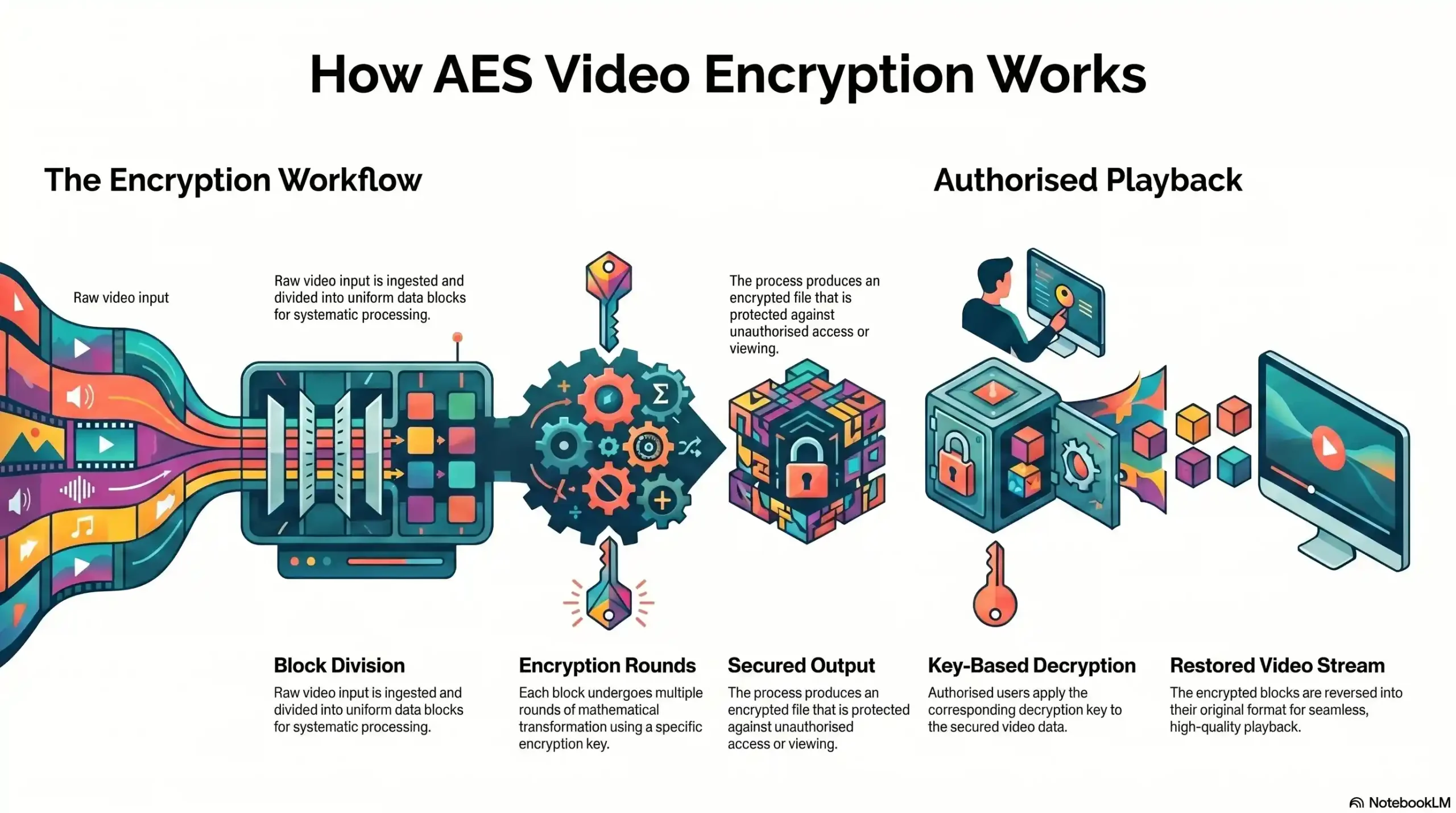
Flowchart showing AES processing from raw video input to encrypted output and decryption for authorized playback
Step-by-step workflow of AES video encryption
StageProcessSecurity Layer
Raw Video InputOriginal unencrypted video fileNone
Block DivisionFile split into fixed data blocksStructural
Key GenerationUnique AES-128/256 key createdCryptographic
Encryption Rounds10–14 transformation rounds applied per blockCryptographic
Encrypted OutputUnreadable ciphertext stored/transmittedActive Protection
Key DeliverySecure key sent to authenticated player onlyAccess Control
Decryption & PlaybackVideo reconstructed for authorized viewerEndpoint

What Is DRM Protection? (And Why It’s Different From Encryption)

Digital Rights Management is not an encryption method. It is an access control and enforcement system that wraps around encrypted content to dictate the terms of its use. Where AES answers the question “how do we scramble this video?”, DRM answers the question “who is allowed to unscramble it, on which device, for how long, and under what conditions?”

Think of AES encryption as the vault and DRM as the security guard who checks credentials before anyone is allowed near the vault door β€” and who continues monitoring what they do once they are inside.

The Three Major DRM Systems Explained

The modern DRM ecosystem is built on three proprietary systems, each developed by a major technology company and optimized for their respective device and browser environments.

Widevine (Google) is the most widely deployed DRM system in the world, supporting Android devices, Chrome browser, and the majority of smart TV and streaming stick platforms. Widevine operates across three security levels β€” L1 (hardware-level, highest security), L2, and L3 (software-level) β€” with L1 required for HD and 4K content protection on certified devices.

FairPlay (Apple) is Apple’s proprietary DRM system, exclusively controlling content playback on iOS devices, macOS, and the Safari browser. Any content creator or publisher targeting Apple device users β€” which represents a significant portion of the premium content consumption market β€” must implement FairPlay or their DRM protection has a critical gap.

PlayReady (Microsoft) covers the Windows ecosystem, Microsoft Edge browser, and Xbox devices. For enterprise media companies with corporate training content, PlayReady is often a non-negotiable requirement given the Windows-dominant enterprise device landscape.

How a DRM Licensing Server Controls Video Access

The DRM licensing server is the operational heart of any DRM system. When an authorized user attempts to play DRM-protected content, the following sequence occurs: the video player sends a license request to the DRM licensing server; the server authenticates the user’s identity and verifies their entitlement; if authorized, the server issues a time-limited license containing the decryption key and the usage rules; the player decrypts and plays the content according to those rules.

Crucially, this license can specify that the content may only be played on a specific device, for a limited number of hours, without the ability to download, screenshot, or cast to an external display. This is the enforcement capability that AES alone fundamentally cannot provide.

What Is Multi-DRM and Why Does It Matter?

Multi-DRM refers to the simultaneous implementation of Widevine, FairPlay, and PlayReady within a single content protection workflow. Because each DRM system is device and browser-specific, a video protected by Widevine alone cannot be played on iOS Safari β€” leaving a significant portion of your audience either locked out or, worse, accessing an unprotected version of the content.

For any content creator or publisher with a global, multi-device audience, multi-DRM is not a premium feature β€” it is the minimum viable protection standard.

AES vs DRM β€” The Head-to-Head Comparison

Side-by-side comparison chart contrasting AES Encryption and DRM Protection across key security dimensions.
A comparison of AES and DRM covering scope, device coverage, post-playback control, complexity, and use cases.
Comparison FactorAES EncryptionDRM Protection
Primary FunctionEncrypts video dataControls access & usage rights
Protection ScopeData at rest & in transitActive playback enforcement
Screen Recording Prevention❌ Noβœ… Yes (on certified devices)
Device-Specific Control❌ Noβœ… Yes
Time-Limited Access❌ Noβœ… Yes
Download PreventionPartialβœ… Strong
Multi-Device Supportβœ… YesRequires Multi-DRM setup
Implementation ComplexityModerateHigh (without a platform)
Best Used ForSecuring video in storage/transitControlling playback experience
Standalone Sufficiency❌ Insufficient alone❌ Insufficient alone
Combined AES + DRMβœ… Industry standardβœ… Industry standard

When AES Alone Is Enough (And When It’s Not)

AES encryption alone is sufficient in exactly one scenario: when you are protecting a video file stored on a server or transmitted across a network, and you have no concerns about what happens to the file once it reaches an authenticated user. Internal corporate archives, encrypted backups, and file transfer security are legitimate AES-only use cases.

For any scenario involving video playback to an end user β€” online courses, streaming media, premium content subscriptions β€” AES alone is demonstrably insufficient.

When You Need Full DRM Protection

Full DRM protection is required whenever your content has ongoing commercial value, whenever your audience accesses content on consumer devices, and whenever unauthorized distribution would cause measurable financial or reputational damage. If you are monetizing video content in any form, you need DRM. The question is only which implementation best fits your infrastructure.

The Winning Combination: AES + DRM as a Unified System

The industry standard for professional video content protection is neither AES nor DRM in isolation β€” it is both, operating as a unified system. AES-256 or AES-128 encrypts the video content at the file level, ensuring the data is unreadable in storage and transit. Multi-DRM then governs the decryption and playback environment, enforcing usage rules at the device level and preventing post-decryption exploitation. Together, they close the two fundamental attack surfaces that each system leaves open individually.

Still relying on a single-layer solution to protect your premium content? Inkrypt Videos combines AES encryption with full Multi-DRM (Widevine, FairPlay & PlayReady) in a single platform β€” no enterprise IT team required.

How to Encrypt Video Files β€” Step-by-Step Implementation

Step 1 β€” Choose Your Encryption Standard (AES-128 or AES-256)

Begin by assessing the commercial value and sensitivity of your content. For online course creators and standard media publishers, AES-128 provides robust protection with optimal streaming performance. For enterprise media companies, compliance-sensitive organizations, or any content with exceptionally high commercial value, AES-256 is the appropriate standard. Document your choice as part of your security policy β€” this decision affects your key management infrastructure downstream.

Step 2 β€” Select a DRM Framework Compatible With Your Audience

Audit your audience’s device ecosystem before you select a DRM framework compatible with their needs. If your audience is primarily iOS-based, FairPlay is non-negotiable. If your content is consumed across Android, smart TVs, and web browsers, Widevine is your primary framework. For enterprise audiences on Windows devices, PlayReady must be included. In practice, any creator with a mixed-device global audience should implement Multi-DRM from the outset rather than attempting to retrofit additional DRM systems later.

Step 3 β€” Integrate With a Secure Video Hosting Platform

Implementing AES encryption and multi-DRM from scratch requires significant engineering resources β€” DRM licensing server infrastructure, key management systems, CDN integration, and ongoing security maintenance. For the vast majority of content creators and publishers, the practical path to implementation is integrating with a purpose-built secure video hosting platform that manages this infrastructure on their behalf. You can also explore a cloud video hosting platform comparison to find the best fit. Evaluate platforms on their DRM coverage, CDN performance, analytics capabilities, and integration complexity.

Step 4 β€” Configure Key Rotation and Token-Based Access

Key rotation is the practice of periodically replacing the encryption keys used to protect your content, ensuring that a compromised key has a limited window of exploitability. Token-based access control adds a second layer by requiring each playback session to present a time-limited, user-specific access token before a DRM license is issued. Together, key rotation and tokenized access eliminate two of the most common attack vectors against DRM-protected content.

Step 5 β€” Test Across Devices and Browsers

Before deploying encrypted content to your audience, conduct systematic playback testing across all target devices and browsers: Chrome on Android (Widevine), Safari on iOS (FairPlay), Edge on Windows (PlayReady), and major smart TV platforms. Verify that DRM licenses are issued correctly, that key rotation does not interrupt playback, and that your analytics platform is capturing engagement data accurately. A protection system that degrades the viewer experience will drive your audience toward finding unprotected alternatives.

Ready to implement AES + Multi-DRM protection without the engineering overhead? Inkrypt Videos is built for creators who need enterprise-grade security without enterprise-level complexity. Setup takes 30 minutes. Protection starts immediately.

Advanced Video Security: Beyond Basic Encryption

Dynamic Watermarking β€” Your Forensic Safety Net

Even the most robust AES + DRM implementation cannot prevent a determined attacker from pointing a professional camera at a high-resolution display. This is where dynamic watermarking becomes your forensic tracking safety net. Unlike static watermarks that can be cropped or obscured, dynamic watermarks embed invisible, viewer-specific identifiers directly into the video stream at the pixel level during playback. If a watermarked copy of your content surfaces on a piracy platform, forensic analysis of that copy will identify exactly which authorized user account was the source of the leak β€” enabling targeted enforcement action and acting as a powerful deterrent against insider threats.

CDN-Level Security and Global Delivery Performance

Content security and content performance are not competing priorities β€” they are interdependent. You can learn more about how to select the best video delivery platforms with CDN encryption support to understand how CDN-level security integrates access control, DRM license delivery, and encrypted content distribution through a globally distributed network of edge servers β€” ensuring that both security enforcement and playback performance are maintained regardless of where your audience is located. A secure video platform that cannot deliver content reliably to a global audience creates the worst of both worlds: frustrated legitimate users who seek alternatives, and a security architecture that has not been battle-tested at scale.

Analytics and Threat Detection β€” Knowing When You’ve Been Breached

An encryption and DRM system without analytics is a security system without alarms. Real-time analytics allow you to detect anomalous viewing patterns β€” multiple simultaneous streams from a single account, geographic access from unexpected locations, or unusual playback durations β€” that signal a credential sharing incident or active security breach. Forensic-grade tracking, combined with dynamic watermarking data, creates a complete threat detection and response capability that transforms your video security from reactive to proactive.

πŸ“š Resources & Citations

1. NIST β€” FIPS 197: Advanced Encryption Standard (AES) The official U.S. government publication that defines and standardizes the AES algorithm (AES-128, AES-192, and AES-256) β€” use this to verify the technical specifications of any encryption standard claimed by a video security vendor.

2. CISA β€” Encryption Guidance for Organizations The Cybersecurity and Infrastructure Security Agency’s official guidance on implementing encryption policies β€” useful for enterprise and compliance-sensitive organizations that need to align their video protection practices with U.S. federal cybersecurity standards.

3. W3C β€” Encrypted Media Extensions (EME) Specification The World Wide Web Consortium’s official technical specification that defines how DRM systems communicate with web browsers β€” the foundational standard behind Widevine, FairPlay, and PlayReady cross-browser DRM enforcement.

4. NIST β€” Cryptographic Standards & Guidelines Resource Center NIST’s central hub for all approved cryptographic algorithms and key management recommendations β€” reference this when evaluating whether a platform’s encryption implementation meets government-grade security benchmarks.

Choosing the Right Video Encryption Solution for Your Business

For Online Course Creators & Coaches

Your primary threat is content piracy and credential sharing. Your primary constraint is technical complexity β€” you need enterprise-grade protection without requiring an in-house engineering team to implement or maintain it. The ideal solution combines AES encryption, multi-DRM support, dynamic watermarking, and a simple integration path with your existing course platform, all managed through a single dashboard. Setup time should be measured in minutes, not weeks.

For Enterprise Media & Entertainment Companies

Your requirements extend beyond basic content protection. You need demonstrable compliance with industry DRM standards, forensic-grade tracking for legal accountability, SLA-backed performance guarantees, and a scalable infrastructure capable of handling simultaneous high-volume streaming events. Integration with existing content management and distribution workflows is non-negotiable. Evaluate solutions on their Widevine L1 certification status, their forensic watermarking capabilities, and their enterprise support infrastructure.

For Premium Content Publishers

Your content is your competitive advantage. Any security solution that creates friction for legitimate subscribers β€” slow load times, device incompatibility, interrupted playback β€” directly damages the subscription experience you are charging a premium to deliver. Your solution must be invisible to authorized users while being impenetrable to unauthorized ones. Prioritize platforms that combine security robustness with global CDN performance and detailed subscriber engagement analytics.

Whether you are a solo course creator or an enterprise media company, Inkrypt Videos has a protection plan built for your scale. Real security for real creators β€” at every level.

Frequently Asked Questions

AES (Advanced Encryption Standard) video encryption is a cryptographic method that converts video file data into an unreadable format using a mathematical key. Only users with the correct decryption key can access the content. It is the global benchmark for securing digital data and is used in both video storage and streaming protection systems.

AES encryption scrambles video data to prevent unauthorized access during storage and transmission. DRM (Digital Rights Management) controls how, where, and by whom the decrypted video can be played. AES secures the file itself; DRM enforces the rules around its use. Professional video protection requires both working together as a unified system.

No. AES encryption is highly effective at securing video data in storage and transit, but it cannot control what happens after the video is decrypted and begins playing. A determined attacker can use screen recording tools to capture unprotected playback. DRM protection must be layered on top of AES to enforce playback-level security.

The three primary DRM systems are Widevine (Google), FairPlay (Apple), and PlayReady (Microsoft). Widevine covers Android devices and Chrome browsers; FairPlay governs iOS and Safari; PlayReady protects Windows and Edge environments. A Multi-DRM solution implementing all three is required for complete cross-device video protection across a global audience.

Multi-DRM is the simultaneous implementation of Widevine, FairPlay, and PlayReady within a single content protection workflow. Because each DRM system is device-specific, using only one leaves significant portions of your audience unprotected. Any creator or publisher with a multi-device global audience requires Multi-DRM as the minimum viable content protection standard.

To encrypt a video file for streaming: (1) Choose AES-128 or AES-256 as your encryption standard. (2) Select a compatible Multi-DRM framework for your audience’s devices. (3) Integrate with a secure video hosting platform. (4) Configure key rotation and token-based access control. (5) Test playback across all target devices and browsers before going live.

Dynamic watermarking embeds invisible, viewer-specific identifiers directly into the video stream at the pixel level during playback. Unlike static watermarks, these cannot be cropped or removed. If watermarked content appears on a piracy platform, forensic analysis identifies the exact source account of the leak β€” enabling enforcement action and deterring insider threats.

Yes, but downloads will be unreadable without the decryption key or authorized player. Encryption protects content, not the file’s existence

AES-GCM is often preferred because it provides encryption plus integrity protection. AES-CTR is also common for streaming use cases

No system is perfect. DRM can reduce copying and enforce playback rules, but screen capture is still possible in some environments

Yes. HLS can use AES to encrypt segments, but it offers fewer playback controls than a full DRM system

Yes. Google says FAQPage structured data can still help search engines understand content, even though broad FAQ rich results are limited.

Conclusion

The choice between AES and DRM is a false one. Both technologies are necessary. Both serve distinct and complementary roles in a complete video content protection architecture. AES encryption secures your content at the data level. DRM enforces your access rules at the playback level. Together, augmented by dynamic watermarking, CDN-level security, and real-time analytics, they constitute the non-negotiable standard for any creator or organization whose business depends on the value of their video content.

The cost of implementing robust video encryption has never been lower. The cost of failing to do so has never been higher. The only remaining question is whether your current solution is actually providing the protection you believe it is β€” or whether it is giving you the false confidence that sophisticated pirates are counting on.

Real security for real creators. That is the only standard worth holding.

Disclaimer: This article is provided for informational and educational purposes. While combining AES encryption and Multi-DRM represents the industry standard for content protection, no digital security system is completely immune to piracy or determined threat actors. Content creators and businesses should evaluate their specific risk profiles and technical requirements before implementing any security solution.

Comments are closed.