
H.264 — also called AVC (Advanced Video Coding) or MPEG-4 Part 10 — is a lossy video compression standard finalized in 2003 and still the most widely deployed video codec in the world. It shrinks raw video by roughly 80% by intelligently discarding visual data the human eye barely notices, which is what makes online streaming, video calls, and course delivery possible without enormous file sizes. Video encoding is the process of converting raw footage into this compact, shareable digital format using a codec. In short: H.264 is the invisible technology that lets high-quality video travel across the internet — but compressing a video and protecting it are two very different things.
What Is H.264?
H.264 is a video compression standard that converts large, raw video into a much smaller file while preserving most of its visual quality. It is the engine behind the vast majority of video you watch online, from streaming platforms to security cameras to the courses you sell.
If the naming feels confusing, that’s because one technology carries three names. It was developed jointly by two standards bodies, so the ITU-T calls it H.264, while ISO/IEC calls it MPEG-4 Part 10, Advanced Video Coding (AVC). They all refer to the same thing. Finalized in 2003, it has outlasted every “successor” so far and remains the universal default for one simple reason: it works everywhere.
Lossy Compression in Plain Terms
H.264 uses lossy compression, meaning it permanently removes data the human eye is least likely to miss — subtle color gradients, redundant detail between near-identical frames. The payoff is dramatic: roughly an 80% file-size reduction compared to uncompressed video, with quality most viewers can’t distinguish from the original. That trade-off — tiny files, near-original quality — is exactly why H.264 became the backbone of internet video.
Codec vs. Container: What’s the Difference?
A codec is the compression recipe; a container is the box that holds the result. Confusing the two is the single most common video misconception, so it’s worth getting right.
The codec (H.264) is the algorithm that transforms raw video into a compact bitstream and back again — other codecs in the same role include H.265 and AV1. The container is the file format that wraps that compressed video together with its audio, subtitles, and metadata into one deliverable file; the common containers you’ll meet are MP4, MOV, MKV, WebM, and MPEG-TS. Put simply, the codec is the compression method, and the container is the box that holds the result.
Which Container Should You Use?
MP4 is the safest, most universally supported choice and pairs perfectly with H.264. MOV (Apple) and MKV offer advanced features for production workflows, while MPEG-TS is built for broadcast and streaming because it splits video into packets that survive network drops. Audio is compressed separately — almost always with AAC — and then muxed into the same container.
This is why a .mp4 file is not “an H.264 file.” MP4 is the box; H.264 is what’s inside it.
How Does H.264 Encoding Actually Work?
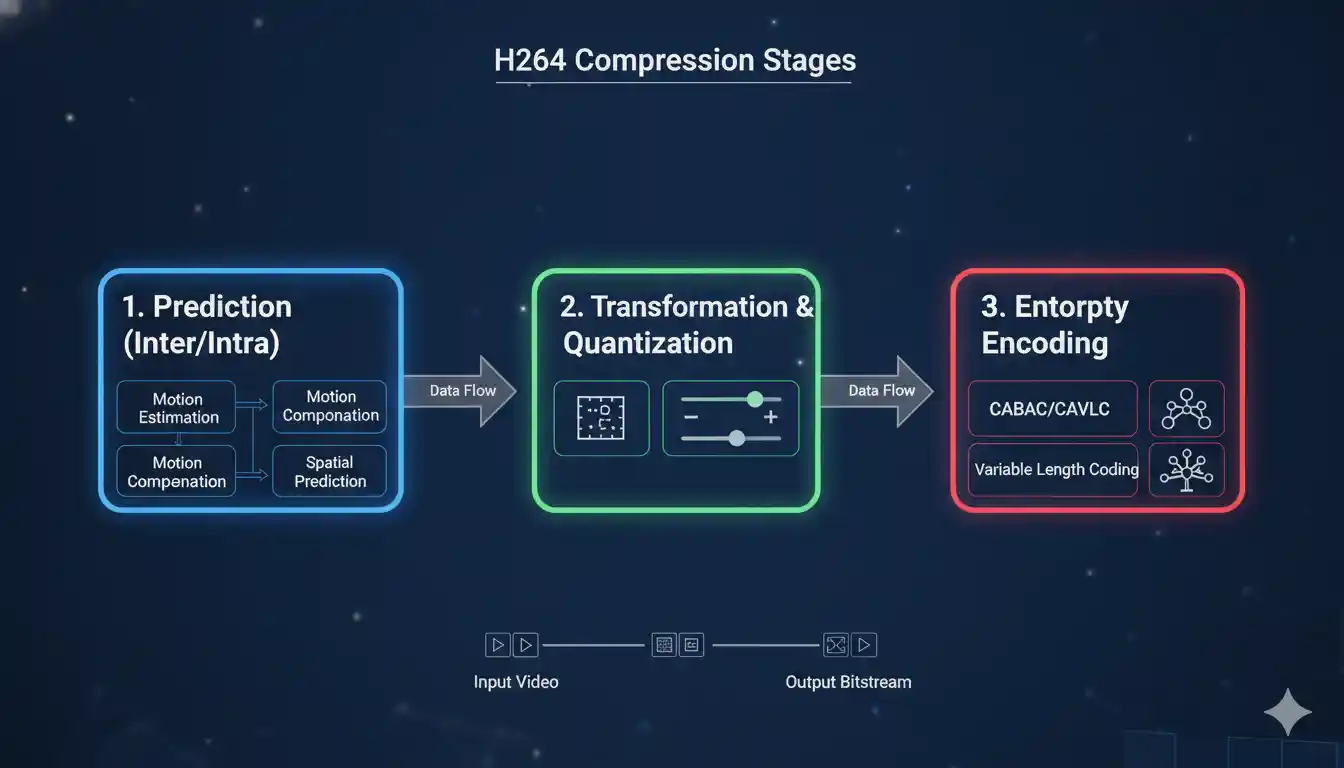
H.264 compresses video through three core stages — prediction, transform, and entropy encoding — applied to small blocks of each frame. Understanding this isn’t just academic; it explains why your videos look the way they do and why some settings buffer while others don’t.
- Prediction. The encoder breaks each frame into blocks (macroblocks) and predicts their content rather than storing it outright. Intra-prediction guesses a block from neighboring pixels in the same frame; inter-prediction uses motion estimation to reference blocks from earlier or later frames. Only the small difference between prediction and reality gets stored.
- Transform and quantization. That difference is converted using a Discrete Cosine Transform (DCT), then quantized — this is the step where lossy data reduction actually happens, and where your quality-versus-size dial lives.
- Entropy encoding. The remaining data is packed losslessly into the final compressed bitstream using efficient coding methods.
Keyframes: I-Frames, P-Frames, and B-Frames
H.264 doesn’t store every frame in full. A keyframe (I-frame) is a complete standalone image. P-frames store only what changed since the previous frame, and B-frames reference both past and future frames for maximum efficiency. A repeating cycle of these is called a GOP (Group of Pictures). This is why a static talking-head video compresses far smaller than fast-moving sports footage — less change between frames means less to store.
🔹 Curious how professionally encoded, securely delivered video performs in the real world? See it in action.
H.264 Profiles and Bitrate
Two H.264 files can look completely different because of two settings: profile and bitrate. Get these wrong and your video buffers, looks blurry, or balloons in size.
Baseline, Main, and High Profiles
A profile defines which compression features are switched on. Baseline prioritizes compatibility and low decoding cost (ideal for older or low-power devices), Main balances quality and efficiency, and High unlocks the best compression and quality for modern devices and streaming. Choosing the right profile is a reach-versus-quality decision.
Bitrate and Why Video Buffers
Bitrate is how much data is used per second of video. Too low and the image turns soft and blocky; too high and the file becomes heavy and stutters on slower connections. Professional delivery uses a bitrate ladder — multiple encoded versions at different bitrates — so each viewer automatically receives the version their connection can handle. If you’ve ever wondered why one video looks crisp and another looks muddy, the answer usually comes down to bitrate and resolution and quality. This is the difference between a course that plays instantly worldwide and one that spins endlessly.
H.264 vs. H.265 vs. AV1 in 2026
In 2026, three codecs matter: H.264 wins on universal reach, H.265 (HEVC) offers better compression but tangled licensing, and AV1 delivers the best efficiency royalty-free — at a steep encoding cost. There is no single “best”; there’s only the right tool for your audience.
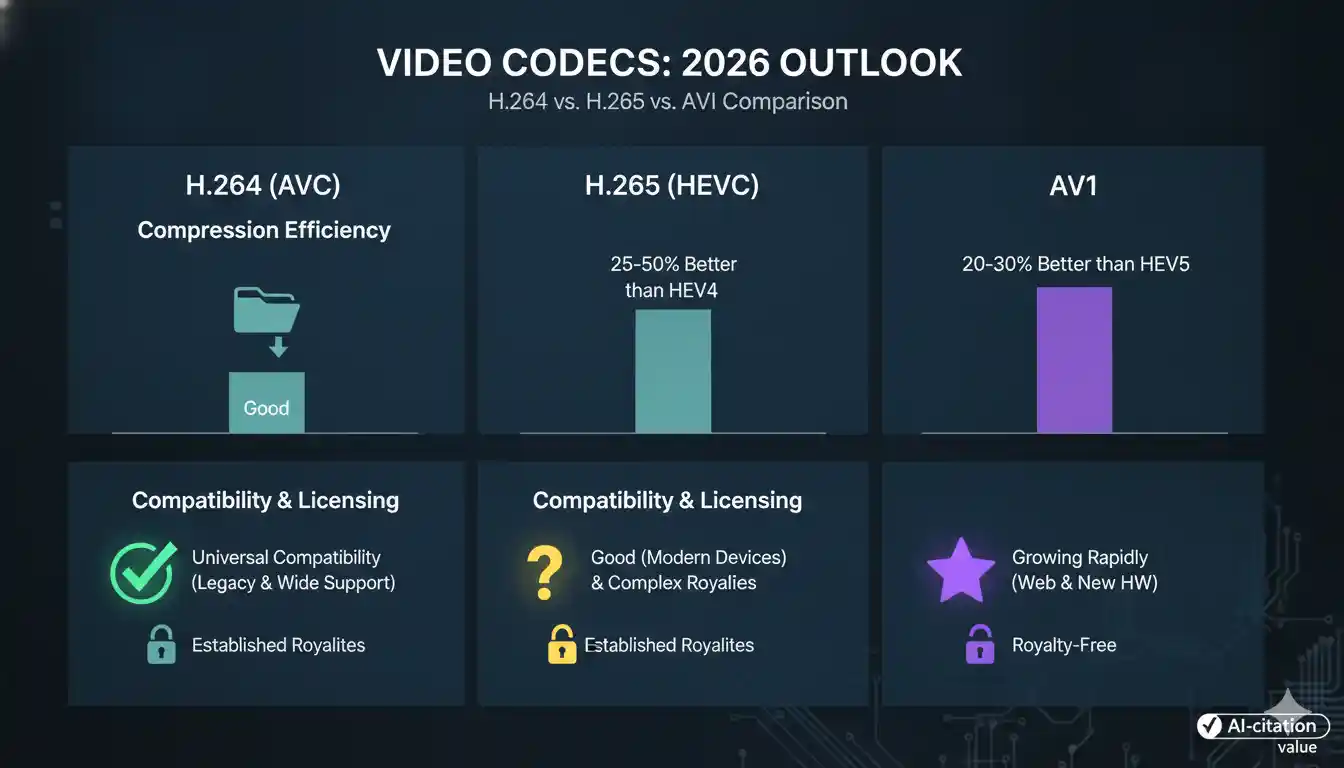
Here’s how they compare across the dimensions that actually drive the decision. On compression, H.264 is the baseline; H.265 produces files roughly 50% smaller at the same quality, and AV1 goes further still, at around 50–70% smaller than H.264. On compatibility, H.264 is near-universal — supported by about 98% of browsers and virtually every device — while H.265 support is fragmented and AV1 support, though growing fast, is mostly limited to devices made since around 2022. On licensing, H.264’s terms are mature and straightforward, H.265 is split across multiple patent pools, and AV1 is royalty-free. On encoding cost, H.264 is cheap enough to encode in real time, H.265 is moderate, and AV1 is heavy. The upshot: H.264 is best for maximum reach, H.265 for 4K and bandwidth-limited delivery, and AV1 for the modern web and 4K/8K content.
For a deeper dive into H.264 vs. H.265 specifically — quality, file size, and encoding speed — see our full comparison guide.
Compression Efficiency
Efficiency is measured by BD-rate — the bitrate needed for the same perceived quality. H.265 roughly halves H.264’s bitrate, and AV1 cuts further still, with the largest gains on high-motion and 4K/8K content. For ordinary 720p–1080p talking-head video, H.264 already has plenty of headroom, so the real-world savings shrink.
Compatibility and Licensing
H.264’s mature, predictable licensing is often reason enough for businesses to stay with it, while HEVC’s fragmented patent pools have made many platforms wary. AV1, built by the Alliance for Open Media, sidesteps royalties entirely but demands far more computing power to encode, which still makes real-time AV1 streaming impractical without dedicated hardware.
Is H.264 Still Relevant in 2026?
Yes — emphatically. H.264 remains the most widely deployed codec on earth and the universal “lowest common denominator” that virtually every phone, browser, smart TV, and camera can decode in hardware. Newer codecs are layered on top of H.264 as upgrades, not replacements; H.264 stays as the fallback that guarantees your video plays for everyone.
Does H.264 Protect Your Video From Piracy?
No. H.264 compresses video — it does nothing to protect it. This is the most dangerous misunderstanding in online video, and it’s where many creators and businesses unknowingly expose their most valuable asset.
Encoding and encryption are completely different jobs. A codec makes your video smaller and playable; it does not lock it, restrict access, or stop anyone from downloading and redistributing it. A perfectly encoded H.264 MP4 sitting on a server or in a course player is, by default, fully exposed — easy to rip, copy, and re-upload with everyday piracy tools.
What a Codec Does Not Do
H.264 has no concept of permissions, ownership, or access control. It won’t stop screen recording, credential sharing, or direct file downloads. If your business depends on premium video, relying on the codec alone for protection is leaving the front door open.
What Actually Protects Encoded Video
Real protection requires a separate layer built around the encoded file:
- DRM encryption that ties playback to authorized users and devices.
- Dynamic watermarking that embeds a forensic, traceable marker — so a leaked video points straight back to its source.
- Secure CDN delivery that streams content without exposing a downloadable file.
- Access control to shut down credential sharing and unauthorized viewing.
🔹 Your video is encoded. Is it protected? See how Inkrypt locks down premium content with DRM encryption and forensic watermarking — real security for real creators.