

H.264 (AVC) and H.265 (HEVC) are the two most widely used video compression standards in the world. H.265 delivers equivalent visual quality at roughly 50% less bandwidth and storage than H.264 by using larger, more flexible Coding Tree Units (CTUs) instead of H.264’s fixed macroblocks. For content creators and enterprise platforms, H.265 is the superior choice for 4K delivery, VOD libraries, and bandwidth-sensitive global audiences — while H.264 remains the safer option for live streaming, universal device compatibility, and real-time encoding workflows. The right codec depends on your resolution target, audience devices, and content protection requirements.
What Are Video Codecs and Why Does Your Choice Matter?
Every video you stream, download, or host online passes through a codec — a compression algorithm that makes raw video transmittable. Without codecs, a single minute of uncompressed 4K footage would consume over 22 GB of storage. That is not a streaming problem. That is an infrastructure catastrophe.
A codec works by removing visual redundancy — data your eyes cannot detect — from each frame and between consecutive frames. The result is a file small enough to stream over a home broadband connection without sacrificing perceived quality.
The two codecs that have shaped modern video delivery are H.264, introduced in 2003, and its successor H.265, finalized in 2013. Choosing between them is not a purely technical decision. It directly determines your storage costs, your global audience’s viewing experience, your CDN expenditure, and — critically for premium content owners — your content protection pipeline’s effectiveness.
How Video Codecs Work (Compression Basics in Plain English)
Codecs reduce file size using two complementary strategies. Intra-frame compression removes redundant data within a single frame — similar to how a JPEG compresses a photograph. Inter-frame compression removes redundant data between frames, storing only the changes from one frame to the next rather than complete images.
Both H.264 and H.265 use these strategies. The difference lies in how efficiently they execute them — and that efficiency gap has billion-dollar consequences for the streaming industry.
Why the Wrong Codec Costs You Money, Viewers, and Quality
A course creator hosting 200 hours of HD video on the wrong codec pays for excess bandwidth on every single student playback. An enterprise platform delivering 4K content over H.264 forces higher bitrates, increasing CDN costs and buffering risk. A content publisher ignoring codec-DRM compatibility may find their security layer performing inconsistently across devices. The codec decision is infrastructure — and infrastructure decisions compound over time.
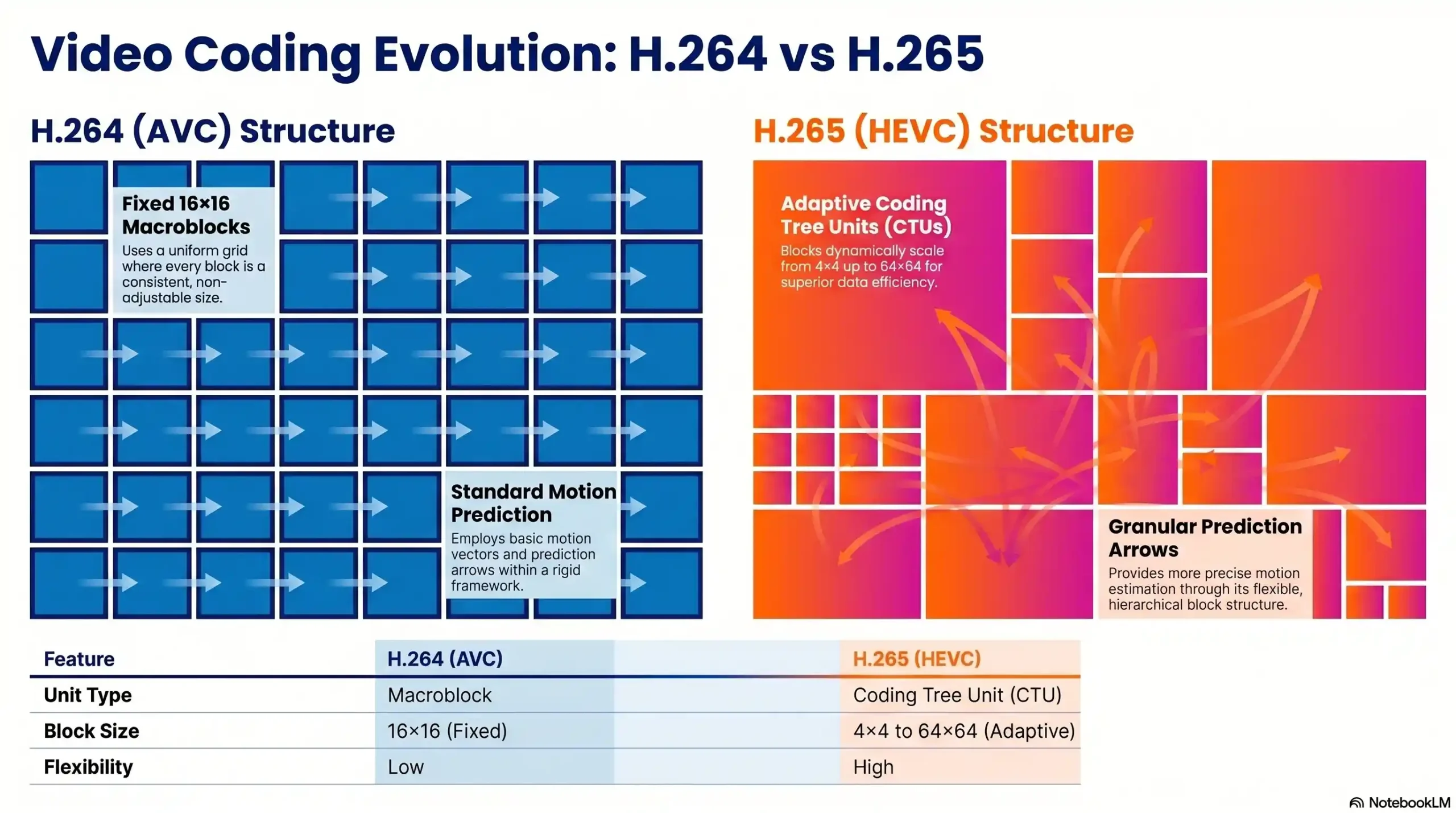
Block Type
- H.264 (AVC): Macroblocks
- H.265 (HEVC): Coding Tree Units (CTUs)
Max Block Size
- H.264 (AVC): 16×16 pixels
- H.265 (HEVC): 64×64 pixels
Compression Method
- H.264 (AVC): Fixed block prediction
- H.265 (HEVC): Adaptive block partitioning
Motion Compensation
- H.264 (AVC): Standard
- H.265 (HEVC): Advanced
Year Introduced
- H.264 (AVC): 2003
- H.265 (HEVC): 2013
H.264 — The Universal Standard That Still Rules
H.264 has been the dominant video codec for over two decades. YouTube, Netflix’s standard-definition streams, Blu-ray, video conferencing, security cameras, and virtually every broadcast workflow have been built on its foundation. That dominance did not happen by accident.
How H.264 Works: Macroblocks, Motion Prediction & CABAC
H.264 divides each video frame into fixed 16×16 pixel macroblocks. Each macroblock is encoded using spatial prediction (comparing pixels within the same frame) and temporal prediction (comparing pixels across frames). To maximize compression, H.264 uses Context-Adaptive Binary Arithmetic Coding (CABAC) — an entropy coding technique that achieves near-optimal data compression at the bitstream level.
This architecture was revolutionary in 2003. It remains highly effective today for standard and high-definition content delivered over reliable connections.
Where H.264 Still Wins in 2026
H.264’s greatest strength is its universal compatibility. It is supported by virtually every device, browser, operating system, and streaming platform in existence. For live streaming, its lower encoding complexity means real-time processing without dedicated hardware encoders. For developers building cross-platform applications, H.264 eliminates the compatibility risk that H.265 still carries in certain browser environments.
If your audience includes users on older hardware, low-powered mobile devices, or regions where software decoding is the norm, H.264 is the codec that will not fail them.
Limitations of H.264 for Modern High-Resolution Delivery
H.264’s fixed macroblock architecture, which was its strength in 2003, becomes its constraint at 4K and above. Uniform 16×16 blocks are inefficient for large areas of consistent color — a blue sky, a studio background, a course slide — because the codec wastes processing cycles on regions that barely change. At 4K resolutions, H.264 requires bitrates of 35–45 Mbps to maintain broadcast quality, placing enormous pressure on CDN bandwidth budgets and challenging mobile connections worldwide.
H.265 (HEVC) — The Compression Powerhouse
H.265, formally known as High Efficiency Video Coding (HEVC), was engineered to solve exactly the problems that H.264’s architecture cannot. It was developed by the Joint Collaborative Team on Video Coding (JCT-VC) and standardized in 2013 as the official successor to H.264.
How H.265 Works: CTUs, Spatial Prediction & Parallel Processing
Instead of fixed macroblocks, H.265 uses Coding Tree Units (CTUs) that scale adaptively from 4×4 to 64×64 pixels. This flexibility is transformative. For a uniform background region, H.265 uses a large 64×64 CTU and encodes it with minimal data. For a detailed facial close-up or fast-moving scene, it drops to smaller blocks to preserve precision. The result is compression that allocates data where it matters rather than treating every region identically.
H.265 also incorporates advanced motion vector prediction, sample adaptive offset (SAO) filtering, and significantly improved parallel processing capabilities — allowing modern encoders to leverage multi-core CPUs and dedicated GPU circuits for faster throughput.
The 50% Bandwidth Reduction — What It Really Means in Practice
The headline figure for H.265 is a 50% reduction in bandwidth and storage at equivalent visual quality compared to H.264. In practical terms, this means a 90-minute 4K course module that requires 11 GB under H.264 can be delivered in approximately 5.5 GB under H.265 — at identical perceived quality.
For a VOD platform hosting 10,000 hours of 1080p content, the difference between H.264 and H.265 can reduce storage infrastructure from roughly 28 TB to 18 TB. That is not a marginal improvement. That is a transformation in operating cost.
It is important to note that the 50% figure is resolution-dependent. At 4K UHD, the average bitrate reduction reaches 65%. At 1080p it settles around 60%. At 720p and below, the gap narrows significantly — sometimes to 20–30% — meaning compatibility trade-offs may outweigh efficiency gains at lower resolutions.
H.265 Licensing Reality: The Four Patent Pools Explained
H.265’s most significant non-technical barrier is its patent licensing structure. Unlike H.264, which operates under a single licensing pool managed by MPEG LA, H.265 has four separate patent pools: MPEG LA, HEVC Advance, Velos Media, and Technicolor. This fragmentation has complicated enterprise adoption, particularly for software developers and platform builders who must navigate multiple licensing agreements and royalty structures.
For most end-users and content platforms deploying H.265 playback, this is a managed cost. For developers building encoders or hardware products, it demands careful legal and financial planning.
🔒 Protecting your video content starts with the right delivery stack.
See how Inkrypt Videos secures and delivers your premium content globally — Explore Inkrypt’s Platform
Head-to-Head Comparison — Quality, File Size & Speed
Video Quality at the Same Bitrate
At an identical bitrate, H.265 consistently produces superior visual output. H.264’s fixed macroblocks create visible blocking artifacts at the edges of each 16×16 unit — a characteristic degradation that becomes especially noticeable in high-motion sequences or fine-detail scenes. H.265’s adaptive CTUs eliminate this artifact pattern, producing images that are sharper, more detailed, and with better color depth — particularly in HDR content. Measured by VMAF (Video Multimethod Assessment Fusion) scoring — the industry benchmark for perceptual video quality — H.265 consistently outperforms H.264 at equivalent bitrates, with the gap widening at 4K resolution.
At 4K resolution with HDR, H.265 is not just better than H.264. It is in a different category of quality delivery.
File Size & Storage Savings: Real Numbers
480p
- H.264 target bitrate: 1.5 Mbps
- H.265 target bitrate: 0.75 Mbps
- Storage savings: ~50%
720p
- H.264 target bitrate: 5 Mbps
- H.265 target bitrate: 2.5 Mbps
- Storage savings: ~50%
1080p
- H.264 target bitrate: 12 Mbps
- H.265 target bitrate: 5 Mbps
- Storage savings: ~58%
4K UHD
- H.264 target bitrate: 40 Mbps
- H.265 target bitrate: 15 Mbps
- Storage savings: ~62%
For a content platform serving 50,000 monthly viewers watching 2 hours of 1080p video each, switching from H.264 to H.265 translates to roughly 40% lower monthly CDN egress costs — a saving that scales linearly with audience size.
Encoding & Decoding Speed: The CPU/GPU Cost Reality
H.265’s superior compression comes at a computational price. Software-based H.265 encoding is 2–5× slower than H.264 encoding using equivalent hardware. For live streaming workflows, this overhead was historically prohibitive.
Modern hardware encoders have dramatically changed this equation. NVIDIA NVENC (GTX 900 series and newer), Intel QuickSync (6th generation Skylake and newer), and AMD VCE/AMF all include dedicated H.265 encoding circuits that deliver near-real-time performance. For VOD platforms where content is encoded once and delivered thousands of times, the encoding time investment is absorbed entirely by the long-term bandwidth savings.
Decoding is a less significant concern. Most devices manufactured after 2017 include hardware H.265 decode support, enabling smooth playback without CPU overhead.
Device & Browser Compatibility Matrix
iOS (iPhone 7+)
- H.264 support: ✅ Full
- H.265 support: ✅ Full (hardware)
Android (2017+)
- H.264 support: ✅ Full
- H.265 support: ✅ Most devices
Windows 10/11
- H.264 support: ✅ Full
- H.265 support: ✅ Full (with codec pack)
macOS (Safari 11+)
- H.264 support: ✅ Full
- H.265 support: ✅ Full
Chrome (desktop)
- H.264 support: ✅ Full
- H.265 support: ✅ Full (hardware-dependent, since Chrome 107+)
Firefox
- H.264 support: ✅ Full
- H.265 support: ⚠️ Platform-dependent
Smart TVs (2017+)
- H.264 support: ✅ Full
- H.265 support: ✅ Most models
Older devices (pre-2016)
- H.264 support: ✅ Full
- H.265 support: ❌ Not supported
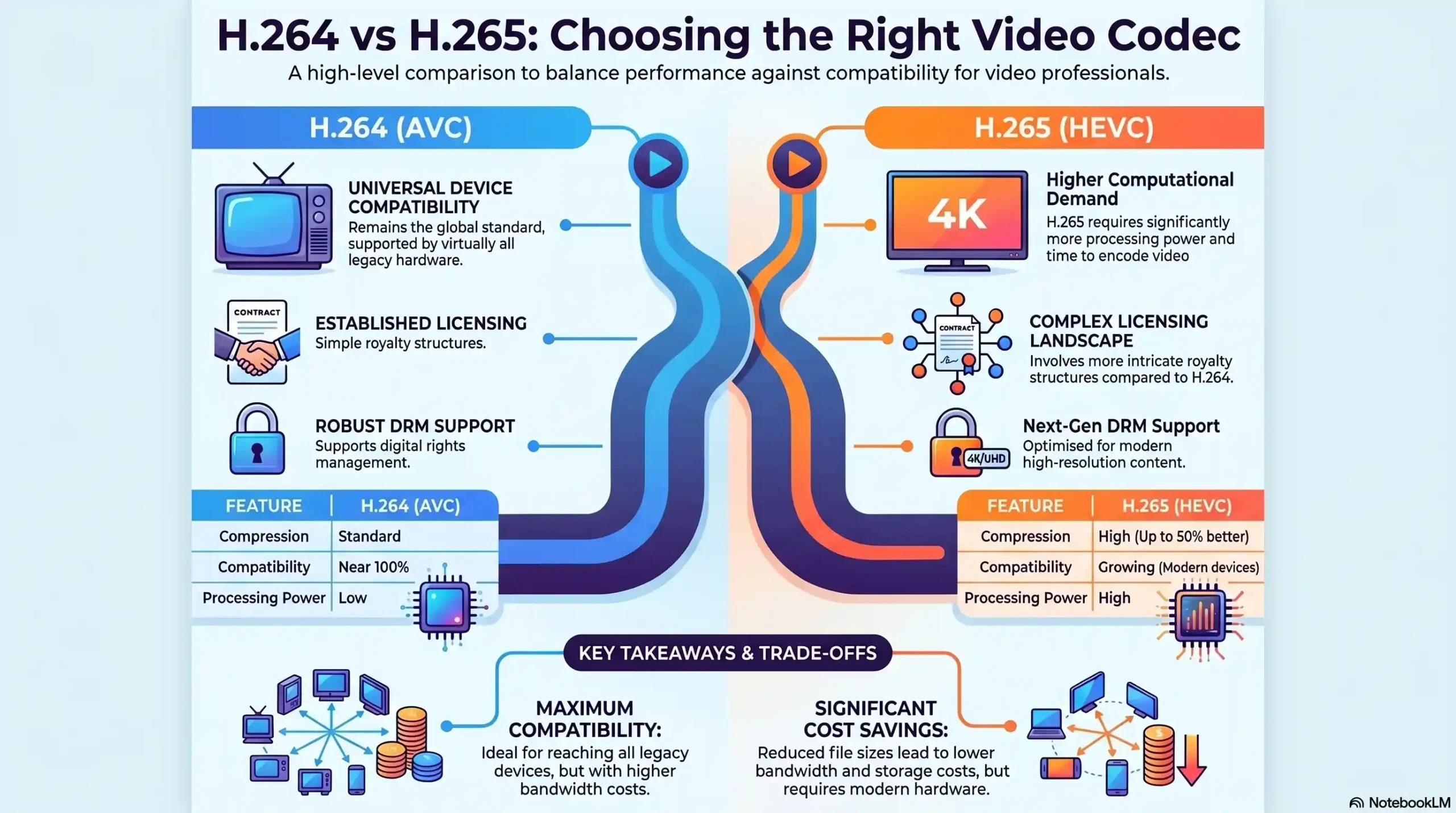
Compression Efficiency
- H.264 (AVC): Baseline
- H.265 (HEVC): ~50% better
- Winner: ✅ H.265
Video Quality (same bitrate)
- H.264 (AVC): Good
- H.265 (HEVC): Superior
- Winner: ✅ H.265
Encoding Speed
- H.264 (AVC): Fast
- H.265 (HEVC): 2–5× slower (software)
- Winner: ✅ H.264
Device Compatibility
- H.264 (AVC): Universal
- H.265 (HEVC): Modern (post-2017)
- Winner: ✅ H.264
4K / 8K Support
- H.264 (AVC): Limited
- H.265 (HEVC): Native
- Winner: ✅ H.265
HDR Support
- H.264 (AVC): Partial
- H.265 (HEVC): Full (HDR10, Dolby Vision)
- Winner: ✅ H.265
Licensing Cost
- H.264 (AVC): Single pool
- H.265 (HEVC): Four patent pools
- Winner: ✅ H.264
Live Streaming
- H.264 (AVC): Ideal
- H.265 (HEVC): Requires hardware encoder
- Winner: ✅ H.264
VOD / Course Delivery
- H.264 (AVC): Good
- H.265 (HEVC): Excellent
- Winner: ✅ H.265
DRM Compatibility
- H.264 (AVC): Broad
- H.265 (HEVC): Full support
- Winner: ✅ Tie
Which Codec Is Right for Your Use Case?
For Online Course Creators & E-Learning Platforms
If you host pre-recorded course content, H.265 is the clear choice for your master delivery format. Your videos are encoded once and served thousands of times — meaning the encoding overhead is a one-time investment and the bandwidth savings apply to every single student playback. For a course library with 50+ hours of HD content, the reduction in hosting and CDN costs is substantial and immediate.
The critical caveat: ensure your video hosting platform and student-facing player supports H.265 decoding. Modern LMS platforms and dedicated course hosting solutions handle this natively. For maximum reach, maintain an H.264 fallback for legacy device users.
For Enterprise Media & Streaming Platforms
Enterprise platforms operating at scale should treat H.265 as their primary delivery codec for on-demand content at 1080p and above. The CDN cost reduction compounds with audience size — what saves a small creator 40% in bandwidth saves an enterprise platform with millions of monthly viewers in proportion. H.265’s native 4K and HDR support also future-proofs the content library against evolving viewer expectations and device capabilities.
For live streaming operations, H.265 is viable only with hardware encoder infrastructure. Software-only live H.265 encoding introduces latency and dropped-frame risk that enterprise SLAs cannot tolerate.
For Premium Content Publishers with Global Audiences
Publishers distributing exclusive content to global subscribers face a dual challenge: maximum quality at minimum bandwidth for viewers in bandwidth-constrained markets, and unbreakable content protection. H.265 addresses the first directly. Its 50–65% bandwidth reduction makes premium video accessible to audiences in regions where H.264 would buffer constantly — expanding addressable market without compromising quality standards.
The AV1 Factor — Should You Be Looking Beyond H.265 in 2026?
AV1 — the royalty-free codec developed by the Alliance for Open Media — is no longer a future consideration. It is a present reality. AV1 now accounts for approximately 30% of all Netflix streaming and delivers compression efficiency matching or exceeding H.265, with no patent licensing costs. For platforms building new infrastructure today, AV1 deserves serious evaluation alongside H.265.
The practical limitation remains encoding speed. AV1 software encoding is still 5–10× slower than H.265, making real-time live encoding impractical without dedicated hardware. For VOD-first platforms, however, the equation increasingly favors AV1 — particularly for organizations that want to eliminate HEVC’s patent licensing complexity entirely.
🌍 Running a global content platform?
Inkrypt Videos delivers your H.265-protected content via Amazon CDN to audiences worldwide — zero buffering, zero compromise.