
Table of Contents
Toggle2K resolution refers to any display or video format with roughly 2,000 horizontal pixels. In cinema, “true” 2K is the DCI standard of 2048×1080. In the consumer world, however, “2K” almost always means QHD (1440p) at 2560×1440 — sharper than 1080p (1920×1080) but well short of 4K (3840×2160). The right choice depends on your screen size, bandwidth, and how valuable your content is.
If you’ve shopped for a monitor, camera, or streaming setup lately, you’ve seen “2K” stamped on the box — and you’ve probably wondered why the numbers never seem to match. You’re not imagining it. “2K” is the most misused term in display marketing, and most articles explaining it only add to the confusion.
This guide settles it. We’ll define 2K precisely, compare it head-to-head against 1080p and 4K, and then go where the spec sheets don’t: what each resolution actually means for delivering, streaming, and protecting your video content.
What Is 2K Resolution?
The Simple Definition
2K resolution is a generic term for any display or video format with a horizontal pixel count of approximately 2,000 pixels. The “K” stands for kilo — roughly a thousand — so “2K” loosely means “two thousand pixels wide.” That width-based naming is the source of all the confusion, because several different resolutions technically qualify.
The Real Confusion: DCI 2K vs QHD (1440p)
Here’s the distinction almost nobody explains clearly:
- True 2K (DCI standard): 2048×1080 pixels. This is the official Digital Cinema Initiatives format used in movie theater projectors. It’s only marginally wider than Full HD.
- Consumer “2K” (QHD / 1440p): 2560×1440 pixels. This is what manufacturers mean 95% of the time when they advertise a “2K monitor.” It’s also called Quad HD because it packs four times the pixels of 720p.
So when a gaming monitor claims “2K,” it’s almost certainly 1440p — a resolution with about 3.7 million pixels, considerably more than the cinema standard it borrows its name from.
Why Marketers Call 1440p “2K”
The logic is positional, not technical. 1440p sits neatly between Full HD (1080p) and 4K (2160p), so “2K” became convenient shorthand to signal “a step above HD, a step below 4K.” It stuck because it sells — even though, strictly speaking, 1440p’s pixel count is higher than the DCI definition of 2K. For the rest of this guide, when we say “2K,” we mean the consumer standard most of you are comparing: 1440p / QHD.
2K vs 1080p: What’s the Real Difference?
Pixel Count Head-to-Head
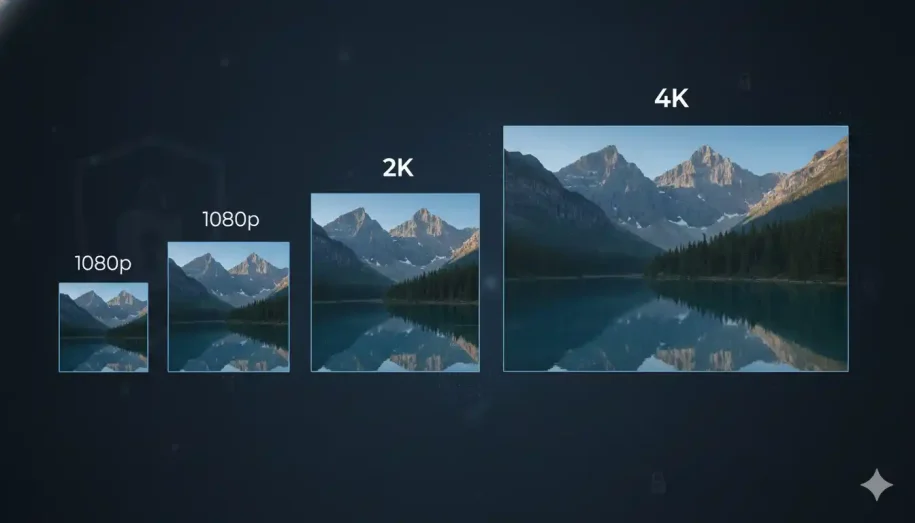
The gap is meaningful. Full HD (1080p) delivers 1920×1080, or about 2.07 million pixels. Consumer 2K (1440p) delivers 2560×1440 — roughly 3.7 million pixels. That’s nearly 78% more pixels packed into the same screen, which translates to crisper text, finer edges, and more detail retained when you zoom in.
When You’ll Actually Notice It
More pixels don’t automatically mean a visible upgrade. The difference between 1080p and 2K becomes obvious in two scenarios: larger screens (27 inches and up) and close viewing distances (sitting at a desk versus across a living room). On a small laptop screen viewed at arm’s length, the jump is subtle. On a 32-inch monitor an arm’s length away, it’s striking.
The File Size Trade-off
Every extra pixel is extra data. A 2K video file is substantially larger than its 1080p equivalent, which means more storage, more bandwidth to deliver, and a higher risk of buffering on weaker connections. This is the trade-off the spec sheets rarely mention — and the first sign that resolution is as much a delivery decision as a visual one.
🟦 Higher resolution means heavier files — and heavier files mean buffering, unhappy viewers, and ballooning delivery costs unless your infrastructure can keep up. This is exactly the problem Inkrypt Videos solves: zero-buffering, globally distributed delivery so your high-res content streams flawlessly everywhere. Learn how →
2K vs 4K: Is the Jump Worth It?
Pixel Density Compared
If 2K is a step up from 1080p, 4K is a leap. 4K UHD measures 3840×2160 — over 8.3 million pixels, more than four times the pixel count of Full HD and roughly 2.25 times that of 1440p. On large displays and at close range, 4K’s clarity is unmistakable: text stays razor-sharp, and fine textures hold up even when you lean in.
Hardware & GPU Demands
That detail isn’t free. Driving 4K — especially in gaming or video editing — demands far more graphics horsepower than 2K. Many gamers deliberately choose 2K at a high refresh rate (144Hz and beyond) over 4K at a lower frame rate, because smooth motion often matters more than maximum pixel density. For editors and designers, though, 4K’s extra working canvas is worth the hardware investment.
The Bandwidth Reality
This is where the resolution conversation gets real. For standard frame rates, the common streaming benchmarks are roughly 8 Mbps for 1080p, 16 Mbps for 1440p, and 35–45 Mbps for 4K. In other words, delivering 4K can demand four to five times the bandwidth of Full HD. If your audience is global — or on mobile — that’s not a footnote; it’s a make-or-break factor for whether they watch smoothly or stare at a spinning wheel.
2K vs 4K vs 1080p at a Glance
Here’s the quick mental model:
- 1080p (Full HD): 1920×1080, ~2.07M pixels, 16:9. The universal baseline — broadly compatible, lightweight, ideal when bandwidth or storage is tight. Streaming benchmark ~8 Mbps.
- 2K (QHD / 1440p): 2560×1440, ~3.7M pixels, 16:9. The sweet spot for sharpness without 4K’s overhead. Favored by gamers and creators who want detail and performance. Benchmark ~16 Mbps.
- 4K (UHD): 3840×2160, ~8.3M pixels, 16:9. The clarity king for large screens, production, and premium experiences — at a steep bandwidth and hardware cost. Benchmark ~35–45 Mbps.
The takeaway: there’s no universal “best.” The right resolution balances visual quality against the bandwidth, storage, and hardware your audience can realistically handle.
The Hidden Factor: Bitrate, Codecs & Delivery
Why Resolution Alone Doesn’t Equal Quality
Here’s the truth most resolution guides skip: pixels don’t guarantee quality — bitrate does. Bitrate is the amount of data used per second of video. A 4K file starved of bitrate can actually look worse than a well-encoded 1080p file. So choosing a resolution is only half the equation; encoding it properly is the other half.
How Codecs Change the Math
Modern codecs dramatically change what each resolution costs to deliver. H.264 is the universal baseline, but H.265 (HEVC) delivers comparable quality at roughly half the bitrate. Newer still, AV1 can cut bandwidth by 30–50% versus H.264 — which is precisely why streaming giants like Netflix and YouTube have adopted it. Smart codec choice can make 2K or even 4K delivery viable on bandwidth that would otherwise only support 1080p.
Adaptive Bitrate Streaming, Explained
The professional solution is adaptive bitrate streaming (ABR). Instead of serving one fixed file, ABR prepares multiple renditions of your video and automatically serves the best one for each viewer’s connection in real time. A viewer on fiber gets crisp 1440p; someone on spotty mobile data seamlessly drops to a lower rendition instead of buffering. This is how serious content businesses deliver high resolution to a global audience without sacrificing the viewing experience.
🟦 Picking a resolution is step one. Delivering it flawlessly — and securely — to viewers worldwide is the real challenge. Inkrypt Videos handles the hard part: enterprise-grade CDN delivery, smart adaptive streaming, and built-in protection, all set up in about 30 minutes.
Which Resolution Should You Choose?
For Online Course Creators & Coaches
For most course content, 1080p is the pragmatic winner — universally compatible, easy to deliver, and more than sharp enough for talking-head lessons and screen shares. Step up to 2K only when fine detail genuinely matters (design tutorials, detailed demonstrations), and pair it with adaptive streaming so students on any connection stay engaged.
For Streamers & Live Content
1080p remains the safest live-streaming choice for reach and compatibility. 2K is a strong option if your audience has the bandwidth and your platform supports it, but always weigh the higher upload requirements before committing.
For Premium Publishers & Enterprises
When content is your competitive advantage, quality signals value — 2K or 4K can be justified. But at this tier, protection becomes non-negotiable (more on that below), and forensic-grade delivery analytics matter as much as the pixels themselves.
For Gaming & General Use
2K (1440p) is widely considered the gaming sweet spot: noticeably sharper than 1080p, far less demanding than 4K, and friendly to high refresh rates. For everyday productivity, 1080p still serves most people perfectly well.
Higher Resolution = Higher Piracy Risk
Why Premium Content Becomes a Bigger Target
Here’s the angle no spec sheet will tell you: the sharper and more valuable your video, the more it becomes a bigger target for piracy. A crisp 2K or 4K course, film, or proprietary training library represents real revenue — and real temptation. Uploading higher-resolution content without protecting it is like leaving a more expensive product on an unlocked shelf.
Protecting High-Value Video
This is where resolution strategy and security converge. Genuine protection means more than a paywall — it means DRM encryption to stop unauthorized downloads and dynamic watermarking that embeds a forensic, viewer-specific trail so leaks can be traced to their source. The higher you push your resolution, the more that protection pays for itself.
🟦 Whatever resolution you choose, your content deserves to be delivered fast and protected for real. Inkrypt Videos combines unbreakable DRM, dynamic watermarking, and zero-buffering global delivery — real security for real creators.
Resources & Citations
- Digital Cinema Initiatives (DCI): The official body that defines the true 2K (2048×1080) and 4K cinema standards referenced in this article — go here for the authoritative technical specification.
- International Telecommunication Union (ITU): The UN agency whose ITU-R recommendations formally define HD and Ultra HD (UHD) broadcast standards.
- Alliance for Open Media (AOMedia): The official consortium behind the AV1 codec mentioned in the delivery section — the source for how modern compression cuts bandwidth.
- Wikipedia – 2K Resolution: A neutral, well-cited overview useful for readers wanting the full table of every 2K format variant.
Conclusion: Resolution Is a Strategy, Not Just a Spec
So, what is 2K resolution? Technically, it’s any format around 2,000 pixels wide — and in the real world, it almost always means 1440p (2560×1440), the sharp, efficient middle ground between Full HD and 4K. But the smarter question isn’t “which resolution is best?” It’s “which resolution best fits my audience, my bandwidth, and the value of my content?”
1080p keeps things lightweight and universal. 2K sharpens the experience without 4K’s overhead. 4K delivers maximum clarity for those who can support it. Whichever you choose, remember that quality lives in three places at once — resolution, delivery, and protection. Get all three right, and your content doesn’t just look great; it reaches everyone, everywhere, securely.
Frequently Asked Questions
In consumer products, yes — almost always. When a monitor, phone, or camera is advertised as “2K,” it nearly always means QHD at 2560×1440 (1440p). The only exception is professional cinema, where “true” 2K refers to the DCI standard of 2048×1080.
For most gamers, 2K (1440p) is the sweet spot. It’s noticeably sharper than 1080p but far less demanding than 4K, letting you run high refresh rates like 144Hz without needing a top-tier graphics card. It balances visual quality and smooth performance well.
Yes. Because 2K (1440p) holds roughly 78% more pixels than 1080p, its files are larger and it needs more bandwidth to stream. As a rough benchmark, 1080p streams at about 8 Mbps while 1440p typically needs around 16 Mbps.
It depends on screen size and viewing distance. On large screens (50 inches or more) or when sitting close, like at a desk, 4K’s extra detail is clearly visible. On smaller screens viewed from across a room, the difference is hard to notice.
2K offers sharper image quality, but “better” depends on your audience. If their devices and internet can handle the higher bandwidth, 2K looks crisper. For the widest reach and compatibility, 1080p remains the safer, lighter choice for most streamers.
Most modern gaming monitors, mid-to-high-end smartphones, tablets, dash cams, and security cameras support 2K (1440p). It has become a popular middle-ground standard, though some streaming platforms still offer limited native 2K support compared to 1080p and 4K.
Yes, for many users. 2K remains an excellent balance of clarity, performance, and reasonable bandwidth, especially for gaming, creator content, and everyday viewing. Choose 4K only if you have large screens, strong internet, and the hardware to support it.
Indirectly, yes. Higher-resolution content is more valuable and therefore a more attractive target for theft. That’s why premium 2K and 4K libraries should be protected with DRM encryption and dynamic watermarking, not just a paywall.
For 1440p at standard frame rates, a bitrate of roughly 16 Mbps is a common benchmark. At 60 fps, you may need 9,000–13,000 kbps or more. Efficient codecs like H.265 or AV1 can deliver the same quality at a lower bitrate.
Usually not. 4K can demand 35–45 Mbps, so on a slow connection it will buffer or downscale anyway. With limited bandwidth, 1080p or 2K paired with adaptive bitrate streaming will give viewers a smoother, more reliable experience.
For most courses, 1080p is the practical winner — sharp enough for lessons and screen shares, and easy to deliver worldwide. Step up to 2K only when fine visual detail genuinely matters, and pair it with adaptive streaming.
You can upscale 1080p to 2K, but upscaling only stretches existing pixels — it can’t add real detail that wasn’t captured originally. The result looks slightly smoother but never matches video natively recorded in 2K.
Disclaimer: This article is for general informational purposes only. Resolution standards, bitrate figures, and bandwidth benchmarks are approximate and may vary by device, platform, codec, and network conditions. Always confirm specifications for your specific use case before making purchasing or production decisions.